This week,
Raiser's Edge NXT updates with a handful of features, including enhanced management of a constituent's notes, additional details about constituents in lists, and — for those of you outside the US — more gift information.
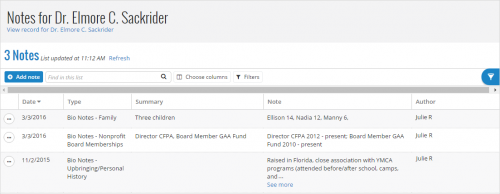 Manage a constituent's notes.
Under
Notes and actions on a constituent's record, you can now select the
Notes total to open a full list of their notes. From this list, you can add, edit, and search for notes; choose which columns to view; and refresh to include new or edited information. You can also filter the list to view only notes that share characteristics such as type or date. For more information, see the
Notes Help.
View when constituents in lists are inactive or deceased. Raiser's Edge NXT recently updated with the ability to mark a constituent as inactive or deceased. To help set priorities and prevent awkward interactions, you can now view when a constituent in a list is marked as such. In a list of constituents, actions, or proposals, just include the
Constituent summary column, which now displays
Inactive or
Deceased when applicable. For more information, see the
Inactive Constituents Help or
Deceased Constituents Help.
View constituents' initials or profile pictures in lists. To help quickly identify and personalize constituents in lists, you can now include a
Profile picture column to view the initials or picture — such as a headshot, logo, or other image — of each individual or organization. For more information, see the
Profile Pictures Help.
 View a gift receipt's stack and history.
In Canada, Australia, and New Zealand, you can now view additional details about the receipt issued for a gift under
Acknowledgements on its record.
- For tracking or accounting purposes, your organization may issue receipts from different groups — with or without duplicate numbers — based on gift type or various departments or chapters. To help track this information, you can now view which group a receipt was issued from in the Receipt stack field.
- To help comply with government guidelines, you can now also view details about previously issued or reprinted receipts for a gift. If you created multiple copies of a receipt — such as if the printer jammed or the donor misplaced the original — you can select View receipt history in the Receipt history field to view pertinent details about the different versions.
View value added tax information for a gift. In the UK, you owe the government a value added tax (VAT) when a donor receives something in return for their gift, such as a coffee mug or museum admission. Typically, this tax is based on the cost to your organization rather than the donation amount. On a gift's record, you can now view how much of its amount is taxable, the tax rate, and how much you owe under
Value added tax.
For more information about these features, or to catch up on previous updates, check out the
What's New Help and
What's Recent Help.
Enjoy!
