Blackbaud CRM - new Batch - datetime issue when importing.



I created a new Batch type using the SDK. One field is a datetime field.
Sample data: 8/1/2021 14:00
I defined it as follows in the AddDataFormTemplateSpec:
<common:FormField FieldID="EVENTSTARTDATETIME" DataType="Date" Caption="Event Start Date and time" IncludeTimeOnDate="true" />
I created a new batch template using this batch type. Then created a new import.
When I try to import, I received the following error: (not a valid date)

Where else do I defined the value should accept a time after the date?
The source for the import is downloaded from a third party.
The import works if I remove the time, but I need the date and time to be saved as is.
Thanks.
Comments
-
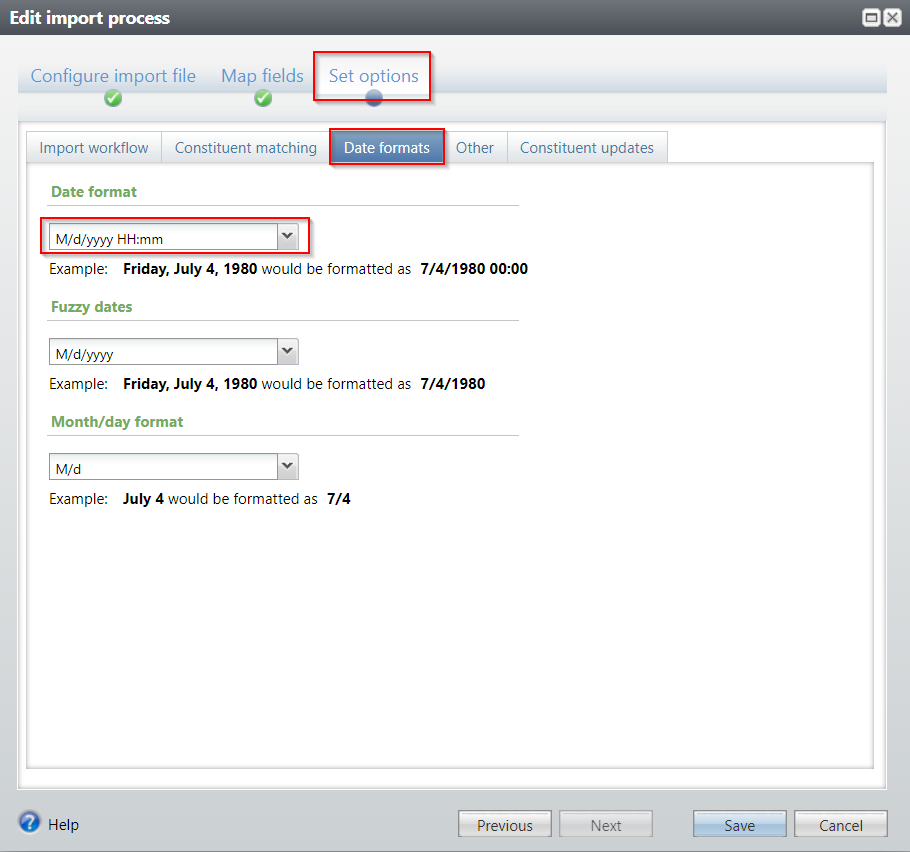
When you are setting up your import process on the front end you may need to tweak your date format options. For your example it should probably be M/d/yyyy HH:mm
 0
0 -
John,
I only see m/d/yyyy without the Time - “HH:mm”
How is the field defined in your tablespec for the field that has the date and time?
Also how is FormFields defined in your AddDataFormTemplateSpec ?
Thanks.
0 -
Kathy,
You should be able to type whatever you want into that date format field, at least that's what we've done.
Our fields are defined very similarly.
Add form- <FormField FieldID="STARTDATE" Caption="Start date" DataType="Date" IncludeTimeOnDate="true" />
Table spec - <DateField Name="STARTDATE" Description="Start date" Required="false" />
0 -
Any solution to this. I have the table configured using a DateField with IncludeTime="true" My add, edit, add commit specs in my batch all have a form field with DataType="Date" IncludeTimeOnDate="true" . My Date format is configured in the Import as per the screen shot in the previous post M/d/yyyy HH:mm
It only seems to accept input during import as valid when the hour has two digits 8/14/2022 1:02:00 is accepted, but 1/3/2023 4:35:00 is not.
I also have a file where AM or PM is included in the field. I realize this is not included in my date mask in the GUI M/d/yyyy HH:mm and I can't figure out how to add that there.
0







Categories
- All Categories
- 6 Blackbaud Community Help
- 206 bbcon®
- 1.4K Blackbaud Altru®
- 394 Blackbaud Award Management™ and Blackbaud Stewardship Management™
- 1.1K Blackbaud CRM™ and Blackbaud Internet Solutions™
- 15 donorCentrics®
- 357 Blackbaud eTapestry®
- 2.5K Blackbaud Financial Edge NXT®
- 646 Blackbaud Grantmaking™
- 561 Blackbaud Education Management Solutions for Higher Education
- 3.2K Blackbaud Education Management Solutions for K-12 Schools
- 934 Blackbaud Luminate Online® and Blackbaud TeamRaiser®
- 84 JustGiving® from Blackbaud®
- 6.4K Blackbaud Raiser's Edge NXT®
- 3.6K SKY Developer
- 242 ResearchPoint™
- 118 Blackbaud Tuition Management™
- 165 Organizational Best Practices
- 238 The Tap (Just for Fun)
- 33 Blackbaud Community Challenges
- 28 PowerUp Challenges
- 3 (Open) Raiser's Edge NXT PowerUp Challenge: Product Update Briefing
- 3 (Closed) Raiser's Edge NXT PowerUp Challenge: Standard Reports+
- 3 (Closed) Raiser's Edge NXT PowerUp Challenge: Email Marketing
- 3 (Closed) Raiser's Edge NXT PowerUp Challenge: Gift Management
- 4 (Closed) Raiser's Edge NXT PowerUp Challenge: Event Management
- 3 (Closed) Raiser's Edge NXT PowerUp Challenge: Home Page
- 4 (Closed) Raiser's Edge NXT PowerUp Challenge: Standard Reports
- 4 (Closed) Raiser's Edge NXT PowerUp Challenge: Query
- 778 Community News
- 2.9K Jobs Board
- 53 Blackbaud SKY® Reporting Announcements
- 47 Blackbaud CRM Higher Ed Product Advisory Group (HE PAG)
- 19 Blackbaud CRM Product Advisory Group (BBCRM PAG)