Some frustration with the new grade book updates





Just wondering if anyone has heard from faculty about their frustration with the grade book updates and what it now does not allow them to do?
When adding assignments, they have to pick an assigned date and a due date. In the past, the class schedule would be linked to the calendar that would pop up, and the days they met would be tinted blue. Now there is no link between the two, and another calendar must be opened in a separate window to then figure out what days they have the class they are adding the assignment for.
Additionally, there used to be a link from the grade book for adding assignments, as well as adding assignments from previous years. It was very convenient and useful. That has been taken away also and even made getting old assignments harder to get. Still doable, but much less convenient.
Comments
-
Following up on Mary's comments, I am hearing HUGE complaints from our teachers about the loss of the class meeting day feature when creating assignments. (Requires lots of back and forth between screens.) There has been some positive feedback about the commitment capability, but most comments are that it looks nice, but not worth the loss of other important features.
0 -
Ben from the LMS team here. Thanks for reaching out! I'm happy to share that the date highlighting will be coming back this fall. In terms of adding an assignment from an existing assignment, we now have two ways to accomplish this: (1) from the Import Assignments feature, which is intended for larger, bulk imports; and (2) the Make a copy feature, which allows you to quickly duplicate an assignment at a time. It would be helpful to hear from you (and others!) whether the Add from existing option feels like it offers something these other two pathways don't so we can keep it in mind.1
-
Our teachers have had similar comments to @Krista Peterson. “It COULD be good, but there are too many things that are just messed up now" was what I heard from a teacher. Lots of issues with the “Assignment Detail” page too. Here are some of the complaints I'm hearing:
- I miss the ability to select the days the class meets when creating a new assignment. (Glad to hear this is coming back soon.)
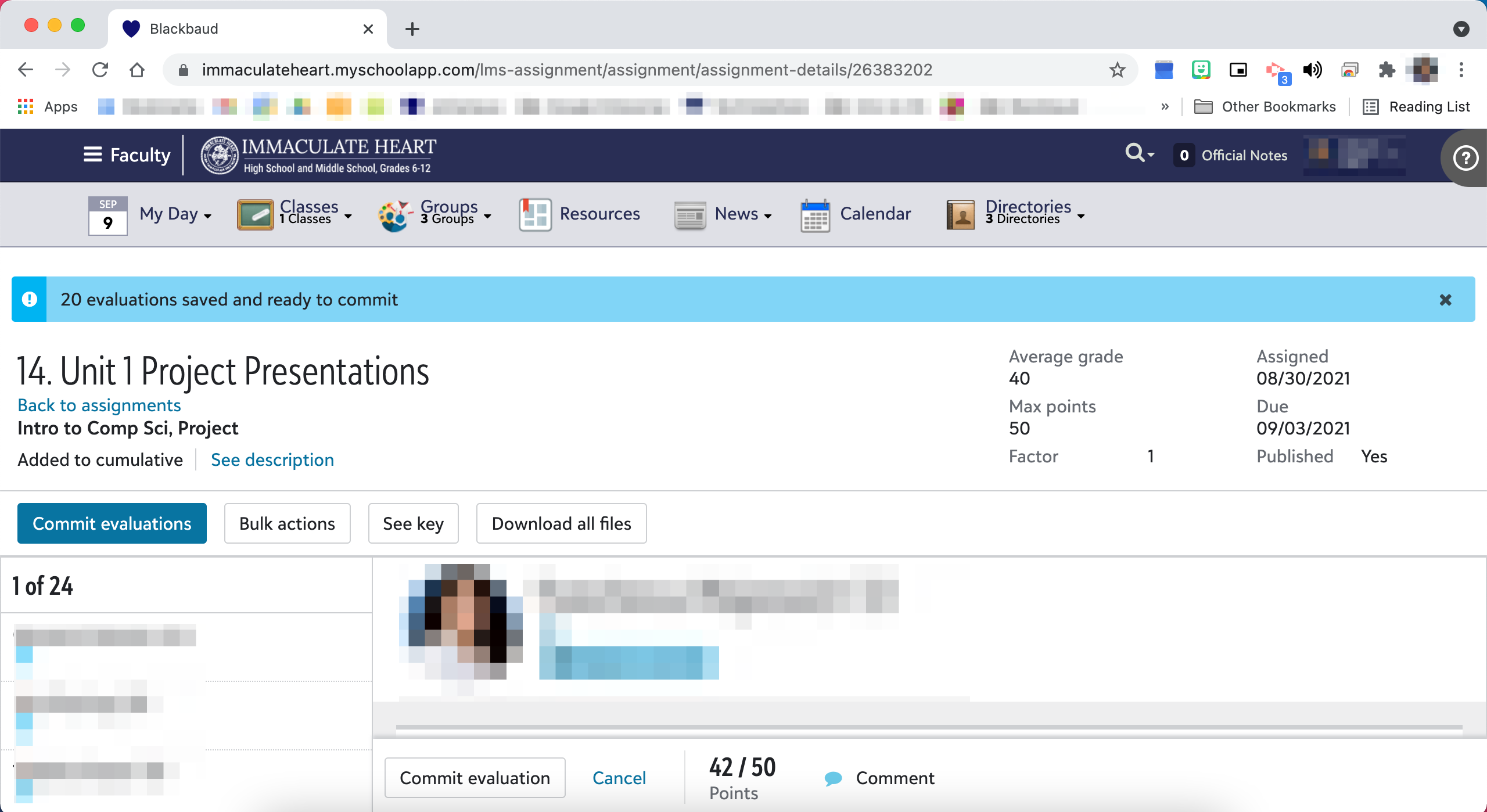
- The assignment title heading is HUGE. We're on 12 inch MacBooks and with the browser toolbar, browser bookmarks, Blackbaud LMS menu ("faculty persona", My Day, Classes, etc.) and the assignment header, the student's submissions show up below the half way mark on the page. At the size it is, I would expect to be able to see the description of the assignment and the downloads and links without having to click into them. Here's a screenshot so you can see how much of the screen is not what I want to see. I appreciate that Blackbaud did an update so the header now scrolls with the page but this causes another issue. (see bullet point below)
- I don't like that from Assignment Details, you can't just type a grade, hit enter, and go to the next student anymore. You have to choose a student, click the grade square, type the grade, click on another student, click their grade square, etc.
- You now have to click on a student's name to see their submission date/time and if you're in the middle of grading (if the grade hasn't been committed yet), you have to click on the student's name to see their grade. You used to be able to easily “eyeball” everyone's grades while you were working.
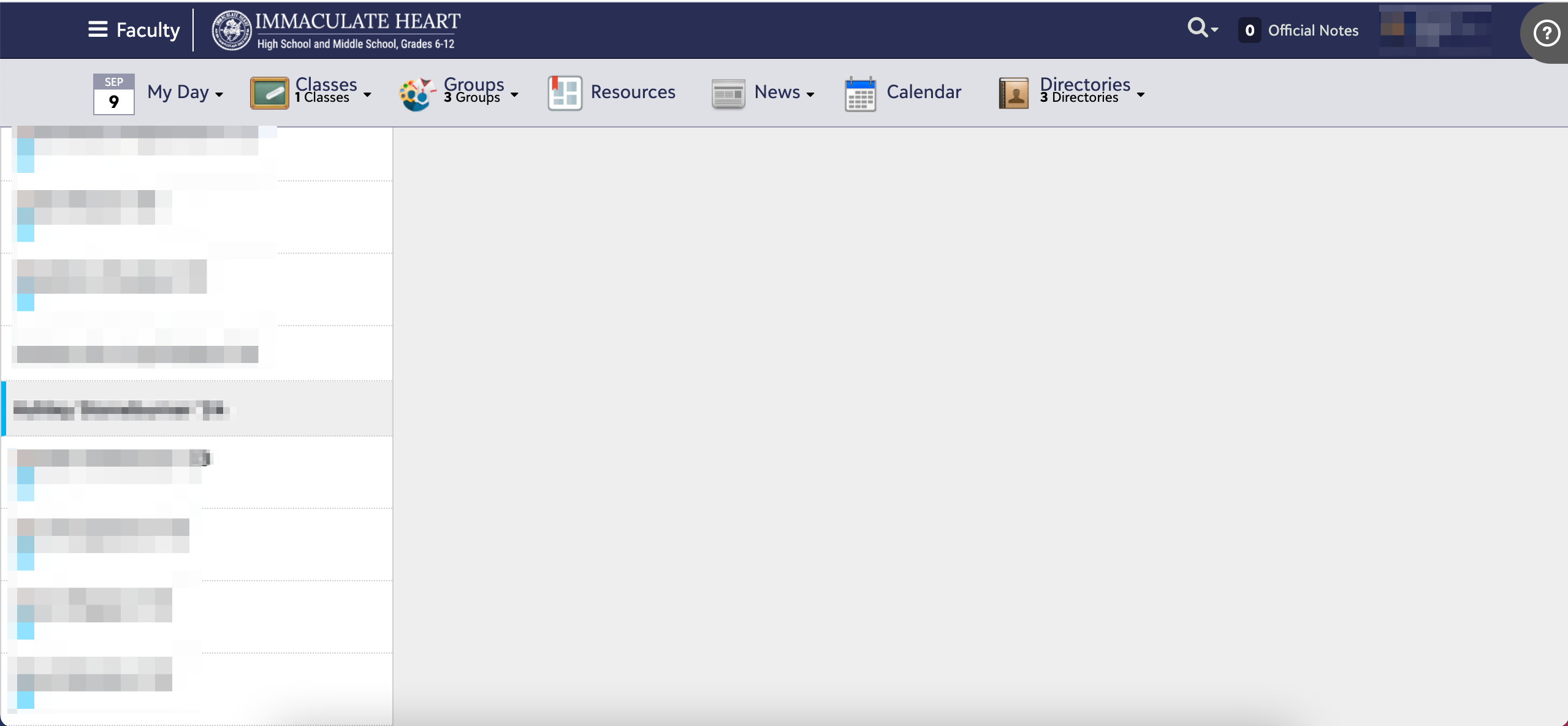
- If you scroll down on the page to a student further down in the roster and click on their name, you then have to scroll up to actually see their submission information. In the screenshot below, I've selected a student's name and the entire area on the right is blank, I have to scroll up (after already scrolling down) to see the info. I know this issue isn't related to screen size because it's also the case on my 27 inch iMac.
- I have a couple open tickets regarding the new submission indicators being incorrect and showing the wrong times and the "uncommitted evaluations" indicator (the blue exclamation mark) showing when all grades are committed which means assignments can't be deleted by teachers. These could be useful new features but they don't work.
2 -
Thank you for bringing up that last point about the timestamps not working correctly. That is driving teachers nuts. I opened a case about that the first week we started school, and I have been following up and for a week no response, but when I wrote again, I did get a response saying that they had found the cause of the issue, but it would take for a patch to be released. Right now we have icons that are not showing the late color even though they are passed the deadline, and others that are showing they are late even though they aren't. I hope that since they found the root cause that the release will be relatively quickly because that feature is not functional operating like that, at least not for my teachers.
0 -
Hi @Ben Leddy, I can't speak for @Mary Kanakaris and her teachers but the new Import Assignment tool is problematic for us. I was reminded of the issue this morning by a teacher who asked if there was an easier way. Currently, when you use the “Import Assignment” widget, there isn't anyway to add them to the gradebook. So if a teacher imports assignments (either one or fifty), they have to go in afterwards, edit each assignment, check the add to gradebook option, and fill out the grade settings. This is true even if the previous assignment being imported was included in the gradebook. If the previous assignment was in the gradebook, the settings should get imported with the assignment or (even better), the teacher should see the options when importing and have the ability to edit, if needed.
2 -
Hi @Ben Leddy
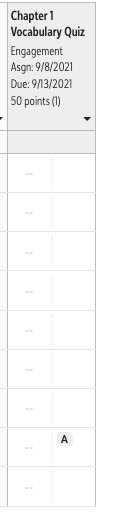
Our teachers are confused about the A or T appearing if the student is absent/tardy on the day it was assigned or the day it was due. There is no indicator of WHEN they were absent/tardy. Was it the day it was assigned or was it the day it was due. So with this assignment for instance. What day was the student absent?? This is how teachers would determine if they have extra time to turn in the assignment.
 0
0 -
This has been happening to us as well Megan Day! I have sat with three teachers in the last 24 hours who have imported last year's assignments in bulk that did not show up in the gradebook. We had to go in and click "add to gradebook" for each one. Would be great if this could be fixed!
0 -
Thank you for the thoughtful feedback, all. A few quick notes:
- If you hover over the A symbol in the gradebook, you will either see “Absent when due” or “Absent when assigned.”
- For assignment import, to add items to the gradebook, they need to be added to a Marking Period. This change was made to allow import for schools that choose not to use marking periods. We did present a written notice of this in the import experience. However, I understand that this is not clear and is presenting challenges.

- You can hover over the Submitted icon to see the date and time of submission. Colors indicate late or on-time, though we are looking into reports where folks are finding inconsistencies. Similar functionality is about to be released for Discussions, allowing you to see the number of discussion responses per student, when the first response was made, and how many posts are original posts vs. followups to others.
We are continuously reviewing the feedback we’re receiving, both here and via the feedback form on My Day. We really appreciate you taking the time to share, and we have a number of enhancements coming soon in direct response designed to speed up grading and save clicks.
2 -
Thanks for that info @Ben Leddy! We definitely hadn't noticed that “Note” for the assignment import. Still frustrating that there isn't anything you can do after they've already been imported but glad to know that if they choose the marking period, the gradebook info would come over. Is there a reason the marking period NEEDS to be there? I realize that schools are set up in all sorts of different ways so there may be instances that I can't think of, but if the option for selecting a marking period was removed, wouldn't it eliminate the issues? As always, I appreciate you hearing and responding to our feedback!
0 -
Megan Day Yes, the selection of a marking period is our way of knowing that you would like the assignment to be added to the gradebook. Previously, schools who did not use marking periods could not proceed with import at all because a marking period was required. I am going to connect with my team about better ways to highlight this and reduce the chance of leaving off a marking period unintentionally.0
-
Oops! I absolutely missed that note. ? If you are going to keep the default this way, I'd love a pop up reminder prior to saving the import if possible. Something like “These assignments will NOT be added to gradebook. If you would like them to show in your gradebook please choose a marking period.” Another option - make it a mandatory filter/field and have “Do not show in my gradebook” or something similar as one of the options instead of the default if left alone. That way people have to choose to not add to gradebook. Thanks for understanding our confusion, Ben!
0 -
I had a teacher mention to me that the Gradebook “Report” for showing an individual assignment grade average is not available any longer. There is a report for average by assignment type, but not for a specified assignment. He wants that report back please~!
4 -
Seconding (thirding?) this! I have had teachers report frustration when creating assignments for multiple class sections as they are no longer able to see meeting times for their courses when editing assignments.
0 -
I agree with concerns about the loss of seeing the highlighted days for the course meetings.
My teachers are also having a big issue with not seeing the assignment average in the gradebook. We would really like that back.
3 -
Many of my teachers have mentioned that having to hover over each individual student's icon to see the timestamp of submission is an extra step for them. When the actual date & time was visible it was much more user friendly for busy teachers. Any chance of restoring the submissions timestamps or at least give a teacher the option of displaying the submission timestamp or the icon? Or having the timestamp when grading through Assignment Center and the icon in the grade book?
There is an Ideas posting started that I voted for today after talking to BB Support. https://blackbaudk12.ideas.aha.io/ideas/K12CO-I-3109
0 -
Thanks for creating the idea Sheila Long! Part of what we're trying to balance is the need to surface important information with the need to not display an overwhelming amount of content at once. The current hypothesis is that the color indication of late or on-time surfaces the most important submission information, and that the additional details can be gathered from hovering or from clicking a student. That said, I am so glad you've posted an idea so we can monitor to see how the community feels and take this into consideration.
0 -
My teachers (especially math) are complaining about the assignment average not showing before the grades are committed. They also want to be able to see the max, min, etc. (stats they could see before about each assignment). I believe this was under assignment details before.
3 -
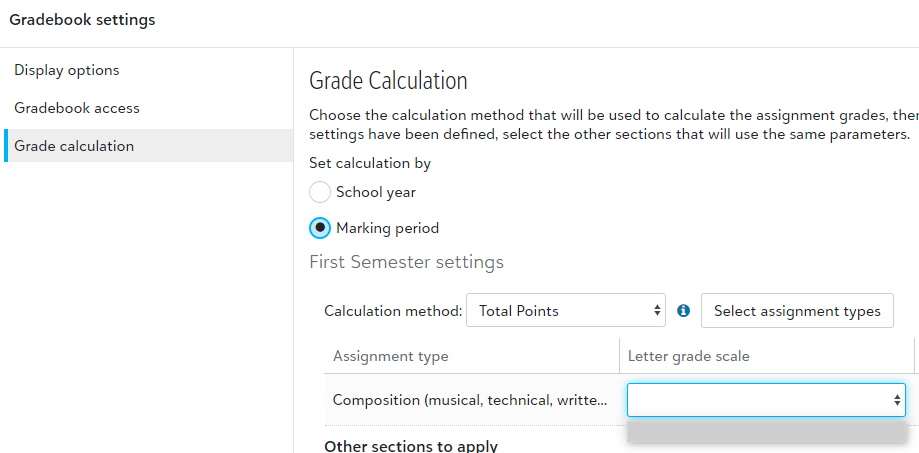
Trying to help out a teacher and figure out changes. It seems like the Letter grade scale is now required and wasn't before since we never set it up and have been using it?
Second is does the grading tab in a class do anything any longer? It seems you have to hit button and spawn a window. If that is the case why is tab still there. Also why does it force a window to spawn? It is good since you can actually use more than 1024 pixels wide but still odd choice.
 0
0 -
Brian -
The Letter Grade scale is not a required field. Though we have ours set up, I tell the faculty they are not to use it. If the feature is set up and a teacher selects it for that assignment type, the only grades the teacher can enter for those assignments are the grades on that letter scale. In my opinion, it is very restricting and can start to throw off the accuracy of grade calculations if you use letter grades due because of the translations.
The Grading tab will populate if you have an active grading plan.
Hope that helps.
Scott0 -
Here is the question from my teacher
I simply want to enter numeric grades. But for some reason, the pull down menu where I normally tell the program "calculate by total points--1-100" isn't available to select. I think this is the problem. Basically, when I put in grades, nothing calculates. No total is established.
Any ideas?
0 -
Leave the area blank where it is asking for letter grades. You will then see the numerical grades.
0 -
Brian -
It sounds as if the teacher has not set up the calculation in their gradebook yet: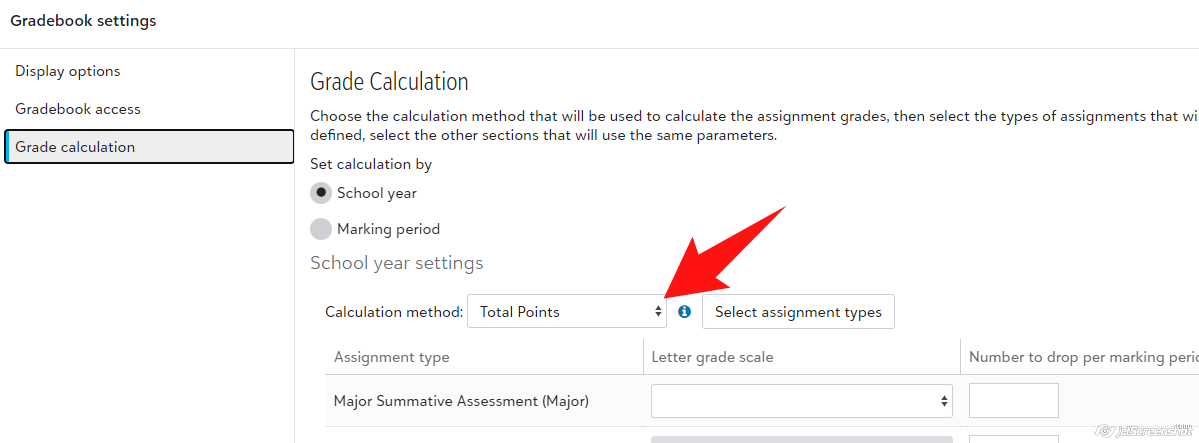
Scott0 -
The teacher is saying
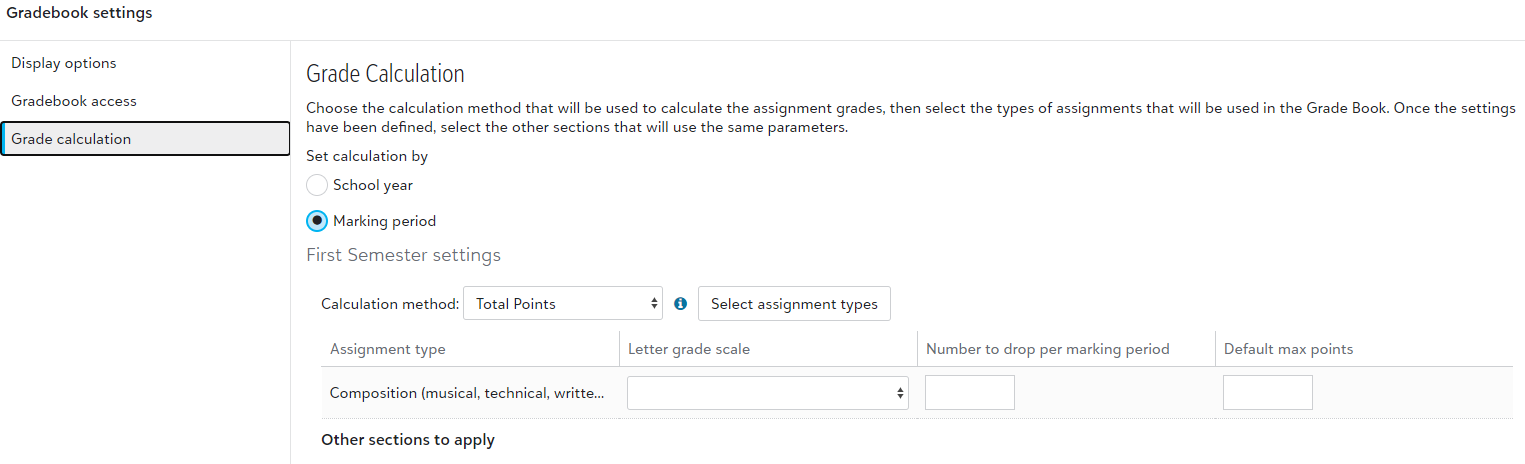
the "current marking period" total isn't calculating. I think it has to do with "settings" --> grade calculation
We literally have one teacher that uses the gradebook in this product so my experience is super limited and I can't seem to get support to understand the issue either. Something is different with new format.
0 -
It seems to be setup
 0
0 -
I finally figured this out, not sure if it is new with revised gradebook or not. You have to committ grades before they are added to calculations. Thanks for the help.
0 -
Brian -
Glad you figured it out. Believe it or not, I literally just sat back down at my desk after having to show a teacher just that. So I was about to add it to this thread. That feature is new this year. Though it is an extra step, our teachers, especially in the humanities, are really liking it because they enter grades as they go and release them to the kids al at once.
Scott1 -
Teachers are frustrated that they lost the ability to add an existing assignment via the gradebook. They can go to the assignment center and have the choice to add or to add existing. The add existing used to be in gradebook but now only add is.
The issue of not being able to see dates of classes from gradebook but being able to see from assignments is also a big painpoint, as is not being able to see submissions from gradebook and having to use assignment center to see and download. Plus sometimes the submitted work is not showing up on the teachers assignments timely - the icon shows it was submitted, but the submission doesn't show for hours and hours sometimes, but not all the time.
Last complaint I have is that when a teacher looks at a class from precious years and want to see its assignments, the filter defaults to DATE is in the FUTURE, which is a dumb default for a prior year class. And the publish status defaults to NOT PUBLISHED for the filter which is not our norm.
0 -
Ben Leddy, you say, "If you hover over the A symbol in the gradebook, you will either see “Absent when due” or “Absent when assigned.”
Why isn't this in the Assignment page, where teachers are actually doing the corrections?!?
0 -
I am getting slammed by my faculty because of Meghan's 5th point “If you scorll down on the page….”.
This is immensely unpopular and time wasting for our faculty.
We have classes as big as 37. This might work for a tiny school, but not ours.
0 -
I'm also hearing that people are hindered by the fact that they can no longer quickly go one submission to another. [you used to tab from grade box to grade box].
NOW, you have to:
- click on the student
- find your way to the details [on the right; often after a time consuming scroll]
- enter the grade
- find your way on the left to the next student
- repeat.
All this was done in the past with ONE Tab.
idea: a quick fix might be to provide a next student button in the detail window that would take you to the same control you are in for the next student. [AND, this should of course needs a keyboard shortcut to avoid switching back and forth to the mouse.
0
























Categories
- All Categories
- 6 Blackbaud Community Help
- 206 bbcon®
- 1.4K Blackbaud Altru®
- 394 Blackbaud Award Management™ and Blackbaud Stewardship Management™
- 1.1K Blackbaud CRM™ and Blackbaud Internet Solutions™
- 15 donorCentrics®
- 357 Blackbaud eTapestry®
- 2.5K Blackbaud Financial Edge NXT®
- 646 Blackbaud Grantmaking™
- 561 Blackbaud Education Management Solutions for Higher Education
- 3.2K Blackbaud Education Management Solutions for K-12 Schools
- 934 Blackbaud Luminate Online® and Blackbaud TeamRaiser®
- 84 JustGiving® from Blackbaud®
- 6.4K Blackbaud Raiser's Edge NXT®
- 3.6K SKY Developer
- 242 ResearchPoint™
- 118 Blackbaud Tuition Management™
- 165 Organizational Best Practices
- 238 The Tap (Just for Fun)
- 33 Blackbaud Community Challenges
- 28 PowerUp Challenges
- 3 (Open) Raiser's Edge NXT PowerUp Challenge: Product Update Briefing
- 3 (Closed) Raiser's Edge NXT PowerUp Challenge: Standard Reports+
- 3 (Closed) Raiser's Edge NXT PowerUp Challenge: Email Marketing
- 3 (Closed) Raiser's Edge NXT PowerUp Challenge: Gift Management
- 4 (Closed) Raiser's Edge NXT PowerUp Challenge: Event Management
- 3 (Closed) Raiser's Edge NXT PowerUp Challenge: Home Page
- 4 (Closed) Raiser's Edge NXT PowerUp Challenge: Standard Reports
- 4 (Closed) Raiser's Edge NXT PowerUp Challenge: Query
- 778 Community News
- 2.9K Jobs Board
- 53 Blackbaud SKY® Reporting Announcements
- 47 Blackbaud CRM Higher Ed Product Advisory Group (HE PAG)
- 19 Blackbaud CRM Product Advisory Group (BBCRM PAG)