Blackbaud beta-error





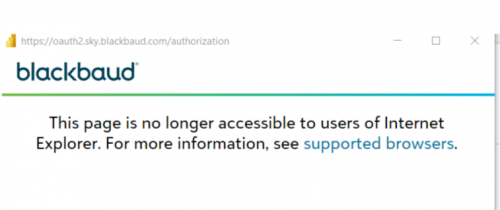
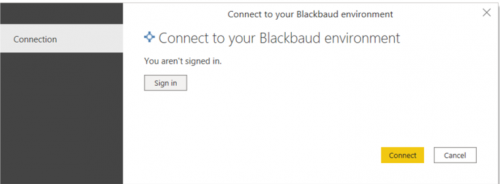
Have you ever had this error when you connected to “Blackbaud beta”?
Comments
-
Hey @Veronica Krivis,
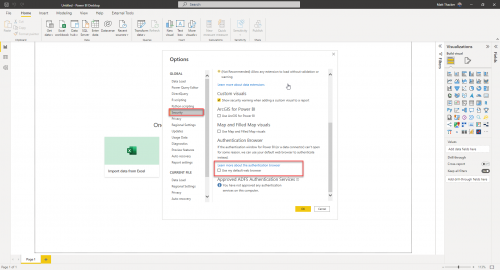
I know the screenshot isn't great, but the first step (if you haven't already done so), is change your default browser from Internet Explorer on your computer. From your Power BI desktop app, go to File → Options and settings → Options → Security. Once you're on the Security tab, scroll down to the bottom and there will be a field labeled Authentication Browser, click Use my default web browser.
One thing to note: make sure you're using the Aug 2022 release of the Power BI desktop version.
 2
2 -
@Matt Thacker
Thank you!!0 -
Hi @Matt Thacker!! Thanks for your help! I have another question. Do you know how to uninstall and install the power bi desktop? I still have the error when I connect the Blackbaud beta and before I did not this one. I followed your instructions but I don't have the Aug-22 version of power bi and I can't update it so I was thinking to uninstall and then install power bi desktop. Thanks,
0 -
Hi Mat! I was able to install the updates of power bi and this solved all the problems. Thanks so much!!
0




Categories
- All Categories
- 6 Blackbaud Community Help
- 206 bbcon®
- 1.4K Blackbaud Altru®
- 394 Blackbaud Award Management™ and Blackbaud Stewardship Management™
- 1.1K Blackbaud CRM™ and Blackbaud Internet Solutions™
- 15 donorCentrics®
- 357 Blackbaud eTapestry®
- 2.5K Blackbaud Financial Edge NXT®
- 646 Blackbaud Grantmaking™
- 561 Blackbaud Education Management Solutions for Higher Education
- 3.2K Blackbaud Education Management Solutions for K-12 Schools
- 934 Blackbaud Luminate Online® and Blackbaud TeamRaiser®
- 84 JustGiving® from Blackbaud®
- 6.4K Blackbaud Raiser's Edge NXT®
- 3.6K SKY Developer
- 242 ResearchPoint™
- 118 Blackbaud Tuition Management™
- 165 Organizational Best Practices
- 238 The Tap (Just for Fun)
- 33 Blackbaud Community Challenges
- 28 PowerUp Challenges
- 3 (Open) Raiser's Edge NXT PowerUp Challenge: Product Update Briefing
- 3 (Closed) Raiser's Edge NXT PowerUp Challenge: Standard Reports+
- 3 (Closed) Raiser's Edge NXT PowerUp Challenge: Email Marketing
- 3 (Closed) Raiser's Edge NXT PowerUp Challenge: Gift Management
- 4 (Closed) Raiser's Edge NXT PowerUp Challenge: Event Management
- 3 (Closed) Raiser's Edge NXT PowerUp Challenge: Home Page
- 4 (Closed) Raiser's Edge NXT PowerUp Challenge: Standard Reports
- 4 (Closed) Raiser's Edge NXT PowerUp Challenge: Query
- 778 Community News
- 2.9K Jobs Board
- 53 Blackbaud SKY® Reporting Announcements
- 47 Blackbaud CRM Higher Ed Product Advisory Group (HE PAG)
- 19 Blackbaud CRM Product Advisory Group (BBCRM PAG)