My Community
YourCause®
Impact Edge™
All-Star Lounge
Member Lounge (Just for Fun)
Community News
Community Manager
Groups
Browse Products
Members
Community All-Stars
Monthly Challenges
Member Search
Jobs Board
Help
Using the Blackbaud Community
Blackbaud Support
Knowledgebase
Blackbaud University
Discussions
Categories
Groups
Home
ResearchPoint™
ResearchPoint™ Blog
ResearchPoint February 2017 (4.94) Release
Sandra Stagner
This past weekend (February 4), we updated ResearchPoint standalone customers to the February 2017 (4.94) release. Here is a summary of the new features.
Split List Functionality for Prospect Researchers
Research Lists are groups of individual constituents that help you more effectively research potential prospects in batches, so you don't need to qualify prospects one-by-one.
ResearchPoint
now provides the capability to split large research lists into smaller groupings to facilitate batch processing.
This feature is available to users who have the Prospect Research role. Prior to this release, the split list capability was only available for System Administrators. Now, Prospect Researchers can add, edit, and view split lists.
In Research Lists, click the research list you want to split, then click
Split list
. Then, in the
Research list split list screen, specify the size (in number of records) of the child research list(s) you want to create, and click
Split
.
Two or more sub-queries (child research lists) are created from the original research list, based on how many records are in the original research list and the split list size you specified. For example, if you have a research list containing 19,620 records and you specify a split list size of 2,500, ResearchPoint creates eight sub-queries; seven sub-queries with 2,500 records each and one sub-query with the remaining 2,120 records.
You can view the sub-queries created by other Prospect Researchers, but you can only edit the sub-queries that you created.
New! Target Analytics Affluence
Target Analytics Affluence is a new donor wealth segmentation system that is integrated with ResearchPoint and is offered as an add-on feature.
Target Analytics Affluence pulls accurate, actionable wealth attribute intelligence from across the US population and organizes it into precise donor groups and segments to maximize fundraising effectiveness. To create our wealth attributes, we leverage data from over 100 fully compliant data sources and employ our advanced proprietary analytics methods.
Target Analytics Affluence is offered by subscription only. There are two subscription levels: Standard and Enterprise. With both subscription types, you'll have five new wealth model scores and ratings attributes. With the Enterprise subscription, you'll also have six investment sub-categories and seven discretionary spending sub-categories. A Target Analytics consultant can determine which subscription is best for your needs.
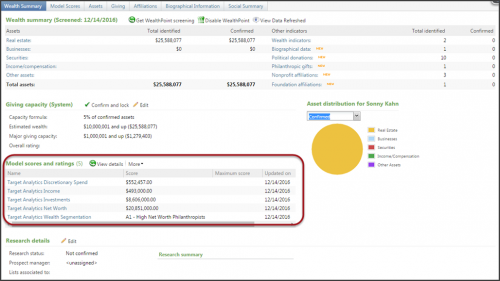
The following five new wealth model scores and ratings attributes are available with Target Analytics Affluence:
Target Analytics Income
: Leverages known financial data to accurately predict household income.
Target Analytics Net Worth
: Uses home value, liquid investment and other proprietary data to accurately predict household net worth.
Target Analytics Investments
: Utilizes the largest survey of financial assets to accurately predict invested assets at the household level.
Target Analytics Discretionary Spend
: Uses known buying patterns to accurately predict discretionary spending per household over the next 12 months.
Target Analytics Wealth Segmentation
: Categorizes donors into five donor groups: (A) Philanthropists, (B) Humanitarians, (C) Casual Donors, (D) Enigmas, and (E) The Masses.
Each donor group is further broken down into segments based on wealth, demographic, and donation attributes.
Philanthropists
: A1 - High Net Worth Philanthropists; A2 - Financially Secure Philanthropists; A3 - Upwardly Mobile Philanthropists
Humanitarians
: B1 - Steady Humanitarians; B2 - Devoted Humanitarians; B3 - Faithful Humanitarians
Casual
Donors
: C1 - Middle Class Casual Donors; C2 - Working Class Casual Donors; C3 - Marginal Casual Donors; C4 - Sporadic Casual Donors
Enigmas
: D1 - Affluent Enigmas
The
Masses
: E1 - Blue Collar Masses; E2 - Non-starter Masses
You can view these new attributes in the
Model scores and ratings
grid on the constituent's Wealth Summary tab. A maximum of seven model score attributes can be displayed here. If a constituent has more than seven model score attributes, click
View all <n>
(where <n> is the constituent's total number of model score attributes) to open the Model Scores tab where you can view the constituent's entire list of model scores and ratings information.
Additional sub-categories for investment and discretionary spending are available with the Enterprise-level subscription.
For the Target Analytics Investments attribute, there are six additional sub-categories:
Checking
Savings
Securities
Savings Bonds
Life Insurance
Annuities
For the Target Analytics Discretionary Spend attribute, there are seven additional sub-categories:
Dining Out
Entertainment
Apparel
Education
Philanthropy
Domestic Travel
International Travel
Target Analytics Data Updates
Since our 4.93 release, we have refreshed the data for NOZA, Federal Elections Commission (FEC), Dun & Bradstreet, CoreLogic, and Thomson Reuters Business Intelligence (TRBI) in our Target Analytics database.
Now, when you perform WealthPoint screenings on a prospect's wealth and ratings record, or when you perform a screening on your research lists, you'll have the latest philanthropic gifts, political donations, business assets, real estate assets, and income records.
ResearchPoint Feedback
Do you want to influence the direction of the product? You can in the
Target Analytics Community
. We're there with you in the community and we're listening for which features you want added or which existing functionality needs to be improved.
You can add a new idea, vote for ideas you want to see implemented, or respond to an existing idea with comments about what you need specifically. The more you tell us, the better we can prioritize and design the product around your organization’s needs.
How do ideas get implemented? Ideas with the most likes are more heavily favored when we consider what we should put on our roadmap for
ResearchPoint
.
To see all the current user-posted ideas, from the Target Analytics Community home page, in the
Navigation Menu
, click
Ideas
. We look forward to hearing from you on how you need
ResearchPoint
improved!
Need a PDF version of these release notes?
View and save a printer-friendly copy of the new features!
Find more posts tagged with
Comments
Eileen Disken
Thank you for sending out the updates. I think it would be great if these came out via email the morning of the release. Yes, I do know they are available on RP itself, but no all users log in daily.
Kim Braun
Since Affluence is now available as an additional subscription, will Experian Mosaic model scores continue to be offered in RP? (The Household Mosaic category, household income estimate, and discretionary spending estime?) Thanks!
Rachel Kave
We have the Target Analytics Affluence-I see in the above screen shot that the new scores are able to imported. Will that field be available when importing to do i have to create a custom field under Model Scores
Sandra Stagner
Hi Eileen,
Thanks for your suggestion.
In addition to the What’s New documentation that’s available in RP itself, you can also access the
New Features information
on our How-to Documentation website. We typically post this a week prior to each release.
Sandra Stagner
Hi Kim,
Thanks for your question.
There are no changes to Experian data – the Experian Mosaic model scores will continue to be offered in RP. We’re not taking away any Experian data that overlaps with TA Affluence, since we want to continue to offer this data to users who don’t purchase Affluence. However, note that the Affluence model is stronger and the caps are higher, which means we can get more exact at high ranges.
Sandra Stagner
Hi Rachel, Thanks for your question.
When you sign up for TA Affluence, Target Analytics Production will import the data and create the attributes for you, so there’s nothing further that you’ll need to set up.
Kim Braun
Thanks for getting back to me, Sandra. I appreciate having those details about Mosaic versus Affluence.
Quick Links
All Categories
Recent Posts
Activity
Unanswered
Groups
Help
Best Of