The latest release of
Financial Edge NXT includes the following features and enhancements:
Report parametersWith this release, we continued to add report parameter functionality. For example, you can now use the
Save as option to save a copy of the report parameters. This is helpful when you want to define your own set of parameters, or to add security to the report parameters. You can also now enter the report footer text you want to appear at the end of the report, and the page footer text that appears on each page.
Currently in
Financial Edge NXT, you can edit report parameters for the Income Statement, Balance Sheet, and Custom Management reports. We will add the ability to edit report parameters for the Open Invoice report and General ledger report in upcoming releases. For more information about parameters, see
Report Parameters.
Supported browsersWith this release, we added support for the
Mac Safari browser. We plan to add support for the
Mac Chrome browser in an upcoming release.
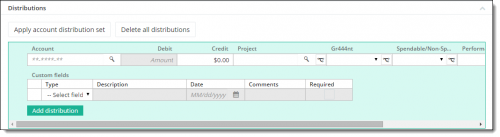
GL distribution enhancementsWe continued our work with GL distributions, making enhancements to how you add and edit distribution information on bank adjustments and adjustment categories. You now add new distribution rows from the top of the Distributions grid. To edit a distribution row, you simply select the account number to expand the row. And you can use the multi-select functionality to duplicate rows, or to delete all distribution rows at one time.
 List page enhancements
 On list pages, you can specify which columns appear when you select
Choose columns. With this release, we added more column options for reports, grants, projects, and deposits.
