What’s New (July 22, 2016)
Justin Ward
Blackbaud Employee
With this release, we made several enhancements to Reporting in an effort improve your experience as you work with reports. These enhancements include:
Preview report without saving. You can now preview a report directly from the Edit report parameters form without having to save it first. This is helpful when you only want to preview a report or get an answer, but have no intention of keeping the report. To do this, simply select Run on the Edit report parameters screen.

Save and run report. You can now save and run a report directly from the Edit report parameters screen. When you select Save and run, the report parameters close and the report is launched automatically. This is a time saver because prior to this release, you were taken back to the report list where you had to locate the report you just saved in order to run it.

Edit report parameters. We added an Edit button to the report view so that you can quickly navigate back to the report parameters to make changes. This is helpful when you run a report and then want to make changes to the parameters.

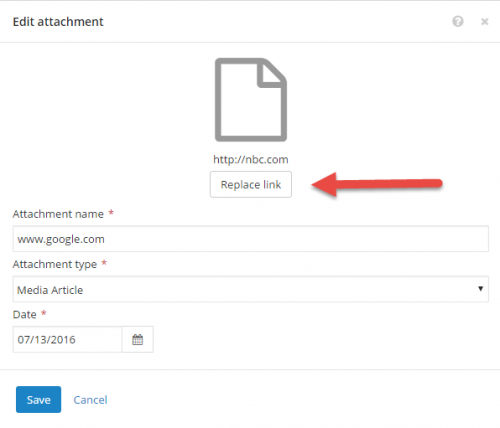
Link attachments. We added the ability to replace links when editing attachments. When you select Replace link on the Edit attachment form, you can quickly and easily update the URL without having to delete it first. For more information about attachments, see Attachments.
Preview report without saving. You can now preview a report directly from the Edit report parameters form without having to save it first. This is helpful when you only want to preview a report or get an answer, but have no intention of keeping the report. To do this, simply select Run on the Edit report parameters screen.

Save and run report. You can now save and run a report directly from the Edit report parameters screen. When you select Save and run, the report parameters close and the report is launched automatically. This is a time saver because prior to this release, you were taken back to the report list where you had to locate the report you just saved in order to run it.

Edit report parameters. We added an Edit button to the report view so that you can quickly navigate back to the report parameters to make changes. This is helpful when you run a report and then want to make changes to the parameters.

Link attachments. We added the ability to replace links when editing attachments. When you select Replace link on the Edit attachment form, you can quickly and easily update the URL without having to delete it first. For more information about attachments, see Attachments.

0
Categories
- All Categories
- 6 Blackbaud Community Help
- 211 bbcon®
- 1.4K Blackbaud Altru®
- 396 Blackbaud Award Management™ and Blackbaud Stewardship Management™
- 1.1K Blackbaud CRM™ and Blackbaud Internet Solutions™
- 15 donorCentrics®
- 360 Blackbaud eTapestry®
- 2.5K Blackbaud Financial Edge NXT®
- 650 Blackbaud Grantmaking™
- 568 Blackbaud Education Management Solutions for Higher Education
- 3.2K Blackbaud Education Management Solutions for K-12 Schools
- 937 Blackbaud Luminate Online® and Blackbaud TeamRaiser®
- 84 JustGiving® from Blackbaud®
- 6.5K Blackbaud Raiser's Edge NXT®
- 3.7K SKY Developer
- 247 ResearchPoint™
- 119 Blackbaud Tuition Management™
- 165 Organizational Best Practices
- 239 The Tap (Just for Fun)
- 34 Blackbaud Community Challenges
- 31 PowerUp Challenges
- 3 (Open) PowerUp Challenge: Data Health
- 3 (Closed) Raiser's Edge NXT PowerUp Challenge: Product Update Briefing
- 3 (Closed) Raiser's Edge NXT PowerUp Challenge: Standard Reports+
- 3 (Closed) Raiser's Edge NXT PowerUp Challenge: Email Marketing
- 3 (Closed) Raiser's Edge NXT PowerUp Challenge: Gift Management
- 4 (Closed) Raiser's Edge NXT PowerUp Challenge: Event Management
- 3 (Closed) Raiser's Edge NXT PowerUp Challenge: Home Page
- 4 (Closed) Raiser's Edge NXT PowerUp Challenge: Standard Reports
- 4 (Closed) Raiser's Edge NXT PowerUp Challenge: Query
- 785 Community News
- 2.9K Jobs Board
- 53 Blackbaud SKY® Reporting Announcements
- 47 Blackbaud CRM Higher Ed Product Advisory Group (HE PAG)
- 19 Blackbaud CRM Product Advisory Group (BBCRM PAG)