With this release, we continued our work around exporting report data to
Excel. When you select
Export Excel data from any General ledger report, you export the report data with only one set of headers, footers, and column headers. This is helpful when you don't want repeated headers, footers, and column headers for every page in the excel spreadsheet.
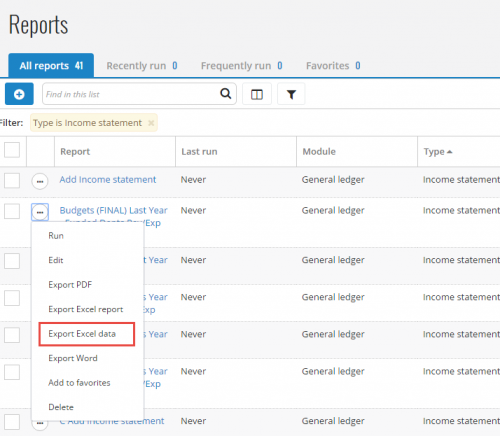
This option is available from the report viewer, as well as the menu in the Reports list. For more information about the report options available, see the
Report Options help file.
We also added a new report to
Financial Edge NXT. The
Statement of Cash Flows report shows the flow of cash and cash equivalents in and out of your organization. This report provides information about the sources and uses of cash flow during a time period you select. For more information about this report, see the
Statement of Cash Flows help file.
And just a reminder, if you want to catch up on what we’ve released so far this year, check out the
What’s Recent help file.
