What's New (Feb 20, 2017)
Justin Ward
Blackbaud Employee
With this release, we enhanced the workflow for copying a batch. Now, when you select More actions, Copy batch from an open, approved, or posted batch record, you are prompted to add a description and change the post date for the new batch. This streamlines data entry by eliminating the need to update each batch row individually.
We also enhanced the workflow for reversing a batch. Now, when you select More actions, Create reversing batch from a posted batch record, you are prompted to add a description and change the post date for the new, reversing batch to a single reversal post date. This streamlines data entry by eliminating the need to update the post date for each batch row individually. For more information, see Batch Record.
We also added the History of Changes dashboard for SKY Reporting™. It's important to periodically review information that is added or edited in your system. When records — such as accounts or vendors — are changed, you may want to track the changes and who made them. You may also want to review updates related to checks and bank reconciliation.
To quickly assess the history of your organization's data, select Analysis, History of Changes for a dashboard of key metrics. Previously, this data was located in the Metrics dashboard. For more information, see History of Changes Analysis.
Contact information
With this release we made enhancements to how contact information displays under Contact info. Now when viewing contact information, you can use the active links to interact with the contact. For example, depending on your browser or device, you can select the phone number link to call the contact through Skype or another voice-over-Internet protocol (VoIP) application.
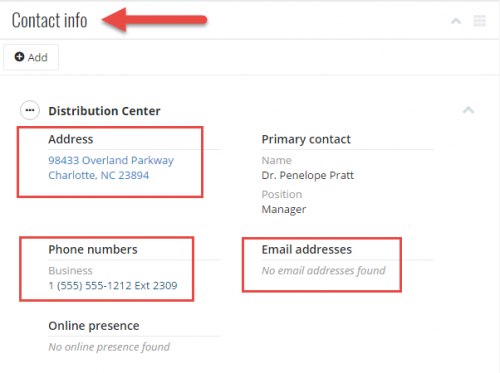
To email the contact, you can simply select the email address to start a message in your default email client. To get directions to or familiarize yourself with the contact’s location, you can select the address link to view it in Google Maps. For more information, see Contacts.
We also enhanced the workflow for reversing a batch. Now, when you select More actions, Create reversing batch from a posted batch record, you are prompted to add a description and change the post date for the new, reversing batch to a single reversal post date. This streamlines data entry by eliminating the need to update the post date for each batch row individually. For more information, see Batch Record.
We also added the History of Changes dashboard for SKY Reporting™. It's important to periodically review information that is added or edited in your system. When records — such as accounts or vendors — are changed, you may want to track the changes and who made them. You may also want to review updates related to checks and bank reconciliation.
To quickly assess the history of your organization's data, select Analysis, History of Changes for a dashboard of key metrics. Previously, this data was located in the Metrics dashboard. For more information, see History of Changes Analysis.
Contact information
With this release we made enhancements to how contact information displays under Contact info. Now when viewing contact information, you can use the active links to interact with the contact. For example, depending on your browser or device, you can select the phone number link to call the contact through Skype or another voice-over-Internet protocol (VoIP) application.

To email the contact, you can simply select the email address to start a message in your default email client. To get directions to or familiarize yourself with the contact’s location, you can select the address link to view it in Google Maps. For more information, see Contacts.
0
Categories
- All Categories
- New YourCause Community TEST
- New SKY Community TEST
- New Grantmaking TEST Community
- New Altru Test Community
- New bbcon Community - TEST
- 12 Blackbaud Agents for Good™
- New Raiser's Edge NXT Community
- 7 Blackbaud Community Help
- 218 bbcon®
- 1.4K Blackbaud Altru®
- 409 Blackbaud Award Management™ and Blackbaud Stewardship Management™
- 1.2K Blackbaud CRM™ and Blackbaud Internet Solutions™
- 16 donorCentrics®
- 361 Blackbaud eTapestry®
- 2.7K Blackbaud Financial Edge NXT®
- 681 Blackbaud Grantmaking™
- 599 Blackbaud Education Management Solutions for Higher Education
- 3.3K Blackbaud Education Management Solutions for K-12 Schools
- 952 Blackbaud Luminate Online® and Blackbaud TeamRaiser®
- 85 JustGiving® from Blackbaud®
- 7K Blackbaud Raiser's Edge NXT®
- 3.9K SKY Developer
- 257 ResearchPoint™
- 123 Blackbaud Tuition Management™
- 165 Organizational Best Practices
- 247 Member Lounge (Just for Fun)
- 40 Blackbaud Community Challenges
- 37 PowerUp Challenges
- 3 (Closed) PowerUp Challenge: Grid View Batch
- 3 (Closed) PowerUp Challenge: Chat for Blackbaud AI
- 3 (Closed) PowerUp Challenge: Data Health
- 3 (Closed) Raiser's Edge NXT PowerUp Challenge: Product Update Briefing
- 3 (Closed) Raiser's Edge NXT PowerUp Challenge: Standard Reports+
- 3 (Closed) Raiser's Edge NXT PowerUp Challenge: Email Marketing
- 3 (Closed) Raiser's Edge NXT PowerUp Challenge: Gift Management
- 4 (Closed) Raiser's Edge NXT PowerUp Challenge: Event Management
- 3 (Closed) Raiser's Edge NXT PowerUp Challenge: Home Page
- 4 (Closed) Raiser's Edge NXT PowerUp Challenge: Standard Reports
- 4 (Closed) Raiser's Edge NXT PowerUp Challenge: Query
- 822 Community News
- 3.1K Jobs Board
- 57 Blackbaud SKY® Reporting Announcements
- 47 Blackbaud CRM Higher Ed Product Advisory Group (HE PAG)
- 19 Blackbaud CRM Product Advisory Group (BBCRM PAG)