What’s New (March 24, 2017)
Justin Ward
Blackbaud Employee
The latest release of Financial Edge NXT includes several new features and enhancements.
In SKY Reporting, we introduced the Development Overview dashboard. To quickly assess your organization's overall fundraising efforts, select Analysis, Development Overview for a dashboard of key metrics. Under Development Overview, you have a pulse-check of how well your organization is acquiring gifts and retaining donors. To increase the impact on your mission, use this analysis to drive action and inform your next steps. For more information, see Development Overview Analysis.
We also enhanced the History of changes dashboard in SKY Reporting.To quickly assess the history of your organization's data, select Analysis, History of Changes for a dashboard of key metrics. Under Check history, you can now view purged check details, such as check number, payee, and purged date. You can use this information to help detect and prevent fraud within your organization. For more information, see History of Changes Analysis.
With this release, we enhanced the account search functionality as well. Now, when searching for an account, you can enter a partial number and/or a description to quickly locate the account. Prior to this release, you could search only by the account segments, and you could not search by account descriptions.
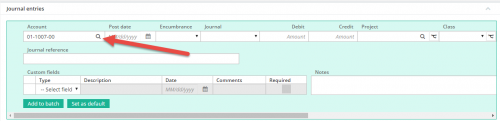
Account searches appear throughout the product, most commonly in General ledger, but also in other areas such as Treasury and Payables. The new search is easier to use and faster because you can enter partial numbers and/or descriptions without having to search by segments.
Attachment enhancements
We also added the Attachments column to multiple list pages (Invoices, Vendors, Deposits, Projects, Grants, and Journal entry). This column indicates whether or not the record has any attachments, and if so, how many. To add the Attachments column, access the Column chooser screen on the record list and mark Attachments. For more information about attachments, see Attachments.
You can also now filter record lists by attachments. To access list filters, select Filters from the action bar above the list. These filters make locating records easier and faster, and are also useful in creating specific lists. For example, you can filter a list to show invoices only if they have attachments.
And finally, you can now use the new Class field to classify invoice distributions for payables. This field appears when you add or edit an invoice under Distributions. Previously, you could only classify distributions using projects, grants, or transaction codes. The Class column also appears in the Distributions panel in the following lists:
In SKY Reporting, we introduced the Development Overview dashboard. To quickly assess your organization's overall fundraising efforts, select Analysis, Development Overview for a dashboard of key metrics. Under Development Overview, you have a pulse-check of how well your organization is acquiring gifts and retaining donors. To increase the impact on your mission, use this analysis to drive action and inform your next steps. For more information, see Development Overview Analysis.
We also enhanced the History of changes dashboard in SKY Reporting.To quickly assess the history of your organization's data, select Analysis, History of Changes for a dashboard of key metrics. Under Check history, you can now view purged check details, such as check number, payee, and purged date. You can use this information to help detect and prevent fraud within your organization. For more information, see History of Changes Analysis.
With this release, we enhanced the account search functionality as well. Now, when searching for an account, you can enter a partial number and/or a description to quickly locate the account. Prior to this release, you could search only by the account segments, and you could not search by account descriptions.

Account searches appear throughout the product, most commonly in General ledger, but also in other areas such as Treasury and Payables. The new search is easier to use and faster because you can enter partial numbers and/or descriptions without having to search by segments.
Attachment enhancements
We also added the Attachments column to multiple list pages (Invoices, Vendors, Deposits, Projects, Grants, and Journal entry). This column indicates whether or not the record has any attachments, and if so, how many. To add the Attachments column, access the Column chooser screen on the record list and mark Attachments. For more information about attachments, see Attachments.
You can also now filter record lists by attachments. To access list filters, select Filters from the action bar above the list. These filters make locating records easier and faster, and are also useful in creating specific lists. For example, you can filter a list to show invoices only if they have attachments.
And finally, you can now use the new Class field to classify invoice distributions for payables. This field appears when you add or edit an invoice under Distributions. Previously, you could only classify distributions using projects, grants, or transaction codes. The Class column also appears in the Distributions panel in the following lists:
- Deposits
- Invoices
- Journal entries
- Purchase orders
- Vendors
0
Categories
- All Categories
- 6 Blackbaud Community Help
- 206 bbcon®
- 1.4K Blackbaud Altru®
- 394 Blackbaud Award Management™ and Blackbaud Stewardship Management™
- 1.1K Blackbaud CRM™ and Blackbaud Internet Solutions™
- 15 donorCentrics®
- 357 Blackbaud eTapestry®
- 2.5K Blackbaud Financial Edge NXT®
- 646 Blackbaud Grantmaking™
- 561 Blackbaud Education Management Solutions for Higher Education
- 3.2K Blackbaud Education Management Solutions for K-12 Schools
- 934 Blackbaud Luminate Online® and Blackbaud TeamRaiser®
- 84 JustGiving® from Blackbaud®
- 6.4K Blackbaud Raiser's Edge NXT®
- 3.6K SKY Developer
- 242 ResearchPoint™
- 117 Blackbaud Tuition Management™
- 165 Organizational Best Practices
- 238 The Tap (Just for Fun)
- 33 Blackbaud Community Challenges
- 28 PowerUp Challenges
- 3 (Open) Raiser's Edge NXT PowerUp Challenge: Product Update Briefing
- 3 (Closed) Raiser's Edge NXT PowerUp Challenge: Standard Reports+
- 3 (Closed) Raiser's Edge NXT PowerUp Challenge: Email Marketing
- 3 (Closed) Raiser's Edge NXT PowerUp Challenge: Gift Management
- 4 (Closed) Raiser's Edge NXT PowerUp Challenge: Event Management
- 3 (Closed) Raiser's Edge NXT PowerUp Challenge: Home Page
- 4 (Closed) Raiser's Edge NXT PowerUp Challenge: Standard Reports
- 4 (Closed) Raiser's Edge NXT PowerUp Challenge: Query
- 777 Community News
- 2.9K Jobs Board
- 53 Blackbaud SKY® Reporting Announcements
- 47 Blackbaud CRM Higher Ed Product Advisory Group (HE PAG)
- 19 Blackbaud CRM Product Advisory Group (BBCRM PAG)