The latest release of
Financial Edge NXT includes several new features and enhancements.
Delete tables and table entriesYou can now delete tables and table entries in the web view. Keep in mind, if the table you want to delete contains any table entries, you must delete those values first. You can delete a table only when it has no table entries. For more information about tables, see the
Manage Tables. help topic
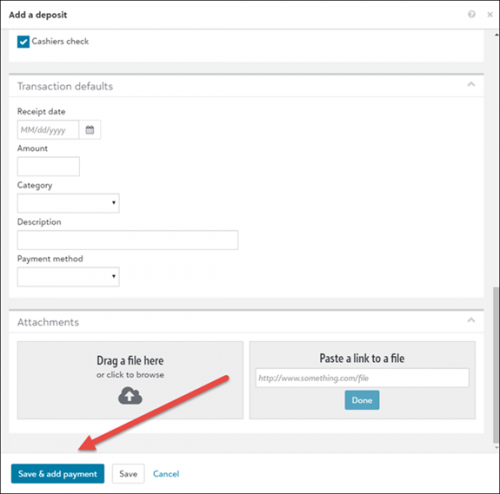
Cash receipt enhancementsYou can add a Cash receipt payment directly from an existing deposit record, or when you are adding a deposit, ensuring the payment is associated with the deposit automatically.
When adding a deposit, look for the new
Save & add payment button on the Add deposit screen.
For more information, see the
Add Cash Receipt Payment help topic.
You can also now add attachments to a cash receipt payment. From the
Attachments tile, you can upload or link to files you want attached to the cash receipt payment - such as images, PDFs, Word documents, Excel spreadsheets, and other files. For more information, see
Attachments.
Budgets – Apply budget distributionWhen you edit a budget scenario, you can now distribute total amounts by applying a budget distribution defined by your organization. Budget distributions are defined in the database view and provide a custom template for you to enter budget percentages for each period. For more information, see
Edit Scenario.
To receive What’s New information as an email after each release, subscribe to the
Financial Edge NXT blog!
