What’s New (June 7, 2018)

Justin Ward
Blackbaud Employee




This release of Financial Edge NXT includes several new features and enhancements. Let’s start with Budgets.
You can now add and edit budget scenarios from the web view! You add a scenario from the Budgets page under General ledger. When you add a scenario, you can also create a new scenario ID if the one you need doesn't exist.
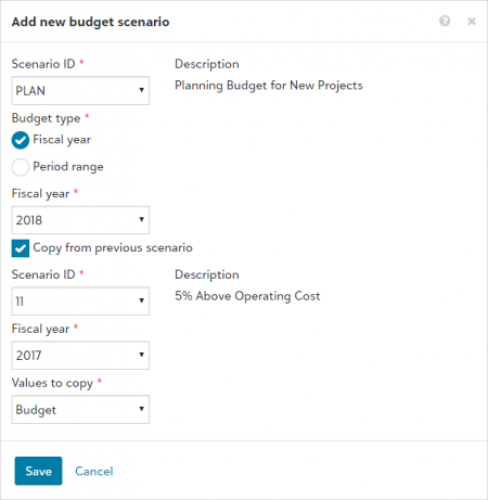
To save time, you can also select to copy an existing scenario to default the data you need for a new one. This allows you to default the same account, project, and grant from the existing one. For more information, see the Add Budgets help topic.
To edit a scenario, access and open the scenario from the Budgets page. On the action bar, select Edit to make your changes. For more information, see the Edit Scenario help topic.
Export a list
You can now export list pages within Financial Edge NXT to Excel. This is helpful when you want to print a list, manipulate the data further, or provide it to someone who does not have Financial Edge NXT access.
To export a list, select the Export to Excel icon located above the list. When you export a list, all the information displayed in the list is exported to an Excel (XLSX) file.
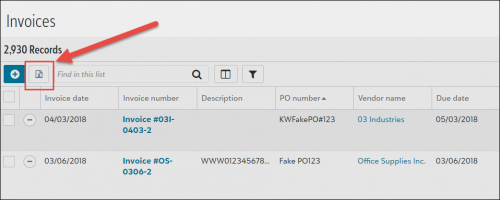
One thing to note, you can export a list only if the Export to Excel icon is present. We will continue adding export functionality to lists in future releases.
Delete a vendor
With this release, you can now delete vendors that have no activity associated with them. For example, if you accidentally create a vendor and you want to remove it from your vendor list, you can simply open the vendor record and delete it.
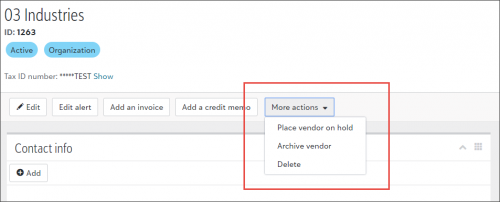
To delete a vendor, select More actions, Delete from the vendor record action bar. Keep in mind, you can delete a vendor only when it has no invoice, credit memo, or purchase order activity, and you have the appropriate security rights.
To receive What’s New information as an email after each release, subscribe to the Financial Edge NXT blog!
You can now add and edit budget scenarios from the web view! You add a scenario from the Budgets page under General ledger. When you add a scenario, you can also create a new scenario ID if the one you need doesn't exist.

To save time, you can also select to copy an existing scenario to default the data you need for a new one. This allows you to default the same account, project, and grant from the existing one. For more information, see the Add Budgets help topic.
To edit a scenario, access and open the scenario from the Budgets page. On the action bar, select Edit to make your changes. For more information, see the Edit Scenario help topic.
Export a list
You can now export list pages within Financial Edge NXT to Excel. This is helpful when you want to print a list, manipulate the data further, or provide it to someone who does not have Financial Edge NXT access.
To export a list, select the Export to Excel icon located above the list. When you export a list, all the information displayed in the list is exported to an Excel (XLSX) file.

One thing to note, you can export a list only if the Export to Excel icon is present. We will continue adding export functionality to lists in future releases.
Delete a vendor
With this release, you can now delete vendors that have no activity associated with them. For example, if you accidentally create a vendor and you want to remove it from your vendor list, you can simply open the vendor record and delete it.
To delete a vendor, select More actions, Delete from the vendor record action bar. Keep in mind, you can delete a vendor only when it has no invoice, credit memo, or purchase order activity, and you have the appropriate security rights.

To receive What’s New information as an email after each release, subscribe to the Financial Edge NXT blog!
0
Comments
-
It is great that we can now edit budgets. I don't see a way to distribute the amount to the months without having to manually type it in. Will this be available soon?0
-
Jennifer,
Distributions should be available in the next release. It is definitely coming!
Vincent Lanzolla
Financial Edge User Expereince0



Categories
- All Categories
- New K-12 Community Home (TEST)
- New Higher Education Home Page (Test)
- New Impact Edge Community TEST
- New YourCause Community TEST
- New SKY Community TEST
- New Grantmaking TEST Community
- New Altru Test Community
- New bbcon Community - TEST
- 12 Blackbaud Agents for Good™
- New Raiser's Edge NXT Community
- 8 Blackbaud Community Help
- 222 bbcon®
- 1.4K Blackbaud Altru®
- 411 Blackbaud Award Management™ and Blackbaud Stewardship Management™
- 1.2K Blackbaud CRM™ and Blackbaud Internet Solutions™
- 16 donorCentrics®
- 361 Blackbaud eTapestry®
- 2.7K Blackbaud Financial Edge NXT®
- 688 Blackbaud Grantmaking™
- 604 Blackbaud Education Management Solutions for Higher Education
- 3.3K Blackbaud Education Management Solutions for K-12 Schools
- 954 Blackbaud Luminate Online® and Blackbaud TeamRaiser®
- 85 JustGiving® from Blackbaud®
- 7.1K Blackbaud Raiser's Edge NXT®
- 4K SKY Developer
- 258 ResearchPoint™
- 123 Blackbaud Tuition Management™
- 165 Organizational Best Practices
- 249 Member Lounge (Just for Fun)
- 40 Blackbaud Community Challenges
- 37 PowerUp Challenges
- 3 (Closed) PowerUp Challenge: Grid View Batch
- 3 (Closed) PowerUp Challenge: Chat for Blackbaud AI
- 3 (Closed) PowerUp Challenge: Data Health
- 3 (Closed) Raiser's Edge NXT PowerUp Challenge: Product Update Briefing
- 3 (Closed) Raiser's Edge NXT PowerUp Challenge: Standard Reports+
- 3 (Closed) Raiser's Edge NXT PowerUp Challenge: Email Marketing
- 3 (Closed) Raiser's Edge NXT PowerUp Challenge: Gift Management
- 4 (Closed) Raiser's Edge NXT PowerUp Challenge: Event Management
- 3 (Closed) Raiser's Edge NXT PowerUp Challenge: Home Page
- 4 (Closed) Raiser's Edge NXT PowerUp Challenge: Standard Reports
- 4 (Closed) Raiser's Edge NXT PowerUp Challenge: Query
- 829 Community News
- 3.1K Jobs Board
- 57 Blackbaud SKY® Reporting Announcements
- 47 Blackbaud CRM Higher Ed Product Advisory Group (HE PAG)
- 19 Blackbaud CRM Product Advisory Group (BBCRM PAG)