What’s New (June 14, 2018)

Justin Ward
Blackbaud Employee




This release of Financial Edge NXT includes the ability to add and edit tables and fields!
The Fields and tables list page displays all the custom fields, system fields, and tables you have. We will add the ability to delete tables and custom fields in an upcoming release.
To access this page, select Fields and tables under Control panel.
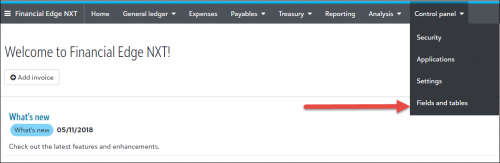
This is slightly different from the database view, where fields and tables are managed from the Configuration area of each module. In the web view, you access and manage all your fields and tables from one location under Control Panel.
Tables
Tables increase data entry speed and accuracy throughout Financial Edge NXT. For example, when entering information into a field with a table, you can quickly access a list of possible entries for that field and have your selection added directly into the field rather than entering it manually. For more information about tables, see the Manage Tables topic in the help file.
Custom Fields
Custom fields, or attributes, can help define specialized information about your records, such as information that you want to track, but for which no field exists. You can define custom fields for a variety of data types, including text, date, yes/no, number, currency, or table.
One quick note here, in the database view, custom fields are called attributes, and you create them in Configuration. For more information about custom fields, see the Manage Custom Fields topic in the help file.
System Fields
System fields help define information about your records. These fields are already named, but you can change a field’s status from optional to required, ensuring the field must contain an entry before the record is saved. You can also hide fields you do not use to prevent data entry.
In the database view, system fields are referred to as "fields." For more information about system fields, see the System Fields topic in the help file.
Credit Card Management
Just a reminder that credit card management features are now available to all Financial Edge NXT customers. Thank you to everyone who participated in our Early Adopter Program (EAP). Your feedback throughout the EAP helped us improve and fine tune these features.
For more information about Credit Card Management, see the Credit Card Feeds topic in the help file.
To receive What’s New information as an email after each release, subscribe to the Financial Edge NXT blog!
The Fields and tables list page displays all the custom fields, system fields, and tables you have. We will add the ability to delete tables and custom fields in an upcoming release.
To access this page, select Fields and tables under Control panel.

This is slightly different from the database view, where fields and tables are managed from the Configuration area of each module. In the web view, you access and manage all your fields and tables from one location under Control Panel.
Tables
Tables increase data entry speed and accuracy throughout Financial Edge NXT. For example, when entering information into a field with a table, you can quickly access a list of possible entries for that field and have your selection added directly into the field rather than entering it manually. For more information about tables, see the Manage Tables topic in the help file.
Custom Fields
Custom fields, or attributes, can help define specialized information about your records, such as information that you want to track, but for which no field exists. You can define custom fields for a variety of data types, including text, date, yes/no, number, currency, or table.
One quick note here, in the database view, custom fields are called attributes, and you create them in Configuration. For more information about custom fields, see the Manage Custom Fields topic in the help file.
System Fields
System fields help define information about your records. These fields are already named, but you can change a field’s status from optional to required, ensuring the field must contain an entry before the record is saved. You can also hide fields you do not use to prevent data entry.
In the database view, system fields are referred to as "fields." For more information about system fields, see the System Fields topic in the help file.
Credit Card Management
Just a reminder that credit card management features are now available to all Financial Edge NXT customers. Thank you to everyone who participated in our Early Adopter Program (EAP). Your feedback throughout the EAP helped us improve and fine tune these features.
For more information about Credit Card Management, see the Credit Card Feeds topic in the help file.
To receive What’s New information as an email after each release, subscribe to the Financial Edge NXT blog!
0
Categories
- All Categories
- New YourCause Community TEST
- New SKY Community TEST
- New Grantmaking TEST Community
- New Altru Test Community
- New bbcon Community - TEST
- 12 Blackbaud Agents for Good™
- New Raiser's Edge NXT Community
- 7 Blackbaud Community Help
- 218 bbcon®
- 1.4K Blackbaud Altru®
- 409 Blackbaud Award Management™ and Blackbaud Stewardship Management™
- 1.2K Blackbaud CRM™ and Blackbaud Internet Solutions™
- 16 donorCentrics®
- 361 Blackbaud eTapestry®
- 2.7K Blackbaud Financial Edge NXT®
- 680 Blackbaud Grantmaking™
- 598 Blackbaud Education Management Solutions for Higher Education
- 3.3K Blackbaud Education Management Solutions for K-12 Schools
- 952 Blackbaud Luminate Online® and Blackbaud TeamRaiser®
- 85 JustGiving® from Blackbaud®
- 7K Blackbaud Raiser's Edge NXT®
- 3.9K SKY Developer
- 257 ResearchPoint™
- 123 Blackbaud Tuition Management™
- 165 Organizational Best Practices
- 247 Member Lounge (Just for Fun)
- 40 Blackbaud Community Challenges
- 37 PowerUp Challenges
- 3 (Closed) PowerUp Challenge: Grid View Batch
- 3 (Closed) PowerUp Challenge: Chat for Blackbaud AI
- 3 (Closed) PowerUp Challenge: Data Health
- 3 (Closed) Raiser's Edge NXT PowerUp Challenge: Product Update Briefing
- 3 (Closed) Raiser's Edge NXT PowerUp Challenge: Standard Reports+
- 3 (Closed) Raiser's Edge NXT PowerUp Challenge: Email Marketing
- 3 (Closed) Raiser's Edge NXT PowerUp Challenge: Gift Management
- 4 (Closed) Raiser's Edge NXT PowerUp Challenge: Event Management
- 3 (Closed) Raiser's Edge NXT PowerUp Challenge: Home Page
- 4 (Closed) Raiser's Edge NXT PowerUp Challenge: Standard Reports
- 4 (Closed) Raiser's Edge NXT PowerUp Challenge: Query
- 822 Community News
- 3.1K Jobs Board
- 57 Blackbaud SKY® Reporting Announcements
- 47 Blackbaud CRM Higher Ed Product Advisory Group (HE PAG)
- 19 Blackbaud CRM Product Advisory Group (BBCRM PAG)