My Community
YourCause®
Impact Edge™
All-Star Lounge
Member Lounge (Just for Fun)
Community News
Community Manager
Groups
Browse Products
Members
Community All-Stars
Monthly Challenges
Member Search
Jobs Board
Help
Using the Blackbaud Community
Blackbaud Support
Knowledgebase
Blackbaud University
Discussions
Categories
Groups
Home
Blackbaud Financial Edge NXT®
Blackbaud Financial Edge NXT® Blog
What’s New (July 6, 2018)
Justin Ward
This release of
Financial Edge NXT
includes several new features and enhancements. Let’s start with some of the enhancements we made to custom fields.
You can now delete custom field types from the Fields and tables page under
Control panel
. Keep in mind, you cannot delete a custom field type if it is in use.
Also, when adding custom field types, if you select "Table" as the input type, you can now add a new table by selecting "New table" in the drop-down menu. This saves time because you no longer have to go to the Tables page to create a new table!
For more information about Custom fields types, see
Manage custom field types
in the help file.
Transaction codes
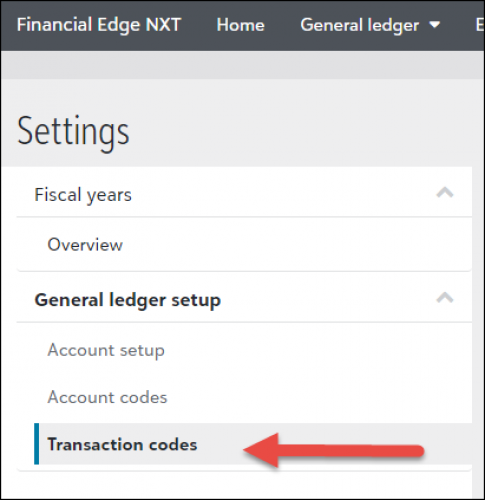
Transaction codes help you track transactions and maintain fund balances by and across fiscal years. You can now add, edit, and remove transaction codes from the web view. To view and manage your transaction codes, go to
General ledger setup
under
Control panel
.
For more information about transaction codes, see
Transaction codes
in the help file.
Budgets
When you edit a budget scenario in the web view, you can now distribute total amounts evenly or by percent. In the list of scenarios, you can select to distribute the total amount one row at a time or multiple rows at the same time. For more details, see
Edit Scenario
in the help file.
Expense management enhancements
Under
Expenses
, cardholders can access the Expense management page to view and submit their credit card transactions as invoice requests, as well as submit reimbursement requests for approval.
The new My reimbursements page is where cardholders can create a new reimbursement request and view their pending, submitted and rejected requests. For more information about reimbursements, see
My Reimbursements
.
Note:
Expense management is currently in our Early Adopter Program (EAP) and available to a limited group of users. During this time, we are reviewing and implementing participant feedback in preparation for general availability.
Analysis enhancements
Analysis
,
Insights
is currently in our Early Adopter Program (EAP). During this time, we are reviewing and implementing feedback. This release, made the following enhancements to
Analysis
,
Insights
:
To quickly summarize a measure's amount, similar to a key performance indicator (KPI), you can now design an insight as a headline.
To track continuous data — such as revenue received over time — and visualize underlying patterns within the data, you can now design an insight as a stacked area chart. While similar to a line chart, a stacked area chart can help compare part-to-whole relationships, as it better shows how the attribute's characteristics contribute to the cumulative total.
When you design an insight in Analysis, Insights, you can now choose to display its data as a donut chart. A donut chart displays the data as a ring divided into slices — like a doughnut — to represent each category's proportion within the whole, similar to a pie chart.
For more information, see
Insights
.
To receive What’s New information as an email after each release, subscribe to the
Financial Edge NXT blog
!
Find more posts tagged with
Comments
There are no comments yet
Quick Links
All Categories
Recent Posts
Activity
Unanswered
Groups
Help
Best Of