What’s New (Aug 16, 2018)
Justin Ward
Blackbaud Employee
This release of Financial Edge NXT includes several new features and enhancements.
Let’s start with Cash receipts. You can now export a list of cash receipt payments from the Payments list under Treasury. To export the list to an Excel .XLSX file, select Export to Excel above the Payments list.
Keep in mind, to add or view cash receipt payments, you must have Cash receipts enabled, as well as security rights to cash receipts and deposits. For more information, see the Cash Receipts Payments help topic.
Budgets — Budget Creator Excel add-in
You can now use the Budget Creator Excel Add-In to edit a budget. The next time you open the add-in, a new panel displays the options to create or edit a budget.
When you select to edit one, your budget's scenario appears in the spreadsheet for you to edit as necessary. This includes the ability to update notes and distribute total amounts. For more information, see Budget Creator Excel Add-In: Create and Edit Budget.
Credit card management
You can now easily add a new subsidiary credit card at the same time you are linking credit cards to online feeds.
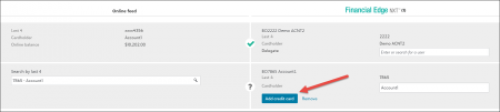
This is helpful when you receive a new credit card for an account already linked to the online feed. Previously, you had to go to the credit card account to add the new subsidiary card, now you can simply select Add credit card from the Link credit card account screen. For more information, see Link Credit Card Account.
Choose your organization from the navigation
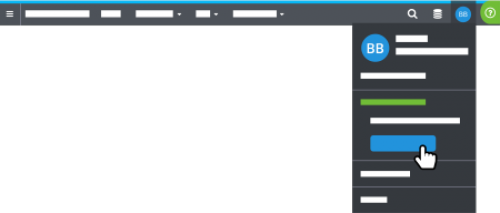
If you use Financial Edge NXT and your Blackbaud ID with multiple organizations, you can now choose which to work with from the navigation.
Expense management enhancement (EAP)
When you add a new credit card account, you specify a “delegate.” The delegate is the Financial Edge NXT user, or users, responsible for submitting charges in Credit card activity. You can also now select multiple "delegates" for a single subsidiary credit card from the Add credit card account screen.
Expense management is currently in our Early Adopter Program (EAP) and available to a limited group of users.
Insight Designer (EAP)
With Insight Designer, you can design a headline insight to summarize a measure's amount at-a-glance, similar to a key performance indicator (KPI). To compare the headline measure to another measure, such as for year-over-year analysis or to gauge two related totals, you can now include a secondary measure for comparison.
When you add a secondary measure, you can view its amount and the percentage difference between it and the primary measure.
Also, when you design a table, column or bar chart, line chart, or headline in Insight Designer, you can now compare its measures' performance time-over-time, such as to the same period the previous year. For more information, see Insights.
To receive What’s New information as an email after each release, subscribe to the Financial Edge NXT blog!
Let’s start with Cash receipts. You can now export a list of cash receipt payments from the Payments list under Treasury. To export the list to an Excel .XLSX file, select Export to Excel above the Payments list.
Keep in mind, to add or view cash receipt payments, you must have Cash receipts enabled, as well as security rights to cash receipts and deposits. For more information, see the Cash Receipts Payments help topic.
Budgets — Budget Creator Excel add-in
You can now use the Budget Creator Excel Add-In to edit a budget. The next time you open the add-in, a new panel displays the options to create or edit a budget.
When you select to edit one, your budget's scenario appears in the spreadsheet for you to edit as necessary. This includes the ability to update notes and distribute total amounts. For more information, see Budget Creator Excel Add-In: Create and Edit Budget.
Credit card management
You can now easily add a new subsidiary credit card at the same time you are linking credit cards to online feeds.

This is helpful when you receive a new credit card for an account already linked to the online feed. Previously, you had to go to the credit card account to add the new subsidiary card, now you can simply select Add credit card from the Link credit card account screen. For more information, see Link Credit Card Account.
Choose your organization from the navigation
If you use Financial Edge NXT and your Blackbaud ID with multiple organizations, you can now choose which to work with from the navigation.
- If you work with only two organizations, select your initials and choose which to work with.
- If you work with more than two, select your initials and Switch organization, and then choose which to work with.
Expense management enhancement (EAP)
When you add a new credit card account, you specify a “delegate.” The delegate is the Financial Edge NXT user, or users, responsible for submitting charges in Credit card activity. You can also now select multiple "delegates" for a single subsidiary credit card from the Add credit card account screen.
Expense management is currently in our Early Adopter Program (EAP) and available to a limited group of users.
Insight Designer (EAP)
With Insight Designer, you can design a headline insight to summarize a measure's amount at-a-glance, similar to a key performance indicator (KPI). To compare the headline measure to another measure, such as for year-over-year analysis or to gauge two related totals, you can now include a secondary measure for comparison.
When you add a secondary measure, you can view its amount and the percentage difference between it and the primary measure.
Also, when you design a table, column or bar chart, line chart, or headline in Insight Designer, you can now compare its measures' performance time-over-time, such as to the same period the previous year. For more information, see Insights.
To receive What’s New information as an email after each release, subscribe to the Financial Edge NXT blog!
0
Categories
- All Categories
- 6 Blackbaud Community Help
- 211 bbcon®
- 1.4K Blackbaud Altru®
- 399 Blackbaud Award Management™ and Blackbaud Stewardship Management™
- 1.1K Blackbaud CRM™ and Blackbaud Internet Solutions™
- 15 donorCentrics®
- 360 Blackbaud eTapestry®
- 2.5K Blackbaud Financial Edge NXT®
- 652 Blackbaud Grantmaking™
- 571 Blackbaud Education Management Solutions for Higher Education
- 3.2K Blackbaud Education Management Solutions for K-12 Schools
- 939 Blackbaud Luminate Online® and Blackbaud TeamRaiser®
- 84 JustGiving® from Blackbaud®
- 6.6K Blackbaud Raiser's Edge NXT®
- 3.7K SKY Developer
- 248 ResearchPoint™
- 119 Blackbaud Tuition Management™
- 165 Organizational Best Practices
- 240 The Tap (Just for Fun)
- 34 Blackbaud Community Challenges
- 34 PowerUp Challenges
- 3 (Open) PowerUp Challenge: Chat for Blackbaud AI
- 3 (Closed) PowerUp Challenge: Data Health
- 3 (Closed) Raiser's Edge NXT PowerUp Challenge: Product Update Briefing
- 3 (Closed) Raiser's Edge NXT PowerUp Challenge: Standard Reports+
- 3 (Closed) Raiser's Edge NXT PowerUp Challenge: Email Marketing
- 3 (Closed) Raiser's Edge NXT PowerUp Challenge: Gift Management
- 4 (Closed) Raiser's Edge NXT PowerUp Challenge: Event Management
- 3 (Closed) Raiser's Edge NXT PowerUp Challenge: Home Page
- 4 (Closed) Raiser's Edge NXT PowerUp Challenge: Standard Reports
- 4 (Closed) Raiser's Edge NXT PowerUp Challenge: Query
- 788 Community News
- 2.9K Jobs Board
- 53 Blackbaud SKY® Reporting Announcements
- 47 Blackbaud CRM Higher Ed Product Advisory Group (HE PAG)
- 19 Blackbaud CRM Product Advisory Group (BBCRM PAG)