What’s New (Jan 24, 2019)

Justin Ward
Blackbaud Employee




This release of Financial Edge NXT includes several new features and enhancements. Let’s start with the new Deposit report.
The Deposit report includes information about a selection of deposits, including payment type and bank information, such as account number and routing number. You can access the report from Reporting, or you can run the report directly from an open deposit. For more information, see Deposit record in the help file.
We also added a time saver for adding new deposits. When you add a cash receipt payment, you can now select Save and new deposit to quickly add a new deposit. This option saves and closes the new payment, and opens the Add deposit form automatically. For more information, see Add cash receipt payment in the help file.
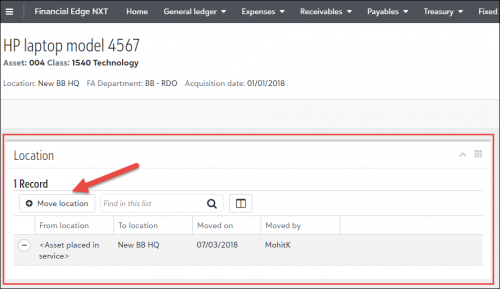
If you use Fixed Assets, you can now change an asset’s location from the Location tile on the asset record. For more information, see Move asset location in the help file.
Expense management enhancements
You can now add, edit and delete expense categories in the web view! Using predefined expense categories creates data entry consistency by simplifying the process of selecting a category and corresponding default GL distribution.
For more information about adding, editing, and deleting expense categories, see Expense Categories in the help file.
You also now have the ability to delete unsubmitted invoice requests in the web view. Keep in mind, to delete invoice requests, you must have the appropriate security rights.
Lastly, when adding an invoice, you can now select “Credit card” as a payment method and select the credit card to use.
To catch up on what we’ve recently released, check out What’s Recent.
The Deposit report includes information about a selection of deposits, including payment type and bank information, such as account number and routing number. You can access the report from Reporting, or you can run the report directly from an open deposit. For more information, see Deposit record in the help file.
We also added a time saver for adding new deposits. When you add a cash receipt payment, you can now select Save and new deposit to quickly add a new deposit. This option saves and closes the new payment, and opens the Add deposit form automatically. For more information, see Add cash receipt payment in the help file.
If you use Fixed Assets, you can now change an asset’s location from the Location tile on the asset record. For more information, see Move asset location in the help file.

Expense management enhancements
You can now add, edit and delete expense categories in the web view! Using predefined expense categories creates data entry consistency by simplifying the process of selecting a category and corresponding default GL distribution.
For more information about adding, editing, and deleting expense categories, see Expense Categories in the help file.
You also now have the ability to delete unsubmitted invoice requests in the web view. Keep in mind, to delete invoice requests, you must have the appropriate security rights.
Lastly, when adding an invoice, you can now select “Credit card” as a payment method and select the credit card to use.
To catch up on what we’ve recently released, check out What’s Recent.
0
Categories
- All Categories
- New eTapestry Home Community
- New K-12 Community Home (TEST)
- New Higher Education Home Page (Test)
- New Impact Edge Community TEST
- New YourCause Community TEST
- New SKY Community TEST
- New Grantmaking TEST Community
- New Altru Test Community
- New bbcon Community - TEST
- 12 Blackbaud Agents for Good™
- New Raiser's Edge NXT Community
- 8 Blackbaud Community Help
- 223 bbcon®
- 1.4K Blackbaud Altru®
- 411 Blackbaud Award Management™ and Blackbaud Stewardship Management™
- 1.2K Blackbaud CRM™ and Blackbaud Internet Solutions™
- 16 donorCentrics®
- 361 Blackbaud eTapestry®
- 2.7K Blackbaud Financial Edge NXT®
- 688 Blackbaud Grantmaking™
- 604 Blackbaud Education Management Solutions for Higher Education
- 3.3K Blackbaud Education Management Solutions for K-12 Schools
- 954 Blackbaud Luminate Online® and Blackbaud TeamRaiser®
- 85 JustGiving® from Blackbaud®
- 7.1K Blackbaud Raiser's Edge NXT®
- 4K SKY Developer
- 258 ResearchPoint™
- 124 Blackbaud Tuition Management™
- 165 Organizational Best Practices
- 249 Member Lounge (Just for Fun)
- 40 Blackbaud Community Challenges
- 37 PowerUp Challenges
- 3 (Closed) PowerUp Challenge: Grid View Batch
- 3 (Closed) PowerUp Challenge: Chat for Blackbaud AI
- 3 (Closed) PowerUp Challenge: Data Health
- 3 (Closed) Raiser's Edge NXT PowerUp Challenge: Product Update Briefing
- 3 (Closed) Raiser's Edge NXT PowerUp Challenge: Standard Reports+
- 3 (Closed) Raiser's Edge NXT PowerUp Challenge: Email Marketing
- 3 (Closed) Raiser's Edge NXT PowerUp Challenge: Gift Management
- 4 (Closed) Raiser's Edge NXT PowerUp Challenge: Event Management
- 3 (Closed) Raiser's Edge NXT PowerUp Challenge: Home Page
- 4 (Closed) Raiser's Edge NXT PowerUp Challenge: Standard Reports
- 4 (Closed) Raiser's Edge NXT PowerUp Challenge: Query
- 829 Community News
- 3.1K Jobs Board
- 57 Blackbaud SKY® Reporting Announcements
- 47 Blackbaud CRM Higher Ed Product Advisory Group (HE PAG)
- 19 Blackbaud CRM Product Advisory Group (BBCRM PAG)