What's New (Oct 25, 2018)

Justin Ward
Blackbaud Employee




This release of Financial Edge NXT includes several new features and enhancements. But first, I want to remind everyone about this year’s Financial Edge NXT Usability Survey. Look for the survey link at the top of your Home page with this release! We value and appreciate your input, so please take a few moments to give us your feedback.
Expense management enhancements
You can now add, edit and delete approval rules in the web view! Approval rules ensure invoice requests are routed to the correct reviewers in the order you specify. To access the Approval rules list, select Expenses, Settings, Approval rules. For more information, see Approval Rules.
You can also now export a list of transactions, based on filters you select, from the Credit Card Activity page under Payables. For example, you might want to export a list of all the charges for the month.
And lastly, when submitting a charge for approval, you can now select the expense category from a list of your existing expense categories. To help locate the expense category, you can search using the account number or account code.
Keep in mind, Expense management is currently available to a limited group of users. During this time, we will review and implement feedback in preparation for a wider release.
Distribution Set Creator Excel add-in
The Distribution Set Creator add-in is an application built by Blackbaud and is available in Microsoft's Office Store. You can use this to enter data in a Microsoft Excel spreadsheet which you can then submit as new distribution sets to Financial Edge NXT.
This integration enables flexible data entry (in bulk) and saves time, especially when entering similar data. For more information, see Distribution Set Creator Excel Add-In.
Budgets - Merge scenarios with period ranges
You can now merge scenarios with a period range budget type. This allows you to quickly and efficiently add or update a scenario by merging multiple scenarios with period ranges into one destination scenario with period ranges.
As a reminder, when you merge scenarios you can select to overwrite existing data for the destination scenario or you can select to keep existing data and add the merged data to it. For more information, see Merge Scenarios.
Insights enhancement (EAP)
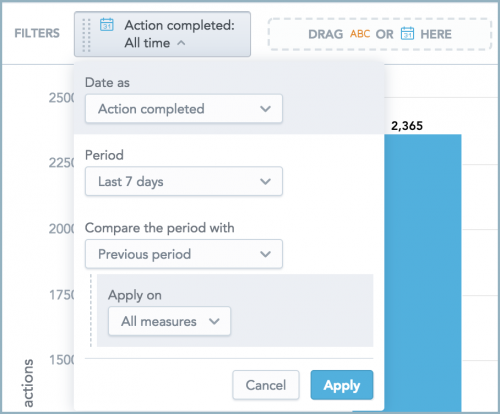
With Insight Designer, when you design a table, column or bar chart, line chart, or headline in Analysis, you can now compare its measures' performance to two consecutive periods, such as The last 7 days and the previous seven days.
Also, to help customize the look of your insights in Analysis, you can now choose how to display visual elements, such as axes, legends, and labels under Configuration in Insight Designer.
And finally, you can now compare a measure across multiple date dimensions. Previously, multiple instances of a measure could only use the same date dimension in an insight. For more information, see Insights.
To receive What’s New information as an email after each release, subscribe to the Financial Edge NXT blog!
Expense management enhancements
You can now add, edit and delete approval rules in the web view! Approval rules ensure invoice requests are routed to the correct reviewers in the order you specify. To access the Approval rules list, select Expenses, Settings, Approval rules. For more information, see Approval Rules.
You can also now export a list of transactions, based on filters you select, from the Credit Card Activity page under Payables. For example, you might want to export a list of all the charges for the month.
And lastly, when submitting a charge for approval, you can now select the expense category from a list of your existing expense categories. To help locate the expense category, you can search using the account number or account code.
Keep in mind, Expense management is currently available to a limited group of users. During this time, we will review and implement feedback in preparation for a wider release.
Distribution Set Creator Excel add-in
The Distribution Set Creator add-in is an application built by Blackbaud and is available in Microsoft's Office Store. You can use this to enter data in a Microsoft Excel spreadsheet which you can then submit as new distribution sets to Financial Edge NXT.
This integration enables flexible data entry (in bulk) and saves time, especially when entering similar data. For more information, see Distribution Set Creator Excel Add-In.
Budgets - Merge scenarios with period ranges
You can now merge scenarios with a period range budget type. This allows you to quickly and efficiently add or update a scenario by merging multiple scenarios with period ranges into one destination scenario with period ranges.
As a reminder, when you merge scenarios you can select to overwrite existing data for the destination scenario or you can select to keep existing data and add the merged data to it. For more information, see Merge Scenarios.
Insights enhancement (EAP)
With Insight Designer, when you design a table, column or bar chart, line chart, or headline in Analysis, you can now compare its measures' performance to two consecutive periods, such as The last 7 days and the previous seven days.

Also, to help customize the look of your insights in Analysis, you can now choose how to display visual elements, such as axes, legends, and labels under Configuration in Insight Designer.
And finally, you can now compare a measure across multiple date dimensions. Previously, multiple instances of a measure could only use the same date dimension in an insight. For more information, see Insights.
To receive What’s New information as an email after each release, subscribe to the Financial Edge NXT blog!
0
Categories
- All Categories
- New YourCause Community TEST
- New SKY Community TEST
- New Grantmaking TEST Community
- New Altru Test Community
- New bbcon Community - TEST
- 12 Blackbaud Agents for Good™
- New Raiser's Edge NXT Community
- 7 Blackbaud Community Help
- 218 bbcon®
- 1.4K Blackbaud Altru®
- 409 Blackbaud Award Management™ and Blackbaud Stewardship Management™
- 1.2K Blackbaud CRM™ and Blackbaud Internet Solutions™
- 16 donorCentrics®
- 361 Blackbaud eTapestry®
- 2.7K Blackbaud Financial Edge NXT®
- 680 Blackbaud Grantmaking™
- 598 Blackbaud Education Management Solutions for Higher Education
- 3.3K Blackbaud Education Management Solutions for K-12 Schools
- 952 Blackbaud Luminate Online® and Blackbaud TeamRaiser®
- 85 JustGiving® from Blackbaud®
- 7K Blackbaud Raiser's Edge NXT®
- 3.9K SKY Developer
- 257 ResearchPoint™
- 123 Blackbaud Tuition Management™
- 165 Organizational Best Practices
- 247 Member Lounge (Just for Fun)
- 40 Blackbaud Community Challenges
- 37 PowerUp Challenges
- 3 (Closed) PowerUp Challenge: Grid View Batch
- 3 (Closed) PowerUp Challenge: Chat for Blackbaud AI
- 3 (Closed) PowerUp Challenge: Data Health
- 3 (Closed) Raiser's Edge NXT PowerUp Challenge: Product Update Briefing
- 3 (Closed) Raiser's Edge NXT PowerUp Challenge: Standard Reports+
- 3 (Closed) Raiser's Edge NXT PowerUp Challenge: Email Marketing
- 3 (Closed) Raiser's Edge NXT PowerUp Challenge: Gift Management
- 4 (Closed) Raiser's Edge NXT PowerUp Challenge: Event Management
- 3 (Closed) Raiser's Edge NXT PowerUp Challenge: Home Page
- 4 (Closed) Raiser's Edge NXT PowerUp Challenge: Standard Reports
- 4 (Closed) Raiser's Edge NXT PowerUp Challenge: Query
- 822 Community News
- 3.1K Jobs Board
- 57 Blackbaud SKY® Reporting Announcements
- 47 Blackbaud CRM Higher Ed Product Advisory Group (HE PAG)
- 19 Blackbaud CRM Product Advisory Group (BBCRM PAG)