What’s New (April 18, 2019)

Betsy Unger
Blackbaud Employee




This release of Financial Edge NXT includes enhancements for applications and Fixed assets.
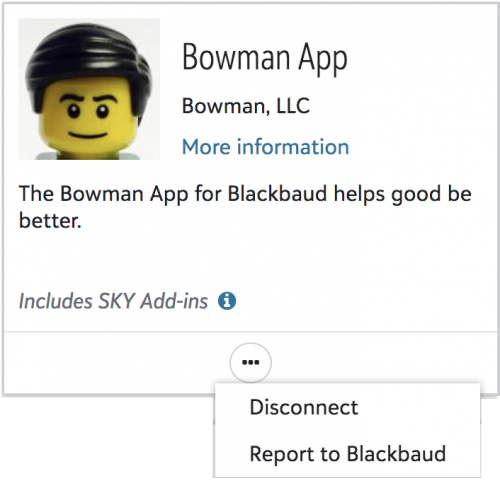
In Control panel, Applications, admins can extend the functionality of Financial Edge NXT with additional applications created by Blackbaud, providers in the Blackbaud Partner Marketplace, and other approved developers. To help ensure quality and security, Blackbaud evaluates all applications submitted to the Blackbaud Partner Marketplace. However, if you suspect an application is malicious or doesn't adhere to the Blackbaud Partner Marketplace policies, you can now report it to Blackbaud for further review.
To email the SKY API team a description of your report, under Connected apps, select Report to Blackbaud from the application's menu. For more information, see Applications.
In Fixed assets, you can now add asset classes in the web view. Asset classes help you organize fixed assets into groups of similar asset records. When you add a new asset class, you define the depreciation method, debit and credit accounts, accumulated depreciation account and depreciation expense account. These asset class defaults can save you time when you add new asset records.
To access the Asset classes list, select Fixed assets, Settings. For more information, see Asset Classes.
To catch up on what we’ve recently released, check out What’s Recent.
In Control panel, Applications, admins can extend the functionality of Financial Edge NXT with additional applications created by Blackbaud, providers in the Blackbaud Partner Marketplace, and other approved developers. To help ensure quality and security, Blackbaud evaluates all applications submitted to the Blackbaud Partner Marketplace. However, if you suspect an application is malicious or doesn't adhere to the Blackbaud Partner Marketplace policies, you can now report it to Blackbaud for further review.
To email the SKY API team a description of your report, under Connected apps, select Report to Blackbaud from the application's menu. For more information, see Applications.

In Fixed assets, you can now add asset classes in the web view. Asset classes help you organize fixed assets into groups of similar asset records. When you add a new asset class, you define the depreciation method, debit and credit accounts, accumulated depreciation account and depreciation expense account. These asset class defaults can save you time when you add new asset records.
To access the Asset classes list, select Fixed assets, Settings. For more information, see Asset Classes.
To catch up on what we’ve recently released, check out What’s Recent.
0
Comments
-
Are these additional applications possible only after enabling single sign on with your domain logins?0
-
Hi Daniel,
No, you can use 3rd party applications without single sign-on. 3rd party applications integrate with Blackbaud using OAuth flows described here: https://developer.blackbaud.com/skyapi/docs/authorization0







Categories
- All Categories
- New YourCause Community TEST
- New SKY Community TEST
- New Grantmaking TEST Community
- New Altru Test Community
- New bbcon Community - TEST
- 12 Blackbaud Agents for Good™
- New Raiser's Edge NXT Community
- 7 Blackbaud Community Help
- 218 bbcon®
- 1.4K Blackbaud Altru®
- 409 Blackbaud Award Management™ and Blackbaud Stewardship Management™
- 1.2K Blackbaud CRM™ and Blackbaud Internet Solutions™
- 16 donorCentrics®
- 361 Blackbaud eTapestry®
- 2.7K Blackbaud Financial Edge NXT®
- 681 Blackbaud Grantmaking™
- 599 Blackbaud Education Management Solutions for Higher Education
- 3.3K Blackbaud Education Management Solutions for K-12 Schools
- 952 Blackbaud Luminate Online® and Blackbaud TeamRaiser®
- 85 JustGiving® from Blackbaud®
- 7K Blackbaud Raiser's Edge NXT®
- 3.9K SKY Developer
- 257 ResearchPoint™
- 123 Blackbaud Tuition Management™
- 165 Organizational Best Practices
- 247 Member Lounge (Just for Fun)
- 40 Blackbaud Community Challenges
- 37 PowerUp Challenges
- 3 (Closed) PowerUp Challenge: Grid View Batch
- 3 (Closed) PowerUp Challenge: Chat for Blackbaud AI
- 3 (Closed) PowerUp Challenge: Data Health
- 3 (Closed) Raiser's Edge NXT PowerUp Challenge: Product Update Briefing
- 3 (Closed) Raiser's Edge NXT PowerUp Challenge: Standard Reports+
- 3 (Closed) Raiser's Edge NXT PowerUp Challenge: Email Marketing
- 3 (Closed) Raiser's Edge NXT PowerUp Challenge: Gift Management
- 4 (Closed) Raiser's Edge NXT PowerUp Challenge: Event Management
- 3 (Closed) Raiser's Edge NXT PowerUp Challenge: Home Page
- 4 (Closed) Raiser's Edge NXT PowerUp Challenge: Standard Reports
- 4 (Closed) Raiser's Edge NXT PowerUp Challenge: Query
- 822 Community News
- 3.1K Jobs Board
- 57 Blackbaud SKY® Reporting Announcements
- 47 Blackbaud CRM Higher Ed Product Advisory Group (HE PAG)
- 19 Blackbaud CRM Product Advisory Group (BBCRM PAG)