What’s New (May 1, 2019)

Justin Ward
Blackbaud Employee




This release of Financial Edge NXT includes several new enhancements. Let’s start with Fixed assets.
You can now edit, delete, and copy asset classes. Asset classes help you organize fixed assets into groups of similar asset records. When you add a new asset class, you define the depreciation method, debit and credit accounts, accumulated depreciation account and depreciation expense account.
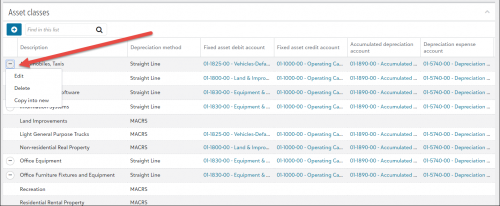
These asset class defaults can save you time when you add new asset records. For more information, see Asset Classes.
We also added the Transactions list page, which displays transactions for every asset in Fixed assets. Use this page to view and edit existing transactions, or add new ones. To access the Transactions list, select Asset transactions under Fixed assets on the menu bar. For more information, see Transactions List.
Expense management
You can now view the history of an invoice request from the Expense management history tile on the invoice record. For example, you can view all the changes made to the invoice request, including dates, what changed, and who made the change. For more information, see Invoice Record.
To catch up on what we’ve recently released, check out What’s Recent.
You can now edit, delete, and copy asset classes. Asset classes help you organize fixed assets into groups of similar asset records. When you add a new asset class, you define the depreciation method, debit and credit accounts, accumulated depreciation account and depreciation expense account.

These asset class defaults can save you time when you add new asset records. For more information, see Asset Classes.
We also added the Transactions list page, which displays transactions for every asset in Fixed assets. Use this page to view and edit existing transactions, or add new ones. To access the Transactions list, select Asset transactions under Fixed assets on the menu bar. For more information, see Transactions List.
Expense management
You can now view the history of an invoice request from the Expense management history tile on the invoice record. For example, you can view all the changes made to the invoice request, including dates, what changed, and who made the change. For more information, see Invoice Record.
To catch up on what we’ve recently released, check out What’s Recent.
2
Categories
- All Categories
- New YourCause Community TEST
- New SKY Community TEST
- New Grantmaking TEST Community
- New Altru Test Community
- New bbcon Community - TEST
- 12 Blackbaud Agents for Good™
- New Raiser's Edge NXT Community
- 7 Blackbaud Community Help
- 218 bbcon®
- 1.4K Blackbaud Altru®
- 409 Blackbaud Award Management™ and Blackbaud Stewardship Management™
- 1.2K Blackbaud CRM™ and Blackbaud Internet Solutions™
- 16 donorCentrics®
- 361 Blackbaud eTapestry®
- 2.7K Blackbaud Financial Edge NXT®
- 680 Blackbaud Grantmaking™
- 598 Blackbaud Education Management Solutions for Higher Education
- 3.3K Blackbaud Education Management Solutions for K-12 Schools
- 952 Blackbaud Luminate Online® and Blackbaud TeamRaiser®
- 85 JustGiving® from Blackbaud®
- 7K Blackbaud Raiser's Edge NXT®
- 3.9K SKY Developer
- 257 ResearchPoint™
- 123 Blackbaud Tuition Management™
- 165 Organizational Best Practices
- 247 Member Lounge (Just for Fun)
- 40 Blackbaud Community Challenges
- 37 PowerUp Challenges
- 3 (Closed) PowerUp Challenge: Grid View Batch
- 3 (Closed) PowerUp Challenge: Chat for Blackbaud AI
- 3 (Closed) PowerUp Challenge: Data Health
- 3 (Closed) Raiser's Edge NXT PowerUp Challenge: Product Update Briefing
- 3 (Closed) Raiser's Edge NXT PowerUp Challenge: Standard Reports+
- 3 (Closed) Raiser's Edge NXT PowerUp Challenge: Email Marketing
- 3 (Closed) Raiser's Edge NXT PowerUp Challenge: Gift Management
- 4 (Closed) Raiser's Edge NXT PowerUp Challenge: Event Management
- 3 (Closed) Raiser's Edge NXT PowerUp Challenge: Home Page
- 4 (Closed) Raiser's Edge NXT PowerUp Challenge: Standard Reports
- 4 (Closed) Raiser's Edge NXT PowerUp Challenge: Query
- 822 Community News
- 3.1K Jobs Board
- 57 Blackbaud SKY® Reporting Announcements
- 47 Blackbaud CRM Higher Ed Product Advisory Group (HE PAG)
- 19 Blackbaud CRM Product Advisory Group (BBCRM PAG)