This release of
Financial Edge NXT includes several new enhancements. Let’s start with Expense management.
Enable credit card feedsWith credit card feeds, you can connect the online credit card accounts of your financial institutions to
Financial Edge NXT. If you originally declined
Yodlee terms of service, but now want to enable credit card feeds, you can do so from the Credit card accounts page.
To enable credit card feeds, access the Credit card accounts page under
Treasury, and select
Settings. For more information, see
Credit Card Feeds.
Electronic Funds Transfer (EFT)Our EFT Early Adopter Program (EAP) has kicked off! If you are a part of this EAP, you can now pay invoices using an electronic funds transfer (EFT) file. EFTs allow you to exchange money electronically instead of using checks or wire transfers, providing cost savings and convenience.
To pay invoices using an EFT file, select
Download EFT file from the
Pay invoices tile on the bank account record.
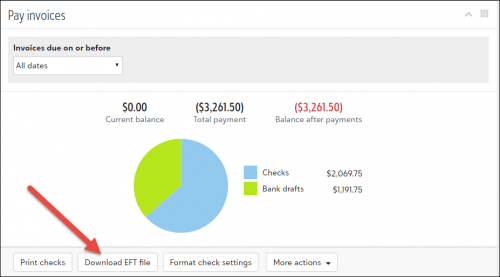
For more information about creating an EFT file, see
Download EFT File. If you have any interest in being a part of this EAP, contact
David.vroblesky@blackbaud.com.Exciting Features Releasing In Waves!We are continuing to release
Statistical units and
Financial roles in waves. Some of you will now have the ability to invite users and manage their access with roles. You can also work with statistical units to determine when and how to move amounts over time. For more information about these features, or the release strategy, check out this
blog post.
To catch up on what we’ve recently released, check out
What’s Recent.
