This week’s release of
Financial Edge NXT includes several new enhancements. Let’s start with Journal entry.
When creating a batch, you can now enter a date in the
Reverse on column to reverse transactions within the batch. This is helpful if you include accruals in manual journal entries, or have deposits you want recorded in the next month. For more information, see
Add a batch.
We also added security controls in Journal entry for who can approve manual journal entries. System admins can go to the database view to select which users have approval rights.
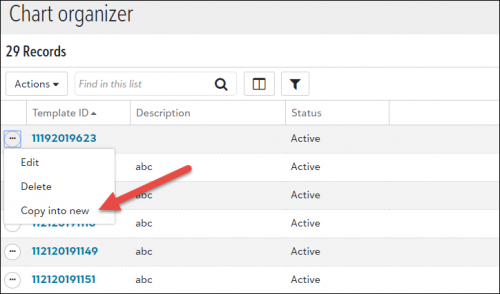
Chart OrganizerTo save time creating similar chart templates, you can now copy one template into another. When you select
Copy into new from the Chart organizer list, a new template opens with all the copied information. You only need to enter the
Template ID and
Template description fields.
Another time saver for creating templates is
Save as. When you select
Save as from an open template, a new, editable copy of the template opens.
Accounts Receivables (EAP)Receivables is currently in our Early Adopters Program (EAP). If you're a part of the EAP, you can now do the following:
- Add, edit, and delete invoices. This includes the ability to add, edit, and delete line items and distributions.
- Apply applications (payments and credits) to invoices
- Print invoices
- Export invoices as PDFs
For more information, see
Receivable Invoices.
To catch up on what we’ve recently released, check out
What’s Recent.