This week’s release of
Financial Edge NXT includes the following enhancements:
Payment schedulesYou can now create and manage invoice payment schedules from
Payables, giving you full control of the payment frequency and dates. You can create a payment schedule under
Payment details when you add an invoice, or from
Payments on an existing invoice.
If you need to change the payment schedule, you can do so from
Payments on the invoice. For example, if you have a change in balance due to an adjustment, you can select
Edit Schedule to adjust the payment schedule.
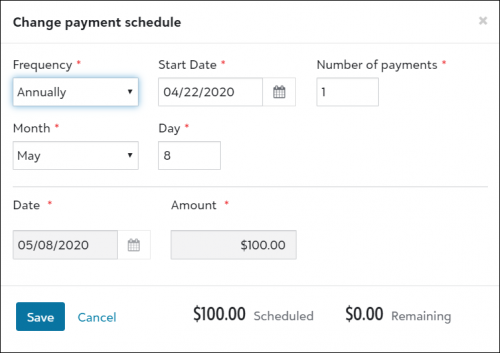
For more information, see
Payment Schedules.
Project Balance SheetDo you hear that? We’ve been listening to your ideas! Based on your feedback, you can now view balance sheet information for a project in the web view. This provides a way for you to easily monitor the impact of a project’s activity, such as pledges posted to the project or multiple funds associated with the project.
When you view a project record, Balance sheet displays the project’s categories and the actual or encumbrance amounts. Filter the data to view actual or encumbrance amounts, or both.
You can also filter based on fiscal year, fiscal period, or fund. Select a project's category to view more information. For more information, see
Project Record.
To catch up on what we’ve recently released, check out
What’s Recent.
