What's New (March 2021)
For example, with the latest release, we updated areas of Reporting. Here are the changes we made:
Navigation and menu options
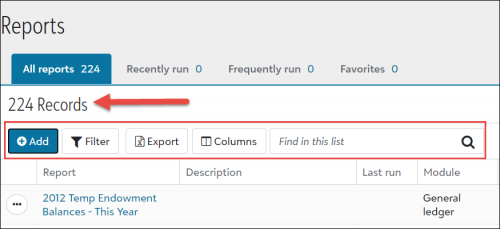
We updated toolbar actions with new labels to make them more easily identifiable, and we added the total number of records.
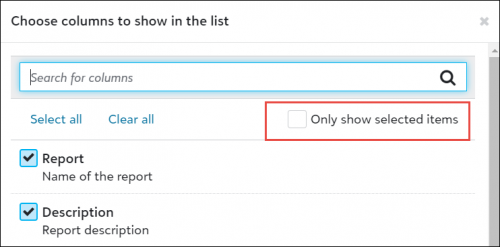
We also added the filter Only show selected items to the Choose column screen, and rearranged the order of the Column list to be more intuitive.
On the Reports list page, we streamlined the list menu options to:
• Edit
• Run
• Export Excel data
• Add to favorites
• Delete
Once you run the report, you can select the following:
• Export PDF
• Export Excel
• Export Word
Add a report
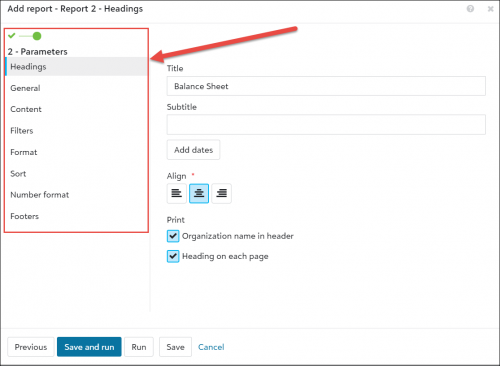
When adding a report, we've made it easier to navigate the report parameters. You now add a report in two steps, with parameters appearing in a vertical view along the left side of the screen, instead of the bottom.
What’s coming next?
Our next release will focus on the Fields and tables settings under Control Panel. For a preview of these upcoming changes, check out the What’s Next help topic.
Comments
-
Overall I like the changes to reporting, however under "Content" it would be great to see my date ranges without having to go into each column.0
-
I agree. This is very frustrating. Clearly these updates had no input from an accountant who lives in the world of GL Periods!
0 -
I actually really loved the reporting parameters the way they were. Being able to scroll down and see what you have selected is much easier than having to click on each tab to make sure your settings are accurate.
0 -
I agree as well. And Susan has an excellent point.
Are there actual beta testers that go through these updates? Some items are obvious issues that would have been identified prior to release.
0 -
When I run a financial report, it no longer indents the details under a subtotal. I tried adding spaces before my subtotal headings in Visual Chart Organizer, but when I click save it removes the spaces. I'm hoping this is just something temporary and that subtotals and headings will be indented like they were previously and like they are in database view.
0 -
Please don't ever implement an update unless you actually test it with actual users of your product. The report update has been hell for me and I'm pretty sure I am not alone.
0
Categories
- All Categories
- 6 Blackbaud Community Help
- 213 bbcon®
- 1.4K Blackbaud Altru®
- 400 Blackbaud Award Management™ and Blackbaud Stewardship Management™
- 1.1K Blackbaud CRM™ and Blackbaud Internet Solutions™
- 15 donorCentrics®
- 360 Blackbaud eTapestry®
- 2.6K Blackbaud Financial Edge NXT®
- 655 Blackbaud Grantmaking™
- 576 Blackbaud Education Management Solutions for Higher Education
- 3.2K Blackbaud Education Management Solutions for K-12 Schools
- 939 Blackbaud Luminate Online® and Blackbaud TeamRaiser®
- 84 JustGiving® from Blackbaud®
- 6.6K Blackbaud Raiser's Edge NXT®
- 3.7K SKY Developer
- 248 ResearchPoint™
- 119 Blackbaud Tuition Management™
- 165 Organizational Best Practices
- 241 Member Lounge (Just for Fun)
- 34 Blackbaud Community Challenges
- 34 PowerUp Challenges
- 3 (Open) PowerUp Challenge: Chat for Blackbaud AI
- 3 (Closed) PowerUp Challenge: Data Health
- 3 (Closed) Raiser's Edge NXT PowerUp Challenge: Product Update Briefing
- 3 (Closed) Raiser's Edge NXT PowerUp Challenge: Standard Reports+
- 3 (Closed) Raiser's Edge NXT PowerUp Challenge: Email Marketing
- 3 (Closed) Raiser's Edge NXT PowerUp Challenge: Gift Management
- 4 (Closed) Raiser's Edge NXT PowerUp Challenge: Event Management
- 3 (Closed) Raiser's Edge NXT PowerUp Challenge: Home Page
- 4 (Closed) Raiser's Edge NXT PowerUp Challenge: Standard Reports
- 4 (Closed) Raiser's Edge NXT PowerUp Challenge: Query
- 790 Community News
- 2.9K Jobs Board
- 53 Blackbaud SKY® Reporting Announcements
- 47 Blackbaud CRM Higher Ed Product Advisory Group (HE PAG)
- 19 Blackbaud CRM Product Advisory Group (BBCRM PAG)