Introducing Payment Assistant™ for Blackbaud Financial Edge NXT®

Justin Ward
Blackbaud Employee




Payment Assistant automates and delivers vendor payments for you directly from Financial Edge NXT. With virtual card payments, accelerated ACH processing, and remote check printing, vendors are paid quickly and on time. By providing a faster, more cost-effective, and more secure way to pay invoices, you have more time to focus on your mission.
Included in your subscription cost of Financial Edge NXT, Payment Assistant is now in Limited Availability (LA). Are you interested in participating? Apply to join our LA group.Once you’re added to the Limited Availability group, you can access Payment Assistant from the Payables menu.
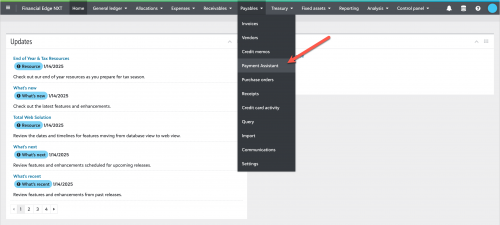
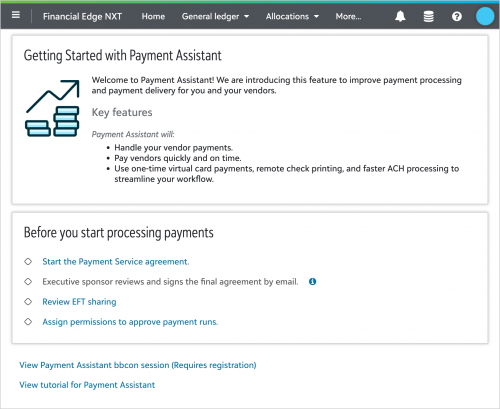
The first time you navigate to Payment Assistant, you’ll go to the Getting Started page. For more assistance, see the Onboarding help.
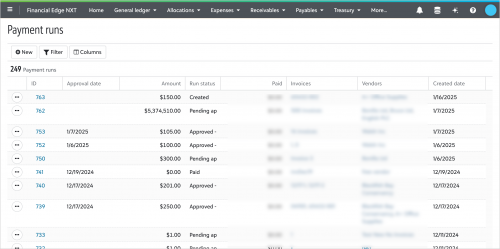
After you complete the onboarding steps, when you navigate to Payment Assistant, you’ll go directly to the Payment runs page. For more assistance, see the Payment runs help.
Let’s review some key features of Payment Assistant.
Group invoices into payment runs
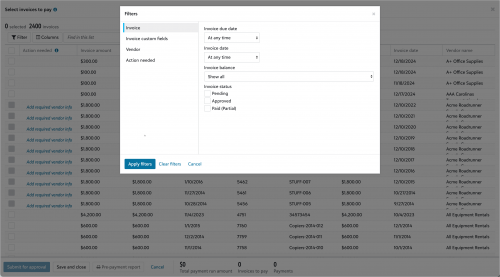
We provide you with the ability to group invoices into payment runs, so they can be paid by Payment Assistant. New! When you create a payment run, we added the ability to use filters to help you find and select the invoices you are ready to pay.
Roles and permissions
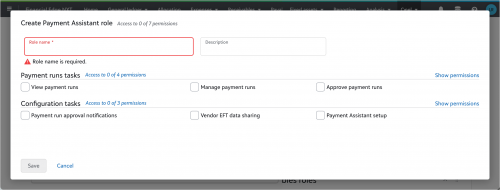
Use roles and permissions to decide who can create payment runs and who can approve them (Coming soon! Tiered payment approvals). For more assistance, see the Roles and permissions help.
Track progress of payments
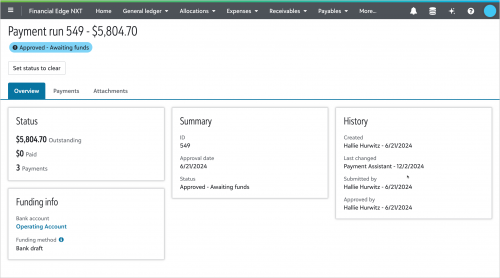
View the payment run record to track the progress of individual payments. For more assistance, see the Payment run record help.
Onboarding vendors to Payment Assistant
We onboard vendors to Payment Assistant for you. When you select to pay invoices, REPAY®, our trusted payments technology partner, contacts them to select their preferred payment method. After set up with Payment Assistant, all of the communication with vendors is automated for subsequent payments. Learn more about the vendor experience with Payment Assistant.
Get to know Payment Assistant in Financial Edge NXT
Up next
While in Limited Availability, we’re continuing to build out key features that matter to you. Keep an eye on the Financial Edge NXT What’s New and Financial Post for upcoming Payment Assistant announcements.
Included in your subscription cost of Financial Edge NXT, Payment Assistant is now in Limited Availability (LA). Are you interested in participating? Apply to join our LA group.Once you’re added to the Limited Availability group, you can access Payment Assistant from the Payables menu.

The first time you navigate to Payment Assistant, you’ll go to the Getting Started page. For more assistance, see the Onboarding help.

After you complete the onboarding steps, when you navigate to Payment Assistant, you’ll go directly to the Payment runs page. For more assistance, see the Payment runs help.

Let’s review some key features of Payment Assistant.
Group invoices into payment runs
We provide you with the ability to group invoices into payment runs, so they can be paid by Payment Assistant. New! When you create a payment run, we added the ability to use filters to help you find and select the invoices you are ready to pay.

Roles and permissions
Use roles and permissions to decide who can create payment runs and who can approve them (Coming soon! Tiered payment approvals). For more assistance, see the Roles and permissions help.

Track progress of payments
View the payment run record to track the progress of individual payments. For more assistance, see the Payment run record help.

Onboarding vendors to Payment Assistant
We onboard vendors to Payment Assistant for you. When you select to pay invoices, REPAY®, our trusted payments technology partner, contacts them to select their preferred payment method. After set up with Payment Assistant, all of the communication with vendors is automated for subsequent payments. Learn more about the vendor experience with Payment Assistant.
Get to know Payment Assistant in Financial Edge NXT
- Review the big picture with our Get Started with Payment Assistant tutorial.
- Look over our additional docs, including onboarding info and FAQs in the Payment Assistant help.
- Check out the Payment Assistant bbcon session (requires registration).
Up next
While in Limited Availability, we’re continuing to build out key features that matter to you. Keep an eye on the Financial Edge NXT What’s New and Financial Post for upcoming Payment Assistant announcements.
2
Comments
-
Has anyone used AvidXchange for invoice approval, and then Payment Assistant for payment processing? If so, please provide your comments and if you recommend this.
0 -
I would like to know about this too since we currently use Avid for approvals and payments.
0 -
Does anyone use EFT to process payments in FENXT?
0 -
Smoothly managing donations and payments is critical for any nonprofit. When you encounter issues with payment processing or equipment, reaching out to a reliable customer service team can save valuable time. Those who use Square for transactions should consider contact square customer service — they offer helpful and responsive help tailored to the needs of nonprofits.
0








Categories
- All Categories
- New YourCause Community TEST
- New SKY Community TEST
- New Grantmaking TEST Community
- New Altru Test Community
- New bbcon Community - TEST
- 12 Blackbaud Agents for Good™
- New Raiser's Edge NXT Community
- 7 Blackbaud Community Help
- 218 bbcon®
- 1.4K Blackbaud Altru®
- 409 Blackbaud Award Management™ and Blackbaud Stewardship Management™
- 1.2K Blackbaud CRM™ and Blackbaud Internet Solutions™
- 16 donorCentrics®
- 361 Blackbaud eTapestry®
- 2.7K Blackbaud Financial Edge NXT®
- 680 Blackbaud Grantmaking™
- 598 Blackbaud Education Management Solutions for Higher Education
- 3.3K Blackbaud Education Management Solutions for K-12 Schools
- 952 Blackbaud Luminate Online® and Blackbaud TeamRaiser®
- 85 JustGiving® from Blackbaud®
- 7K Blackbaud Raiser's Edge NXT®
- 3.9K SKY Developer
- 257 ResearchPoint™
- 123 Blackbaud Tuition Management™
- 165 Organizational Best Practices
- 247 Member Lounge (Just for Fun)
- 40 Blackbaud Community Challenges
- 37 PowerUp Challenges
- 3 (Closed) PowerUp Challenge: Grid View Batch
- 3 (Closed) PowerUp Challenge: Chat for Blackbaud AI
- 3 (Closed) PowerUp Challenge: Data Health
- 3 (Closed) Raiser's Edge NXT PowerUp Challenge: Product Update Briefing
- 3 (Closed) Raiser's Edge NXT PowerUp Challenge: Standard Reports+
- 3 (Closed) Raiser's Edge NXT PowerUp Challenge: Email Marketing
- 3 (Closed) Raiser's Edge NXT PowerUp Challenge: Gift Management
- 4 (Closed) Raiser's Edge NXT PowerUp Challenge: Event Management
- 3 (Closed) Raiser's Edge NXT PowerUp Challenge: Home Page
- 4 (Closed) Raiser's Edge NXT PowerUp Challenge: Standard Reports
- 4 (Closed) Raiser's Edge NXT PowerUp Challenge: Query
- 822 Community News
- 3.1K Jobs Board
- 57 Blackbaud SKY® Reporting Announcements
- 47 Blackbaud CRM Higher Ed Product Advisory Group (HE PAG)
- 19 Blackbaud CRM Product Advisory Group (BBCRM PAG)