Creating Multiple Output Files Via Export In ResearchPoint!

Carol Belair
Blackbaud Employee




If you ever have thought how nice it would be to do a query in ResearchPoint and get multiple Excel or CSV files based on a single data element in your query, you are not alone. You can not only do a multiple file export out of ResearchPoint, but you will find it to be very quick and easy to do. In this blog post I will include the steps with screenshots.
In my example below I will show you how to create output of multiple files for the various Major Giving Capacity ranges based on a query of prospects with Major Giving Capacity ranges of $50K .



In my example below I will show you how to create output of multiple files for the various Major Giving Capacity ranges based on a query of prospects with Major Giving Capacity ranges of $50K .
- First below is a screenshot of the criteria for my query as described above:

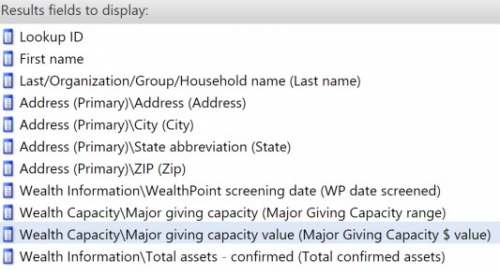
- Next is a screenshot below of the output I have selected, and you will notice that I edited the field names to make the output of the headers short and crisp looking:

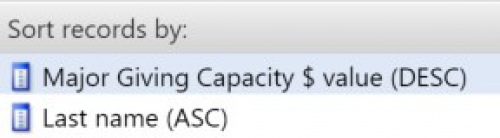
- Next you can see I’m sorting the output first by the Major Giving Capacity dollar value and then by the last name of the prospect:

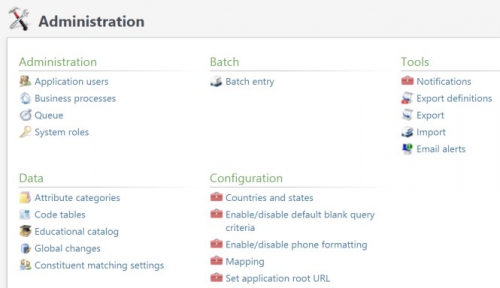
- Then I save and run my query, review the output to make sure I like it and am getting what I need, and create my export by going to the Administration functional area and click on “Export” under the “Tools” list of functions – See screenshot below:

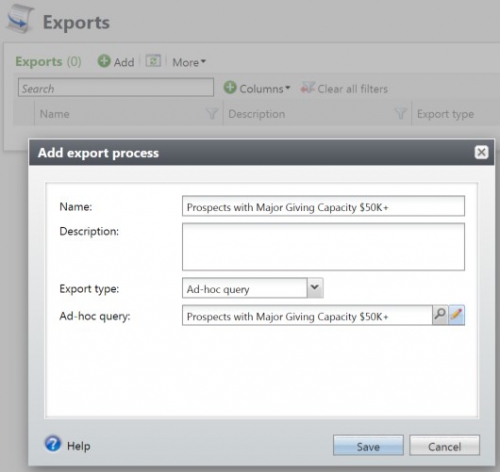
- I then click on the “Add” button, name my export, next select my query into the export process by clicking on the looking glass, and then save the export process (NOTE: I like naming my export the same as the query name for ease of use):

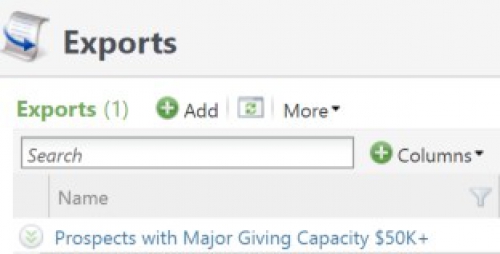
- Then click on the export process just created (NOTE: It will be a blue hyperlink):

- Next click on “Start process” on the top of the left side panel under “Tasks” – Once this is done you will see next to “Status” that it is “Completed”:

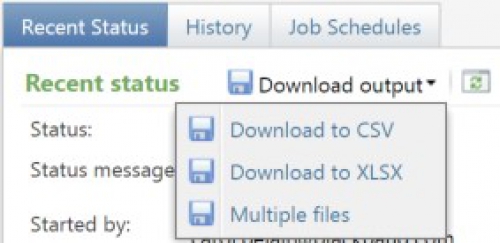
- Then click on the down arrow next to “Download output” and select “Multiple files”:

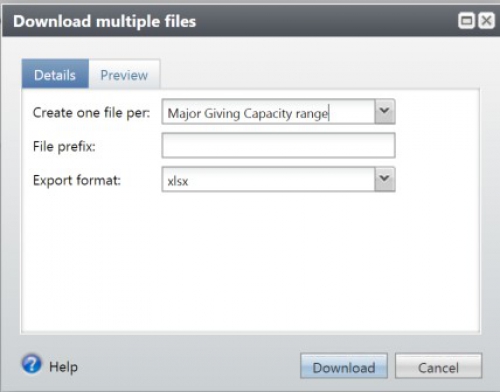
- Be sure to select the field by which you want to create the multiple file output – which in this case is the Major Giving Capacity range – select your format of xlsx or csv and click on the “Download” button (NOTE: if you selected the actual dollar value, you would get an output file for each dollar value for Major Giving Capacity, which would not be what you want):

- If you go to the Downloads folder on your PC, you will see a Zip file that looks like this:

- Lastly you can go to this Zip file and open each file in the output – in this case by the Major Giving Capacity range – to get a list of your prospects that contains the fields that you included in your query:

Please feel free to share on the Community your ideas on multiple file output needs - in other words which field(s) you wish to base your output on. Ideas might include constituency, confirmed estimated wealth range, Target Gift Ranges from modeling, majors, prospect manager, etc.
Happy Holidays to the TA Community!
Happy Holidays to the TA Community!
0
Comments
-
This is a great question Carol. I think there are many answers here. Certainly confirmed estimated wealth range and Estimated Wealth Value (which shows in the RL.)0




Categories
- All Categories
- New K-12 Community Home (TEST)
- New Higher Education Home Page (Test)
- New Impact Edge Community TEST
- New YourCause Community TEST
- New SKY Community TEST
- New Grantmaking TEST Community
- New Altru Test Community
- New bbcon Community - TEST
- 12 Blackbaud Agents for Good™
- New Raiser's Edge NXT Community
- 8 Blackbaud Community Help
- 222 bbcon®
- 1.4K Blackbaud Altru®
- 411 Blackbaud Award Management™ and Blackbaud Stewardship Management™
- 1.2K Blackbaud CRM™ and Blackbaud Internet Solutions™
- 16 donorCentrics®
- 361 Blackbaud eTapestry®
- 2.7K Blackbaud Financial Edge NXT®
- 688 Blackbaud Grantmaking™
- 604 Blackbaud Education Management Solutions for Higher Education
- 3.3K Blackbaud Education Management Solutions for K-12 Schools
- 954 Blackbaud Luminate Online® and Blackbaud TeamRaiser®
- 85 JustGiving® from Blackbaud®
- 7.1K Blackbaud Raiser's Edge NXT®
- 4K SKY Developer
- 258 ResearchPoint™
- 123 Blackbaud Tuition Management™
- 165 Organizational Best Practices
- 249 Member Lounge (Just for Fun)
- 40 Blackbaud Community Challenges
- 37 PowerUp Challenges
- 3 (Closed) PowerUp Challenge: Grid View Batch
- 3 (Closed) PowerUp Challenge: Chat for Blackbaud AI
- 3 (Closed) PowerUp Challenge: Data Health
- 3 (Closed) Raiser's Edge NXT PowerUp Challenge: Product Update Briefing
- 3 (Closed) Raiser's Edge NXT PowerUp Challenge: Standard Reports+
- 3 (Closed) Raiser's Edge NXT PowerUp Challenge: Email Marketing
- 3 (Closed) Raiser's Edge NXT PowerUp Challenge: Gift Management
- 4 (Closed) Raiser's Edge NXT PowerUp Challenge: Event Management
- 3 (Closed) Raiser's Edge NXT PowerUp Challenge: Home Page
- 4 (Closed) Raiser's Edge NXT PowerUp Challenge: Standard Reports
- 4 (Closed) Raiser's Edge NXT PowerUp Challenge: Query
- 829 Community News
- 3.1K Jobs Board
- 57 Blackbaud SKY® Reporting Announcements
- 47 Blackbaud CRM Higher Ed Product Advisory Group (HE PAG)
- 19 Blackbaud CRM Product Advisory Group (BBCRM PAG)