ResearchPoint™: Get To Know Your Grateful Patient Solution Encrypted Fields

Shelley Weifenbach
Blackbaud Employee




Have you heard that there are now attributes with additional field-level encryption that you can include in your Grateful Patient Solution patient screening file? If not, this blog is for you! Learn about the new fields to store sensitive patient fundraising data, where to view them on a prospect record, and how to start using them in your ResearchPoint™.Have you heard that there are now attributes with additional field-level encryption that you can include in your Grateful Patient Solution patient screening file? Blackbaud announced this new ResearchPoint™ functionality in February 2021 after extensive research into the HIPAA-compliant fundraising best practices offered by Giving Institute and the Association for Healthcare Philanthropy.
The following six encrypted attributes provide an extra layer of security around select sensitive patient data:
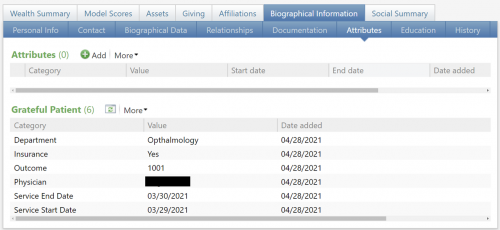
Your organization may choose to use some or all these encrypted attributes in place of other custom fields/attributes submitted in your patient screening file. These six attributes are in addition to the 25 customer-defined attributes allowed as part of your patient screening file layout. One difference is that the six encrypted attributes can have only one value at a time (e.g. just the most recent Service Start Date), whereas you may have multiple values of the other attributes. No attributes will sync to Raiser’s Edge NXT with the ResearchPoint integration.
If your team has not done so already, you will first need to work with Blackbaud Target Analytics to update your file format to include these encrypted attributes. This process should be completed within 1-2 business days. Please reach out to your Target Analytics Project Coordinator or tacoordinators@blackbaud.com to get started.
After you adjust your patient screening file to transition some of your existing attributes to these encrypted fields, you are ready to update your queries, research lists, and export definitions. We will discuss these updates in upcoming blogs over the next few weeks.
Interested in learning more? Check out the Grateful Patient Solution Security Enhancements (February 2021) announcement with FAQs. Bookmark the ResearchPoint™ Assistance and Resources landing page to keep updated on all the new features and other helpful links. You may direct questions to Support, your Target Analytics Project Coordinator, your Target Analytics Strategic Consultant, or tacoordinators@blackbaud.com.
I hope you are excited about these new encrypted fields to track some of your sensitive patient fundraising data!
The following six encrypted attributes provide an extra layer of security around select sensitive patient data:
- Insurance: health insurance status (Yes/No)
- Department: general department of service information
- Service Start Date: start date of service
- Service End Date: end date of service
- Physician: treating physician name
- Outcome: outcome information

Your organization may choose to use some or all these encrypted attributes in place of other custom fields/attributes submitted in your patient screening file. These six attributes are in addition to the 25 customer-defined attributes allowed as part of your patient screening file layout. One difference is that the six encrypted attributes can have only one value at a time (e.g. just the most recent Service Start Date), whereas you may have multiple values of the other attributes. No attributes will sync to Raiser’s Edge NXT with the ResearchPoint integration.
If your team has not done so already, you will first need to work with Blackbaud Target Analytics to update your file format to include these encrypted attributes. This process should be completed within 1-2 business days. Please reach out to your Target Analytics Project Coordinator or tacoordinators@blackbaud.com to get started.
After you adjust your patient screening file to transition some of your existing attributes to these encrypted fields, you are ready to update your queries, research lists, and export definitions. We will discuss these updates in upcoming blogs over the next few weeks.
Interested in learning more? Check out the Grateful Patient Solution Security Enhancements (February 2021) announcement with FAQs. Bookmark the ResearchPoint™ Assistance and Resources landing page to keep updated on all the new features and other helpful links. You may direct questions to Support, your Target Analytics Project Coordinator, your Target Analytics Strategic Consultant, or tacoordinators@blackbaud.com.
I hope you are excited about these new encrypted fields to track some of your sensitive patient fundraising data!
4
Comments
-
Hi Shelley…the link to the RP Assistance and Resources appears to be broken…would you please repost? Thanks!
0 -
Thanks for letting me know, Carolyn! I have updated the link.
0


Categories
- All Categories
- New YourCause Community TEST
- New SKY Community TEST
- New Grantmaking TEST Community
- New Altru Test Community
- New bbcon Community - TEST
- 12 Blackbaud Agents for Good™
- New Raiser's Edge NXT Community
- 7 Blackbaud Community Help
- 218 bbcon®
- 1.4K Blackbaud Altru®
- 409 Blackbaud Award Management™ and Blackbaud Stewardship Management™
- 1.2K Blackbaud CRM™ and Blackbaud Internet Solutions™
- 16 donorCentrics®
- 361 Blackbaud eTapestry®
- 2.7K Blackbaud Financial Edge NXT®
- 680 Blackbaud Grantmaking™
- 598 Blackbaud Education Management Solutions for Higher Education
- 3.3K Blackbaud Education Management Solutions for K-12 Schools
- 952 Blackbaud Luminate Online® and Blackbaud TeamRaiser®
- 85 JustGiving® from Blackbaud®
- 7K Blackbaud Raiser's Edge NXT®
- 3.9K SKY Developer
- 257 ResearchPoint™
- 123 Blackbaud Tuition Management™
- 165 Organizational Best Practices
- 247 Member Lounge (Just for Fun)
- 40 Blackbaud Community Challenges
- 37 PowerUp Challenges
- 3 (Closed) PowerUp Challenge: Grid View Batch
- 3 (Closed) PowerUp Challenge: Chat for Blackbaud AI
- 3 (Closed) PowerUp Challenge: Data Health
- 3 (Closed) Raiser's Edge NXT PowerUp Challenge: Product Update Briefing
- 3 (Closed) Raiser's Edge NXT PowerUp Challenge: Standard Reports+
- 3 (Closed) Raiser's Edge NXT PowerUp Challenge: Email Marketing
- 3 (Closed) Raiser's Edge NXT PowerUp Challenge: Gift Management
- 4 (Closed) Raiser's Edge NXT PowerUp Challenge: Event Management
- 3 (Closed) Raiser's Edge NXT PowerUp Challenge: Home Page
- 4 (Closed) Raiser's Edge NXT PowerUp Challenge: Standard Reports
- 4 (Closed) Raiser's Edge NXT PowerUp Challenge: Query
- 822 Community News
- 3.1K Jobs Board
- 57 Blackbaud SKY® Reporting Announcements
- 47 Blackbaud CRM Higher Ed Product Advisory Group (HE PAG)
- 19 Blackbaud CRM Product Advisory Group (BBCRM PAG)