It Takes A Community: Find The Content You Want With Bookmarks!





You just read the most helpful advice from a fellow Blackbaud Community member in a forum post and think to yourself "I will need this information two months from now, do I really have to save this email for two months?" The answer is no! The Blackbaud Community has a Bookmark Feature just for this situation! Click the title to read more.The number one reason why members come to the Blackbaud Community is to ask questions and learn from others. Our Community is thriving with thoughtful questions and detailed answers. Many of you may be aware of how to change to the "Hot" sorting option to help you find the most popular topics, but according to our reports the "Bookmark" feature is a hidden gem that could get more use in the Community to help you locate useful content.
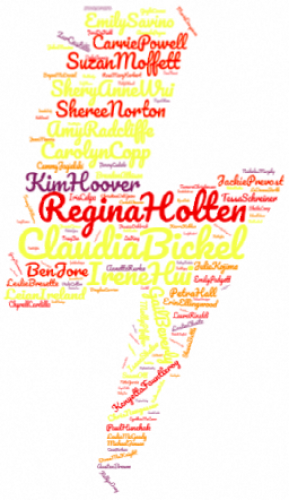
Join these Blackbaud Community Members who already use the bookmark feature for forums, blogs, resources and events to quickly find the content that is important to them 24 hours, 7 days a week!
.......Scroll to see an example of how to use the feature....
How to use the bookmark feature:
1. Open any discussion question.
2. Click the three dots in the right corner.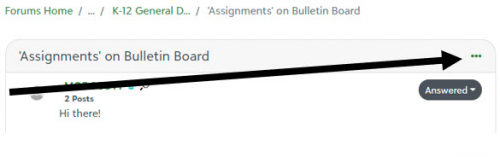
3. Click Bookmark.
To view your Bookmarks, go to Your Profile they are on the left, titled: Bookmarked content I found helpful.
In harmony and inclusion,
Elizabeth

Join these Blackbaud Community Members who already use the bookmark feature for forums, blogs, resources and events to quickly find the content that is important to them 24 hours, 7 days a week!
.......Scroll to see an example of how to use the feature....
How to use the bookmark feature:
1. Open any discussion question.
2. Click the three dots in the right corner.

3. Click Bookmark.
To view your Bookmarks, go to Your Profile they are on the left, titled: Bookmarked content I found helpful.
In harmony and inclusion,
Elizabeth
16
Comments
-
i clicked on this and want to RSVP. Am I one of the 30?0
-
Hi Sharon Rein,
So glad you want to attend the webinar. There are plenty of spots still available for both events with the same info.
Here is how to RSVP:
Click link in the blog above titled Collaborating in the Community: August Webinars.
Click the event that suits you the best.
Then click the RSVP for YES!
Your name will appear in the right hand column.
Did that help?
Elizabeth
Blackbaud Community Team0 -
Thank you for this. I never knew what it did and hadn't tried it. After 30 years I learned something that is so valuable. I have a subfolder in my email and save them there but now I have a better place. Thank you!!!0
-
This is helpful info, thank you! I also like to look at the bookmarks of new connections to find hidden gems like this post.
0









Categories
- All Categories
- New YourCause Community TEST
- New SKY Community TEST
- New Grantmaking TEST Community
- New Altru Test Community
- New bbcon Community - TEST
- 12 Blackbaud Agents for Good™
- New Raiser's Edge NXT Community
- 7 Blackbaud Community Help
- 218 bbcon®
- 1.4K Blackbaud Altru®
- 409 Blackbaud Award Management™ and Blackbaud Stewardship Management™
- 1.2K Blackbaud CRM™ and Blackbaud Internet Solutions™
- 16 donorCentrics®
- 361 Blackbaud eTapestry®
- 2.7K Blackbaud Financial Edge NXT®
- 680 Blackbaud Grantmaking™
- 598 Blackbaud Education Management Solutions for Higher Education
- 3.3K Blackbaud Education Management Solutions for K-12 Schools
- 952 Blackbaud Luminate Online® and Blackbaud TeamRaiser®
- 85 JustGiving® from Blackbaud®
- 7K Blackbaud Raiser's Edge NXT®
- 3.9K SKY Developer
- 257 ResearchPoint™
- 123 Blackbaud Tuition Management™
- 165 Organizational Best Practices
- 247 Member Lounge (Just for Fun)
- 40 Blackbaud Community Challenges
- 37 PowerUp Challenges
- 3 (Closed) PowerUp Challenge: Grid View Batch
- 3 (Closed) PowerUp Challenge: Chat for Blackbaud AI
- 3 (Closed) PowerUp Challenge: Data Health
- 3 (Closed) Raiser's Edge NXT PowerUp Challenge: Product Update Briefing
- 3 (Closed) Raiser's Edge NXT PowerUp Challenge: Standard Reports+
- 3 (Closed) Raiser's Edge NXT PowerUp Challenge: Email Marketing
- 3 (Closed) Raiser's Edge NXT PowerUp Challenge: Gift Management
- 4 (Closed) Raiser's Edge NXT PowerUp Challenge: Event Management
- 3 (Closed) Raiser's Edge NXT PowerUp Challenge: Home Page
- 4 (Closed) Raiser's Edge NXT PowerUp Challenge: Standard Reports
- 4 (Closed) Raiser's Edge NXT PowerUp Challenge: Query
- 822 Community News
- 3.1K Jobs Board
- 57 Blackbaud SKY® Reporting Announcements
- 47 Blackbaud CRM Higher Ed Product Advisory Group (HE PAG)
- 19 Blackbaud CRM Product Advisory Group (BBCRM PAG)