With insights, you can pair attributes with measures to break down totals and compare categorical data. For starters in
Raiser's Edge NXT, try these "recipes" — based on ideas from the
SKY Reporting EAP Community, with measures and attributes as the main ingredients — to compare the goals of your campaigns, funds, and appeals to their giving.

In
Raiser's Edge NXT, you can quickly compare giving toward campaigns, funds, and appeals toward their set goals.
- At the top of the record of a campaign, fund, or appeal, you can view how much it raised toward its goal and its overall progress, as a percentage.
- In Fundraising, Analyze, you can quickly compare giving toward your 20 top-grossing active campaigns, funds, and appeals to their goals under Overview or Campaigns, Funds, or Appeals.
To compare giving toward specific campaigns, funds, or appeals toward their goals, you can build similar comparisons in
Analysis,
Insights.
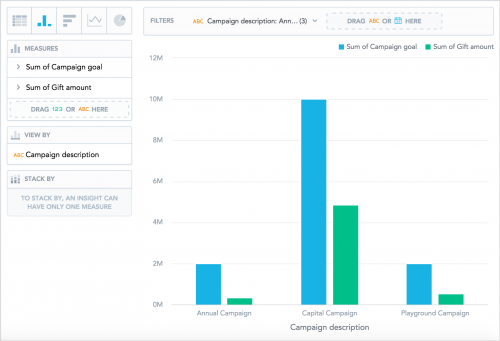 1.
1. Select
Clear and choose the insight format —
Column chart or
Bar chart.
2. Move
Gift amount and
Campaign goal,
Fund goal, or
Appeal goal (depending on what you're analyzing) from the data catalogue to
Measures.
3. Move how you want to identify the campaigns, funds, or appeals — such as
Campaign description or
Fund short description — to
View by.
4. Under
Filters, select the attribute; choose which campaigns, funds, or appeals to analyze; and select
Apply.
5. Select
Save, enter a unique name to identify the insight, and select
Save.
As you build your insights, include additional attribute filters to add your own flavor! For more ideas and inspiration, see the
Gift Insights Recipes Help.
Have recipes for your own favorite or frequently used insights? Share the details below!