What's New In Financial Edge NXT: Attributes And Multiple Filters For Measures

Ellyn Hassell
Blackbaud Employee




Financial Edge NXT recently updated with new and renamed attributes, as well as multiple filters for measures.
Account Segment Attributes - New
You can now use the following account segment attributes to help you further analyze account numbers when building your insights:
Transaction Code Attributes - Renamed
Any Transaction code and Transaction code status attributes you define are now prefixed with “Transaction”. This groups the attributes and helps you locate them more quickly.
Multiple Filters for Measures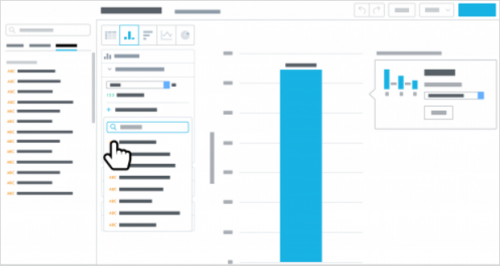
To narrow the focus of a measure, you can now apply multiple — up to 20! — attribute filters. (Previously, you could apply only one attribute filter directly to a measure.).
To apply filters to a measure, select it under Measures in the insight, select Add attribute filter, and choose the attributes and criteria of the records to include in its number-crunching.
Account Segment Attributes - New
You can now use the following account segment attributes to help you further analyze account numbers when building your insights:
- Fund (user-defined)
- Account code (hard-coded)
- Up to eight additional account segment attributes (user-defined)
Transaction Code Attributes - Renamed
Any Transaction code and Transaction code status attributes you define are now prefixed with “Transaction”. This groups the attributes and helps you locate them more quickly.
Multiple Filters for Measures

To narrow the focus of a measure, you can now apply multiple — up to 20! — attribute filters. (Previously, you could apply only one attribute filter directly to a measure.).
To apply filters to a measure, select it under Measures in the insight, select Add attribute filter, and choose the attributes and criteria of the records to include in its number-crunching.
0
Categories
- All Categories
- New YourCause Community TEST
- New SKY Community TEST
- New Grantmaking TEST Community
- New Altru Test Community
- New bbcon Community - TEST
- 12 Blackbaud Agents for Good™
- New Raiser's Edge NXT Community
- 7 Blackbaud Community Help
- 218 bbcon®
- 1.4K Blackbaud Altru®
- 409 Blackbaud Award Management™ and Blackbaud Stewardship Management™
- 1.2K Blackbaud CRM™ and Blackbaud Internet Solutions™
- 16 donorCentrics®
- 361 Blackbaud eTapestry®
- 2.7K Blackbaud Financial Edge NXT®
- 680 Blackbaud Grantmaking™
- 598 Blackbaud Education Management Solutions for Higher Education
- 3.3K Blackbaud Education Management Solutions for K-12 Schools
- 952 Blackbaud Luminate Online® and Blackbaud TeamRaiser®
- 85 JustGiving® from Blackbaud®
- 7K Blackbaud Raiser's Edge NXT®
- 3.9K SKY Developer
- 257 ResearchPoint™
- 123 Blackbaud Tuition Management™
- 165 Organizational Best Practices
- 247 Member Lounge (Just for Fun)
- 40 Blackbaud Community Challenges
- 37 PowerUp Challenges
- 3 (Closed) PowerUp Challenge: Grid View Batch
- 3 (Closed) PowerUp Challenge: Chat for Blackbaud AI
- 3 (Closed) PowerUp Challenge: Data Health
- 3 (Closed) Raiser's Edge NXT PowerUp Challenge: Product Update Briefing
- 3 (Closed) Raiser's Edge NXT PowerUp Challenge: Standard Reports+
- 3 (Closed) Raiser's Edge NXT PowerUp Challenge: Email Marketing
- 3 (Closed) Raiser's Edge NXT PowerUp Challenge: Gift Management
- 4 (Closed) Raiser's Edge NXT PowerUp Challenge: Event Management
- 3 (Closed) Raiser's Edge NXT PowerUp Challenge: Home Page
- 4 (Closed) Raiser's Edge NXT PowerUp Challenge: Standard Reports
- 4 (Closed) Raiser's Edge NXT PowerUp Challenge: Query
- 822 Community News
- 3.1K Jobs Board
- 57 Blackbaud SKY® Reporting Announcements
- 47 Blackbaud CRM Higher Ed Product Advisory Group (HE PAG)
- 19 Blackbaud CRM Product Advisory Group (BBCRM PAG)