My Community
YourCause®
Impact Edge™
All-Star Lounge
Member Lounge (Just for Fun)
Community News
Community Manager
Groups
Browse Products
Members
Community All-Stars
Monthly Challenges
Member Search
Jobs Board
Help
Using the Blackbaud Community
Blackbaud Support
Knowledgebase
Blackbaud University
Discussions
Categories
Groups
Home
Blackbaud Education Management Solutions for Higher Education
Blackbaud Higher Education Solutions™ Announcements
Pro Tips For Associating Awards With A Group
Derek Nichols
This month, we launched a small feature that we thought could use a little extra explanation: the ability to associate a student award with a group. With this feature, you can specify on student records and transcripts that an award was related to the student’s performance in a specific class, sport, activity, or advisory group.
This setting is optional, and it associates awards with groups in the same way that the old Manage Awards page did. If you select an Academic, Activity, Advisory, or Athletics group, then it becomes a part of the award for that student. If you select a Dorm group, that dormitory will
not
be associated with the award; the Dorm group simply functions as a filter to search for a student.
Here’s how it works. While in
Academics
, go to Grades and select Grades management. To record an award for a student, you can either stay on the
Overview
tab and select
+ Record award
(if that option is available to you) or go to the
Manage awards
tab and select
Record award
.
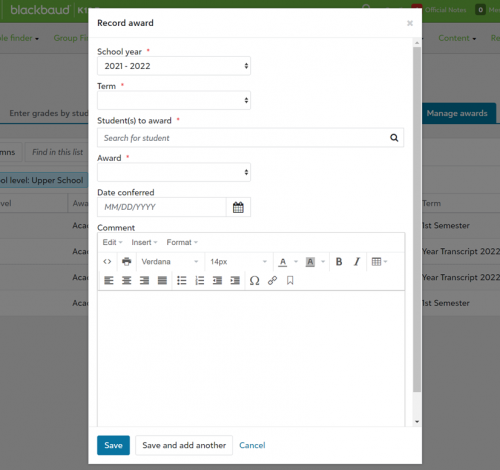
Either way, you will see a modal that looks like this:
You will notice that the Group menu does not appear yet. You should start from the first dropdown menu and work your way down. Once you have chosen a
School year
and
Term
, the
Group
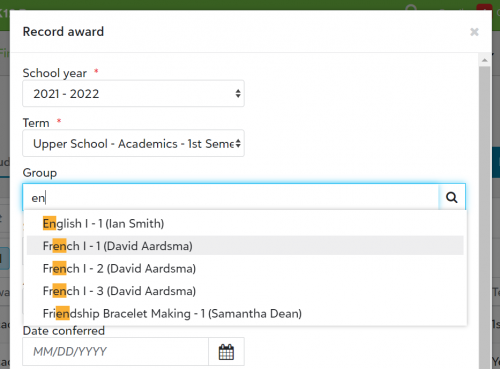
search bar will appear. Start typing the name of the appropriate group until it appears, then choose it.
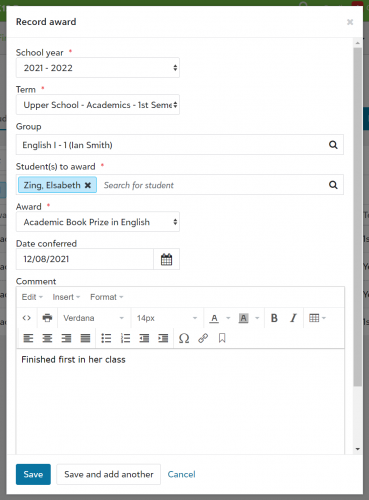
The Group setting is optional, but the Student(s) to award and Award fields are still required. You can also add a Date conferred and Comment (both optional), then select Save or Save and add another. The award is now assigned to the student, and the record of the award will show that it was associated with the group you chose.
That’s all for this week. If you have any tips to share or feedback on how we can improve this feature, sound off in the comments below.
Find more posts tagged with
Comments
There are no comments yet
Quick Links
All Categories
Recent Posts
Activity
Unanswered
Groups
Help
Best Of