Estimated read time: 6:00 minutes
Welcome to The Financial Post for May 2026!
Each month, we bring you the latest updates on Financial Edge NXT®—from newly released enhancements to what’s coming next on our product roadmap.
If you missed it, be sure to catch up on last month’s Financial Post before diving in. Then read on to see what’s new, what’s next, and how you can stay actively involved in what’s ahead.
In This Issue
This month's post covers these topics:
- What’s New – Fresh enhancements now available in web view
- Feature Spotlight – Smart Import mapping
- What’s Next – Preview of features currently in development
- Total Web Solution Journey – Where we are and what’s ahead
- bbdevdays – Registration info
- Stay in the Know – Ways to keep up with ongoing updates
What’s New
We’re excited to share several powerful enhancements now available in Financial Edge NXT web view. These updates are designed to streamline workflows, reduce friction, and give you greater visibility into your financial operations.
- New file formats when emailing scheduled reports – You're no longer limited to sending a report as a PDF. You can now choose PDF, Excel, Excel data, or Word as the delivery format.
- Smart Import mapping - see Feature spotlight below!
- Receivable extension endpoints for returns and return line items
- Vendor alias
- Invoice request: display negative rates
- Receivables refunds: Check format settings
- Add and edit purchase requests for products
- Home page Project budget vs Actual tile
The following features are in EAP for some customers.
- Chat for Blackbaud AI
- Expenses – generate invoice requests and upload charge receipts
- Payables - generate new invoices from a draft
- Automated deposits - only for gifts disbursed through Blackbaud Merchant Services (now part of Blackbaud Integrated Payments)
The following features are in LA for some customers.
- Receivables
- Partial returns for invoices
- Third-party applications
- Payment processing improvements
- Canada
- Manage clients and billing items with Canadian‑specific fields and terminology
Be sure to explore these enhancements and see how they can simplify your day‑to‑day work.
What’s Next
We’re currently working on several features and enhancements for Financial Edge NXT web view. Here are some of the updates you’ll see in upcoming releases:
- Allocations — expanded ability to edit allocations, groups, pools, fee schedules, and rates
- Report groups and scheduling enhancements
- Approve purchase requests
- Home page Account budget vs actual tile
- Public sector bodies report (Canada customers) — Will be available in Receivables with updated filters
- Business activity statement (Australia and New Zealand customers) — Will be available in Receivables with updated filters
- Option to mark the Include carriage return/line feed in web view for EFT format
Keep an eye on What’s Next and in‑product notifications so you’re ready as soon as these features become available.
Feature Spotlight
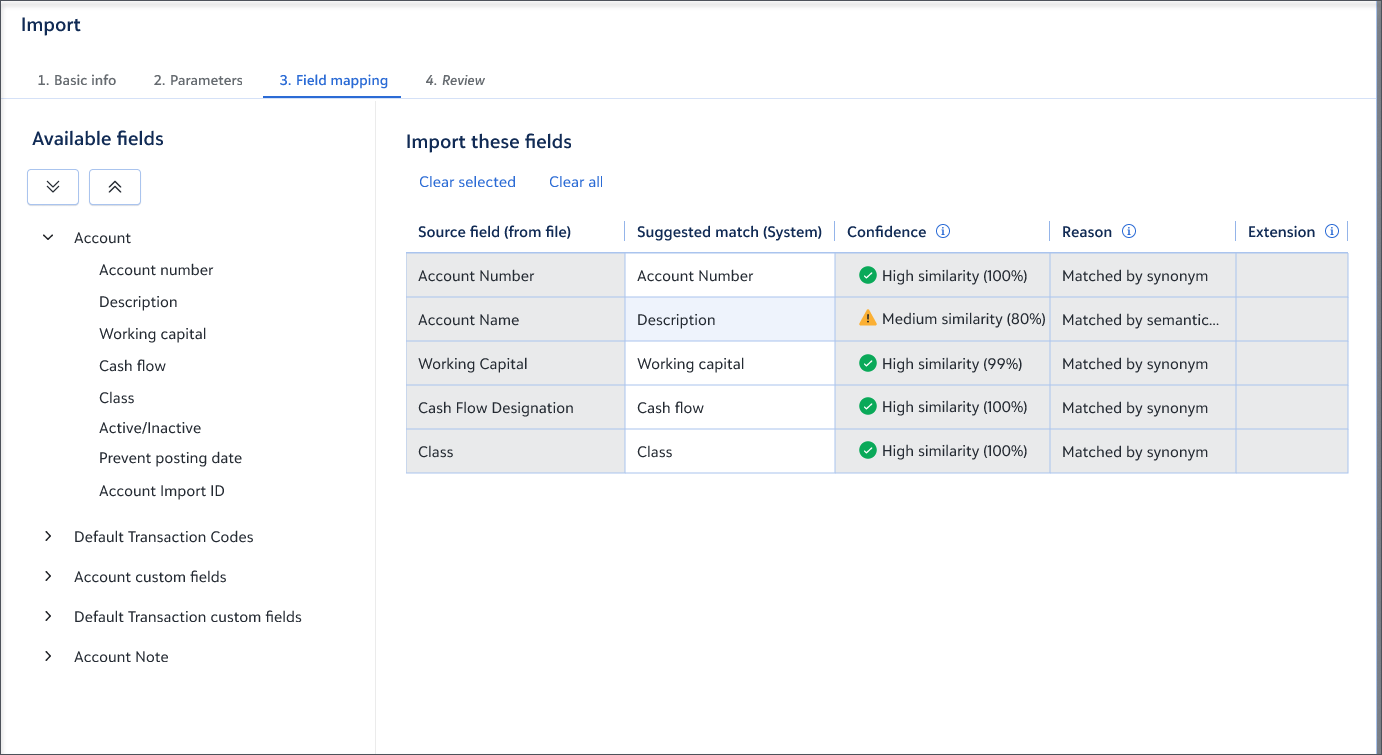
We’re excited to introduce Smart Import Mapping, now available in Financial Edge NXT. This new capability uses AI to turn a manual process into a faster, more guided experience.
Importing data often requires significant setup and manual effort. Smart Import Mapping addresses these challenges by helping users move through the import process with greater speed and confidence.
How It Works
Smart Import Mapping uses intelligent pattern recognition to detect and suggest field mappings during import. Instead of starting from scratch, users receive guided suggestions based on their data. This reduces setup time while improving consistency and accuracy. Key capabilities include:
- Intelligent Auto‑Detection
Automatically matches fields using name similarity and data type, reducing manual setup. - Learns Over Time
Improves suggestions based on previous imports and usage patterns. - User Control
Users can review, adjust, or override mappings before finalizing. - Confidence Scores
Each suggestion includes a confidence level to help guide decisions. - Reusable Templates
Save and reuse mapping templates for recurring imports, helping maintain consistency across teams.
Smart Import Mapping is part of a broader effort to bring more intelligent, embedded assistance into Financial Edge NXT. This approach focuses on reducing manual effort while helping you be more efficient with your day‑to‑day tasks.
Total Web Solution Journey
We’re in the home stretch — and we’re extending the timeline!
To support a thoughtful and successful transition, we’re extending the Total Web Solution (TWS) completion timeline from mid‑year to the end of 2026. This additional time allows teams to adopt new web‑based functionality at a comfortable pace while maintaining confidence and continuity.
We truly appreciate your continued partnership as we move through the final phase of our TWS journey and focus on a smooth, successful transition.
You can continue to follow our TWS progress through:
Thank you for being part of this transformation. We look forward to what’s ahead.
bbdevdays – Registration is open!
Ready to create impact with cutting-edge tech? Over three days, developers of all skill levels will connect and solve challenges through virtual peer- and expert-led sessions.
Join us to unlock dynamic demos with actionable takeaways, hands-on Skills Labs, and fresh perspectives. Register today and be part of the community!
Stay in the Know

Thirsty for more Financial Edge NXT knowledge? Here are some of the best ways to learn more about what's coming:
- Community Announcements. The Community is a great way to stay informed. Subscribe to Financial Edge NXT Community Announcements by clicking on the "Subscribe" link at the top of this blog. You can then select how often you want to receive update notifications.
- Release Updates. Check out What's Recent, What's New, and What's Next to get all the details on prior, current, and future releases. To help keep you up to date on the most recent developments, What's New automatically opens when you log in to the web view.
- In-Product Help. Help documentation throughout Financial Edge NXT is context-sensitive. So, no matter where you are in the solution, you can click the bright green question mark at the top right of your screen to get help for that feature.
- Product Update Briefings (PUB). Check out the most recent Financial Edge NXT PUB, now on demand, to hear from our product management team directly on the latest and upcoming development for Financial Edge NXT!
