My Community
YourCause®
Impact Edge™
All-Star Lounge
Member Lounge (Just for Fun)
Community News
Community Manager
Groups
Browse Products
Members
Community All-Stars
Monthly Challenges
Member Search
Jobs Board
Help
Using the Blackbaud Community
Blackbaud Support
Knowledgebase
Blackbaud University
Discussions
Categories
Groups
Home
Blackbaud eTapestry®
Blackbaud eTapestry® General Discussions
Social Share URL
Jen Gibson
Hi,
I am creating a drag and drop template and I have a social share block at the bottom. I noticed two of the links are broken. Where do I change the url those icons point to? Thanks!!
Find more posts tagged with
Communications
Comments
Melissa Rancour
Hi Jen,
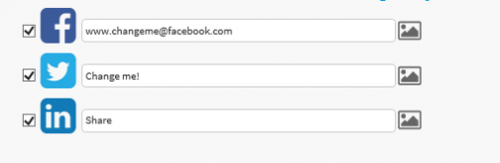
If you select the Social Share content block, and then click on the Edit tab, you can add your social media links.
Hope this helps!
Melissa
Jen Gibson
Thanks Melissa! Where can I change where it links to? I can select and change the various social shares I want to use, but I can't find the field to redirect the link.
Melissa Rancour
Hi Jen,
It is a little tricky, but you actually change the words next to the images of the social media icons.
Please let me know if this works for you!
Melissa
Quick Links
All Categories
Recent Posts
Activity
Unanswered
Groups
Help
Best Of