Statement builder is now available!

Julia Meseck
Blackbaud Employee




This morning you should start see Statements available in the Billing menu.
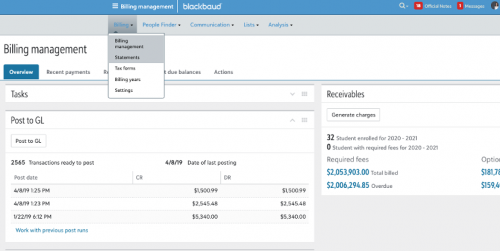
With our new statement builder tool, you can create statement templates to print or publish to students in the payer portal.
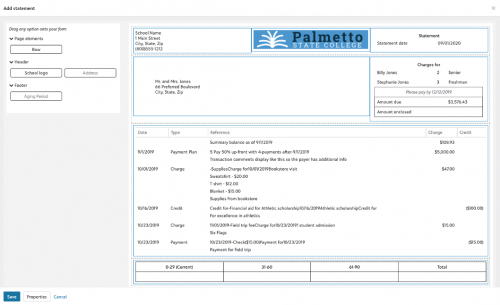
Here is a link to the help topic:
https://webfiles.blackbaud.com/files/support/helpfiles/education/higher-ed/content/bm-billing-statements.html
We can’t wait to get your feedback! ?

With our new statement builder tool, you can create statement templates to print or publish to students in the payer portal.

Here is a link to the help topic:
https://webfiles.blackbaud.com/files/support/helpfiles/education/higher-ed/content/bm-billing-statements.html
We can’t wait to get your feedback! ?
2
Comments
-
Love it! Finally I can stop creating my statments by exporting to Excel and then copying and pasting to a template. I have used it many times over the last couple of weeks since we have to give a copy of the account statement to our Financial Aid processer any time we have a withdrawal. It has made my life so much easier.
Still have to play around as I would like to change the layout at the top to get it the way I would like it to look, but this is a huge step forward.
Thanks,
Dawn 2
2 -
It has been a few weeks and so far so good. It has kept me from having to copy and paste to my letterhead and then emailing it out the students. Good job Team!!!1
-
Hi Julia,
I was checking some things out today and noticed that you said you could print or publish the statements to the student payer portal. I can see how to print, but there does not seem to be anything showing how to publish to the payer portal. Would a published statement look exactly like the printed statement?
Thank you,
Dawn0 -
Hi Dawn!
There isn't a process to publish them like we see for Print. If you open the template that you want to make available online you'll see a Properties button at the bottom. Click that and you'll be able to mark the option Use this template when printing statements online. Once this option is marked, students will see a Print statements button in the Statements area of the payer portal.
Hope this helps!
Julia0 -
Ahhhh! Thank you!0






Categories
- All Categories
- New YourCause Community TEST
- New SKY Community TEST
- New Grantmaking TEST Community
- New Altru Test Community
- New bbcon Community - TEST
- 12 Blackbaud Agents for Good™
- New Raiser's Edge NXT Community
- 7 Blackbaud Community Help
- 218 bbcon®
- 1.4K Blackbaud Altru®
- 409 Blackbaud Award Management™ and Blackbaud Stewardship Management™
- 1.2K Blackbaud CRM™ and Blackbaud Internet Solutions™
- 16 donorCentrics®
- 361 Blackbaud eTapestry®
- 2.7K Blackbaud Financial Edge NXT®
- 680 Blackbaud Grantmaking™
- 598 Blackbaud Education Management Solutions for Higher Education
- 3.3K Blackbaud Education Management Solutions for K-12 Schools
- 952 Blackbaud Luminate Online® and Blackbaud TeamRaiser®
- 85 JustGiving® from Blackbaud®
- 7K Blackbaud Raiser's Edge NXT®
- 3.9K SKY Developer
- 257 ResearchPoint™
- 123 Blackbaud Tuition Management™
- 165 Organizational Best Practices
- 247 Member Lounge (Just for Fun)
- 40 Blackbaud Community Challenges
- 37 PowerUp Challenges
- 3 (Closed) PowerUp Challenge: Grid View Batch
- 3 (Closed) PowerUp Challenge: Chat for Blackbaud AI
- 3 (Closed) PowerUp Challenge: Data Health
- 3 (Closed) Raiser's Edge NXT PowerUp Challenge: Product Update Briefing
- 3 (Closed) Raiser's Edge NXT PowerUp Challenge: Standard Reports+
- 3 (Closed) Raiser's Edge NXT PowerUp Challenge: Email Marketing
- 3 (Closed) Raiser's Edge NXT PowerUp Challenge: Gift Management
- 4 (Closed) Raiser's Edge NXT PowerUp Challenge: Event Management
- 3 (Closed) Raiser's Edge NXT PowerUp Challenge: Home Page
- 4 (Closed) Raiser's Edge NXT PowerUp Challenge: Standard Reports
- 4 (Closed) Raiser's Edge NXT PowerUp Challenge: Query
- 822 Community News
- 3.1K Jobs Board
- 57 Blackbaud SKY® Reporting Announcements
- 47 Blackbaud CRM Higher Ed Product Advisory Group (HE PAG)
- 19 Blackbaud CRM Product Advisory Group (BBCRM PAG)