My Community
YourCause®
Impact Edge™
All-Star Lounge
Member Lounge (Just for Fun)
Community News
Community Manager
Groups
Browse Products
Members
Community All-Stars
Monthly Challenges
Member Search
Jobs Board
Help
Using the Blackbaud Community
Blackbaud Support
Knowledgebase
Blackbaud University
Discussions
Categories
Groups
Home
SKY Developer
SKY Developer General Discussions
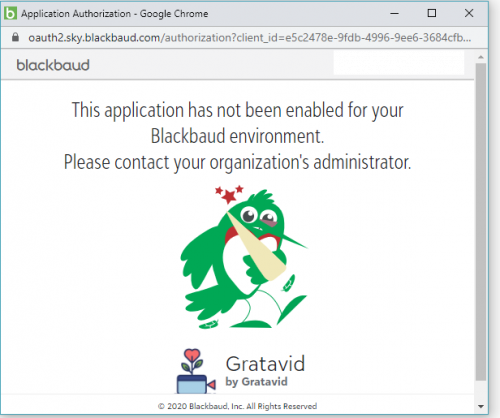
Auth Error: This app has not been enabled for your Blackbaud environemt.
Will Trapp
My users are trying to connect to my app and getting this error, does anyone know what it means? How can I fix it?
Find more posts tagged with
Comments
Steven Cinquegrana
Hi Will,
Have you had a read through here
https://developer.blackbaud.com/skyapi/docs/authorization/common-auth-issues
?
You need to "connect" your app to your environment.
Cheers,
Steve Cinquegrana | CEO and Principal Developer | Protégé Solutions
Ben Lambert
Hi Will,
Steven's answer is correct, but just wanted to clarify a little...
That message indicates that the user who is logged in doesn't have access to any environments in which your
Gratavid
application has been "connected". Most users only have access to a single environment, but some users will have access to multiple environments, even environments for different organizations.
An environment administrator at the organization will need to connect your application to the environment - that's not something that you as the app developer can do, it's a step that requires administrator privileges. The intent here is that an admin must explicitly "connect" an app from a 3rd-party developer before the app can obtain any user-level access tokens for making API calls.
The admin can perform this connect action from within the Control Panel -> Applications page by clicking the "Connect app" button and pasting in your application ID. This is currently the process for SKY applications that aren't yet visible in the Blackbaud Marketplace. Once in the Marketplace, admins can easily discover and connect your application to their environment via the UI.
(I do think we should improve that error message on our end...we've been inconsistent in our terminology over the years, sometimes we've said "connect" but other times we've used words like "add/activate/install/enable". It's been a challenge to find the word that properly reflects the action being taken. I'll create a work item on our end to improve that error message, so thanks for bringing this to our attention!)
Hope this helps - let us know if you have any issues and we'll be glad to help troubleshoot.
Quick Links
All Categories
Recent Posts
Activity
Unanswered
Groups
Help
Best Of