Difficulties Adding Users/Roles
Can anyone provide step-by-step instructions for successfully adding users to an account and granting them product access (eg RE NXT)? I’m having quite a few problems and was wondering if anyone else had experienced these weirdities.
- Log in to Developer account as Admin, the go to Admin then Users and Admins.
- Invite a new user by name and email address and await invitation email.
- Sign out of Blackbaud and click on Accept Invite in email when it arrives.
- Get taken to a webpage showing login options. But I can’t enter the new user’s email address because I get told that the user doesn’t exist.
- Try using the Sign Up link which works but the log in isn’t associated with the existing account/environment.
What am I missing?
Even with existing additional users, when I sign in as them, I can’t access any BB products (eg RE NXT) a there is no link to do so.
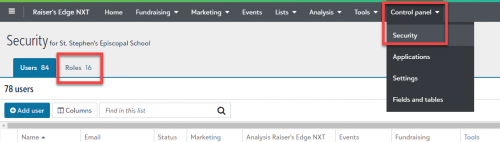
For example, when logged in an Admin, I go to Control panel/Security, then I select the … to the left of an active user and select Manage Roles. When I check any of the boxes, next to Marketing for example, I get No roles exist/To create a role go to the Roles tab (there isn’t one). If I try to link to an existing user under Security groups and type "Supervisor" I get told that there are "No results found for Supervisor", despite another user already showing that they are linked to this account. If I try selecting all or any of the Make admin, I get a warning "Link this user to one in the database view and assign their security groups" and can't save.
So I’m going in a big circle here. I've tried hunting down doco but have drawn a blank.
All I want to do is create some test users with different sign-in options and permissions but nothing seems to get me there.
Any clues?
Steve Cinquegrana | CEO and Principal Developer | Protégé Solutions

Comments
-
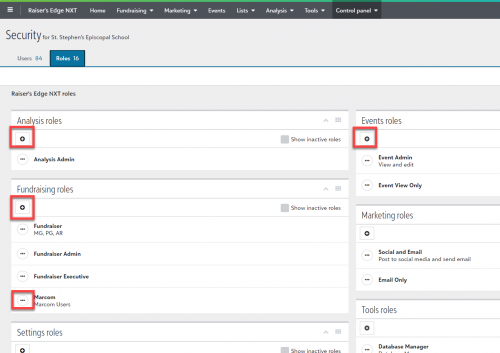
On Control Panel > Security, in the top left corner click on Roles.

On the Roles page, you can create roles and define access. Then, on the Users tab you can assign those roles to a user using the path you tried before: three dots button > Manage Roles.
After you assign roles, the user should have entries in the menu bar at the top of the page at renxt.blackbaud.com1
Categories
- All Categories
- 6 Blackbaud Community Help
- 211 bbcon®
- 1.4K Blackbaud Altru®
- 402 Blackbaud Award Management™ and Blackbaud Stewardship Management™
- 1.1K Blackbaud CRM™ and Blackbaud Internet Solutions™
- 15 donorCentrics®
- 360 Blackbaud eTapestry®
- 2.6K Blackbaud Financial Edge NXT®
- 656 Blackbaud Grantmaking™
- 577 Blackbaud Education Management Solutions for Higher Education
- 3.2K Blackbaud Education Management Solutions for K-12 Schools
- 941 Blackbaud Luminate Online® and Blackbaud TeamRaiser®
- 84 JustGiving® from Blackbaud®
- 6.7K Blackbaud Raiser's Edge NXT®
- 3.7K SKY Developer
- 248 ResearchPoint™
- 120 Blackbaud Tuition Management™
- 165 Organizational Best Practices
- 240 Member Lounge (Just for Fun)
- 34 Blackbaud Community Challenges
- 37 PowerUp Challenges
- 3 (Open) PowerUp Challenge: Grid View Batch
- 3 (Closed) PowerUp Challenge: Chat for Blackbaud AI
- 3 (Closed) PowerUp Challenge: Data Health
- 3 (Closed) Raiser's Edge NXT PowerUp Challenge: Product Update Briefing
- 3 (Closed) Raiser's Edge NXT PowerUp Challenge: Standard Reports+
- 3 (Closed) Raiser's Edge NXT PowerUp Challenge: Email Marketing
- 3 (Closed) Raiser's Edge NXT PowerUp Challenge: Gift Management
- 4 (Closed) Raiser's Edge NXT PowerUp Challenge: Event Management
- 3 (Closed) Raiser's Edge NXT PowerUp Challenge: Home Page
- 4 (Closed) Raiser's Edge NXT PowerUp Challenge: Standard Reports
- 4 (Closed) Raiser's Edge NXT PowerUp Challenge: Query
- 796 Community News
- 3K Jobs Board
- 54 Blackbaud SKY® Reporting Announcements
- 47 Blackbaud CRM Higher Ed Product Advisory Group (HE PAG)
- 19 Blackbaud CRM Product Advisory Group (BBCRM PAG)