POST Attendance Single Not Working

When I try posting to the Attendance single endpoint, I get a 200 success and unique number returned, but it doesn't show up in any list or report. So it doesn't seem to be actually working. I can post to other endpoints that work fine. Any ideas?


Here's what I'm using for my body:
"student_user_id": 5531012,

"begin_date": "2020-12-01T00:00:00.000000+00:00",

"end_date": "2020-12-01T00:00:00.000000+00:00",

"start_time": "",

"end_time": "",

"excuse_type_id": 9105,

"excuse_comment": ""


Type 9105 is one of our Virtual codes, but I've also tried other codes with no success.


I made sure my account has the Attendance Manager role.


Help! ;)

Comments

  • You're definitely using the system record Student User ID, not the public User ID?


    That you're receiving a 200 OK tells me that the call is probably adding the attendance info to the wrong record.


    Just a guess based on other API ID confusions, eg Constituent ID vs Lookup ID.

    Steve Cinquegrana | CEO and Principal Developer | Protégé Solutions

     
  • I'm using the same ID that shows up as student_user_id in a GET Attendance List response, which is the User ID in Core. We do not use the one labeled Student ID.


    I also get back a number in the data of the response. Is this supposed to be the new record ID? If so, it is only 6 digits and all the attendance record IDs in a GET call are 8 digits.


    Any other ideas?
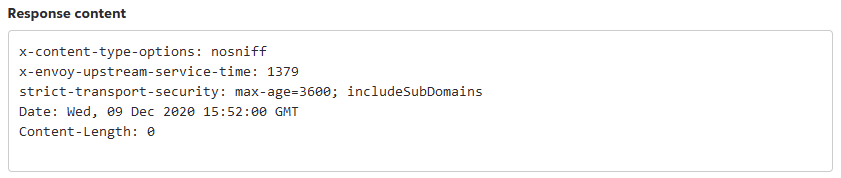
  • According to the Endpoint Reference doco, the response doesn't include a result ID (though I'd expect it to), just a 200 OK if successful.


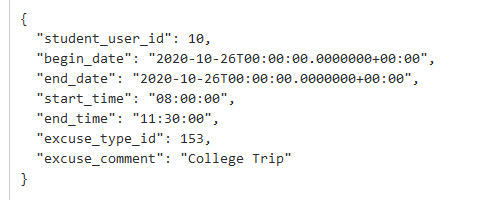
    Using the Try it utility for the endpoint with the default test data:


    I got a successful response with the following raw content:


    This is a bit weird to me as well. I did find that it was easy to elicit the dreaded 500 Internal Server Error, though, just by providing an invalid request argument; that shouldn't happen as the error cause is known and should be handled (IMHO).


    Is it worth trying an alternate ID in the request to see if you can trace the result?


    Steve


    PS I've just discovered that I can't access Education Management atm so can't check the result of my POST test.

     
  • This endpoint can be a bit finicky, we're eager to improve messaging on it.  The student in question must have obligations for the dates/times in question, otherwise you won't see the attendance record obviously reflected.  Also try leaving the start_time & end_time fields off entirely (rather than empty strings), and applying an accurate timezone offset, like this:

     "begin_date": "2020-12-01T00:00:00.0000000-05:00",
     "end_date": "2020-12-01T00:00:00.0000000-05:00",
  • Works! It was the timezone offset. Thanks!
  • Hello, I am having a similar issue. I want to see if anyone sees anything that would cause it in my requests. We send several attendance records and only a select few are showing up. Yet we get a 200 Success on all of them Below is what I've sent in a couple examples.

    Worked:

    {"student_user_id":6428767,"begin_date":"2021-10-14T00:00:00-04:00","end_date":"2021-10-14T00:00:00-04:00","start_time":"00:00:00","end_time":"23:59:00","excuse_type_id":6406,"excuse_comment":"Awaiting covid results"}

    Did not show up:

    {"student_user_id":3714977,"begin_date":"2021-10-14T00:00:00-04:00","end_date":"2021-10-14T00:00:00-04:00","start_time":"00:00:00","end_time":"23:59:00","excuse_type_id":6406,"excuse_comment":""}

Categories