Adding the constituent name in List Gifts notification
Hi there,
What is the trick to add the constituent name in Create HTML table or Create CSV using the List Gifts? It is not included in the LIst Gifts so I tried using Get Constituent in the For Loop then Select the fields which works - I'm able to pick the constituent name. However, I can't create a HTML table outside the loop for the List Gifts including the name. Your help will be appreciated if someone can direct me how to properly write the code.
thanks,
Jundino
What is the trick to add the constituent name in Create HTML table or Create CSV using the List Gifts? It is not included in the LIst Gifts so I tried using Get Constituent in the For Loop then Select the fields which works - I'm able to pick the constituent name. However, I can't create a HTML table outside the loop for the List Gifts including the name. Your help will be appreciated if someone can direct me how to properly write the code.
thanks,
Jundino
Tagged:
1
Comments
-
I have also been trying to do this with no luck. I'm hoping that someone can help.0
-
Hi Jundino,
There are probably a few ways this could be accomplished, but one way is to loop over the results of the List Gifts action and call Get Constituent to retrieve the name (as you're doing). You can use the addProperty() function to append the name to the current item in the array, but the trick is you'll need to compose a new array to contain the result. I'll create a flow to demonstrate this and paste in some screen shots today.0 -
Here's a flow that demonstrates the technique I described above (and this is just an example, you could certainly rearrange some steps in this flow if desired).
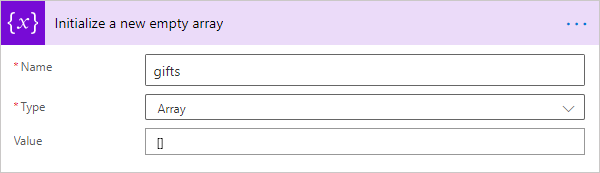
First, I'll initialize a new empty array variable to hold the "augmented" gift items which will include the constituent name (note the empty brackets provided as the default Value for the variable):
Next, I'll use the List gifts action (with whatever criteria is desired) to fetch gifts:
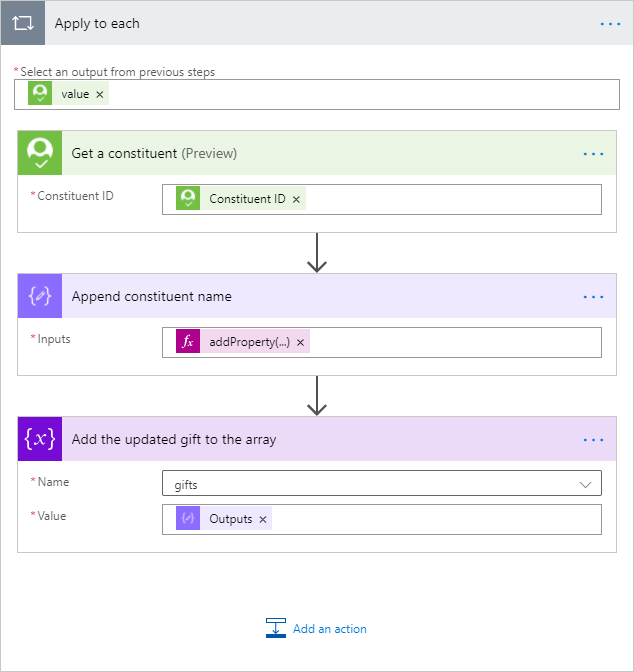
I'll iterate over the results, and within the loop use the Get a constituent action to fetch the constituent details. I'll then use the Compose action to compose a new object (including the constituent name), and then use the built-in Append to array variable action to append that new object to the gifts array variable:
In the above Compose action, the addProperty() function is used to add a new property named "Constituent Name" to the current item in the loop:
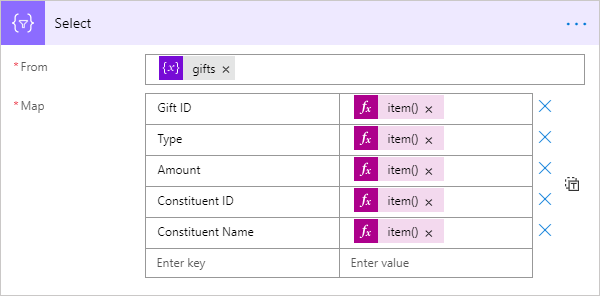
addProperty(item(), 'Constituent Name', outputs('Get_a_constituent')?['body/name'])Now, outside of the loop, for convenience I'll use the built-in Select action to project a new array object (based on the gifts array variable) containing only the fields I want in my HTML table:

The Select actions also allows me to specify more user-friendly column names, and the map formulas I'm using for the column values are:
item()?['id']
item()?['type']
item()?['amount/value']
item()?['constituent_id']
item()?['Constituent Name']
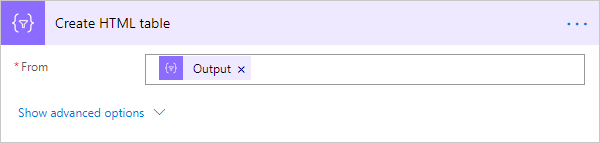
Finally, I use the built-in Create HTML table action to built the HTML table based on the output from the Select action:
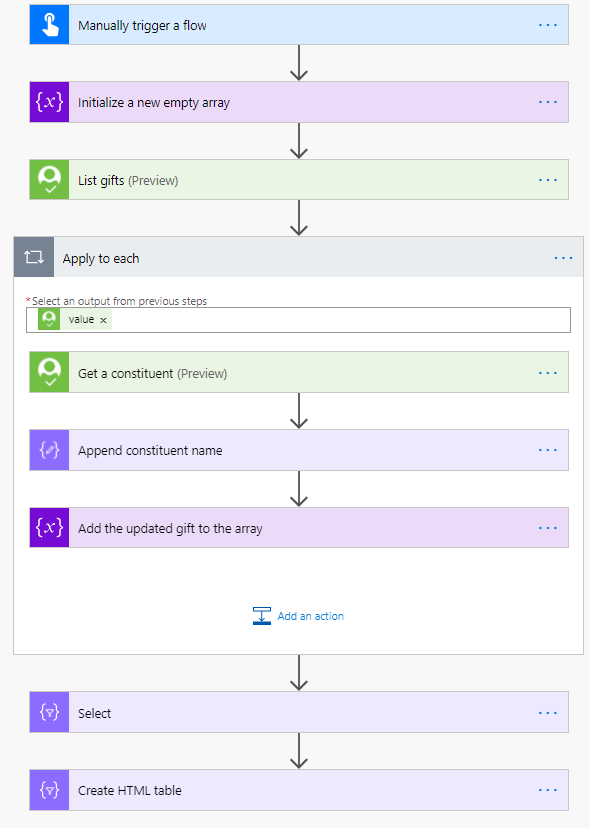
So my completed flow looks like this:
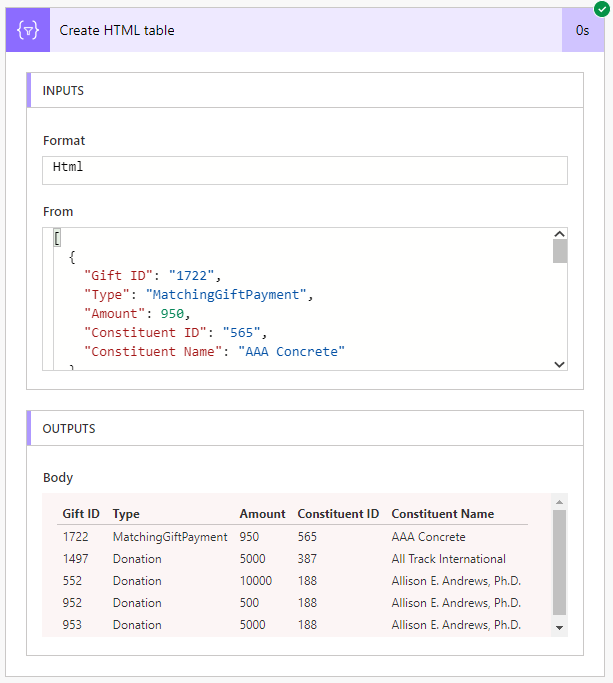
...and when the flow runs, the HTML table will look like this:
I hope this helps demonstrate the approach - please let us know if you have questions!1
Categories
- All Categories
- 6 Blackbaud Community Help
- 211 bbcon®
- 1.4K Blackbaud Altru®
- 396 Blackbaud Award Management™ and Blackbaud Stewardship Management™
- 1.1K Blackbaud CRM™ and Blackbaud Internet Solutions™
- 15 donorCentrics®
- 360 Blackbaud eTapestry®
- 2.5K Blackbaud Financial Edge NXT®
- 649 Blackbaud Grantmaking™
- 568 Blackbaud Education Management Solutions for Higher Education
- 3.2K Blackbaud Education Management Solutions for K-12 Schools
- 937 Blackbaud Luminate Online® and Blackbaud TeamRaiser®
- 84 JustGiving® from Blackbaud®
- 6.5K Blackbaud Raiser's Edge NXT®
- 3.7K SKY Developer
- 247 ResearchPoint™
- 119 Blackbaud Tuition Management™
- 165 Organizational Best Practices
- 239 The Tap (Just for Fun)
- 34 Blackbaud Community Challenges
- 31 PowerUp Challenges
- 3 (Open) PowerUp Challenge: Data Health
- 3 (Closed) Raiser's Edge NXT PowerUp Challenge: Product Update Briefing
- 3 (Closed) Raiser's Edge NXT PowerUp Challenge: Standard Reports+
- 3 (Closed) Raiser's Edge NXT PowerUp Challenge: Email Marketing
- 3 (Closed) Raiser's Edge NXT PowerUp Challenge: Gift Management
- 4 (Closed) Raiser's Edge NXT PowerUp Challenge: Event Management
- 3 (Closed) Raiser's Edge NXT PowerUp Challenge: Home Page
- 4 (Closed) Raiser's Edge NXT PowerUp Challenge: Standard Reports
- 4 (Closed) Raiser's Edge NXT PowerUp Challenge: Query
- 785 Community News
- 2.9K Jobs Board
- 53 Blackbaud SKY® Reporting Announcements
- 47 Blackbaud CRM Higher Ed Product Advisory Group (HE PAG)
- 19 Blackbaud CRM Product Advisory Group (BBCRM PAG)