My Community
YourCause®
Impact Edge™
All-Star Lounge
Member Lounge (Just for Fun)
Community News
Community Manager
Groups
Browse Products
Members
Community All-Stars
Monthly Challenges
Member Search
Jobs Board
Help
Using the Blackbaud Community
Blackbaud Support
Knowledgebase
Blackbaud University
Discussions
Categories
Groups
Home
Blackbaud CRM™ and Blackbaud Internet Solutions™
Blackbaud CRM Developer Discussions
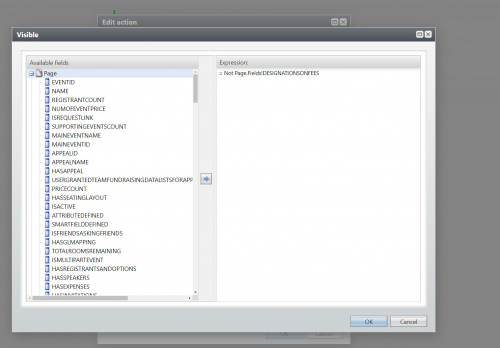
Available fields list on the Visible expression section
Nenad Lukic
Does anyone know what drives this list? These are available fields list on the Visible expression section on an Event page. I would like to create and use a custom field.
Find more posts tagged with
Comments
Joseph Styons
Hi Nenad!
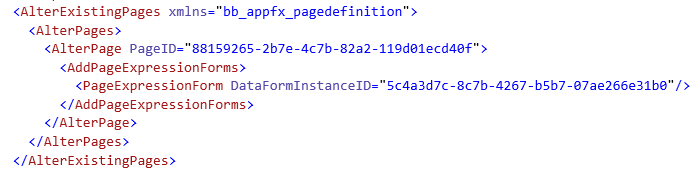
You can add to that palette of fields by using a 'page expression view form'.
It's a view form that takes the same record id as the page itself (for example, an event id) and returns fields you'd like to see.
To expose the fields from the view form on an existing page, you can use an AlterPage tag to attach your custom form to an OOB one.
If you have a custom page, then you can just add a page expression form tag to your page spec.
Screenshots of both approaches are below.
You may also find this article useful.
-J.R. Styons
https://www.styonssoftware.com
An Alter Page tag, adding custom forms to an existing (OOB) page.
A page expression form in a custom page spec
Nenad Lukic
That did it!! Thank you Joseph.
Quick Links
All Categories
Recent Posts
Activity
Unanswered
Groups
Help
Best Of