My Community
YourCause®
Impact Edge™
All-Star Lounge
Member Lounge (Just for Fun)
Community News
Community Manager
Groups
Browse Products
Members
Community All-Stars
Monthly Challenges
Member Search
Jobs Board
Help
Using the Blackbaud Community
Blackbaud Support
Knowledgebase
Blackbaud University
Discussions
Categories
Groups
Home
Blackbaud Financial Edge NXT®
Blackbaud Financial Edge NXT® General Discussions
Is anyone using ADP for their payroll?
Beth Runser
I've been asked to provide the file layout/columns needed for the upload file from ADP. Does anyone have any experience with this?
journal-format-for-adp.xlsx
Find more posts tagged with
Comments
Dawn Ariza
yes, we use ADP and I get a csv file from ADP GLI to upload as a journal entry
Beth Runser
Did you provide them a list of the columns needed and the layout of the columns? Would you be willing to share that information?
Dawn Ariza
See attached. Do you need my file set up from ADP GLI? I can see if I can download it.
journal-format-for-adp.xlsx
Beth Runser
If you can, that would be great!
Heather MacKenzie
Beth Runser
, if you haven't already, try searching the Knowledgebase too. They often have prepared lists as "solutions" in KB for things like this.
Paul Wu
Oh to have my payroll JE automatically exported into the proper FE JE format. Too bad that did not happen with Ceridian Dayforce Payroll. Well it probably could happen, but would have been an extra cost to us.
I have to take the raw data export data and create a pivot table to get my JE into the standard FE JE format to import.
I have not used the import into FE NXT JE, but I know for the database view, the file format needs to be in a specific format.
File is saved as CSV (MS DOS) CSV and for me the Account number column, Project ID and Grants, cell format needs to be 'General'
Dawn Ariza
Here are screenshots from ADP. I was not able to download the format. There is overlap on the screenshots as it all did not fit on one view of the screen.
I hope this helps.
ADP format 1.PNG
ADP format 2.PNG
Sylvia Cook
Hi Paul,
We have a JE export from Dayforce Ceridian that we used for our previous accounting system. I have it on my list to have it updated for NXT the next time we have some programming changes with Ceridian.
Just wondering where you go into Ceridian to get the raw data? I'm wondering if this would be easier than what I do now for JE imports info NXT.
Sylvia
Paul Wu
Hi Sylvia,
It might be easier, depending on your setup, etc.
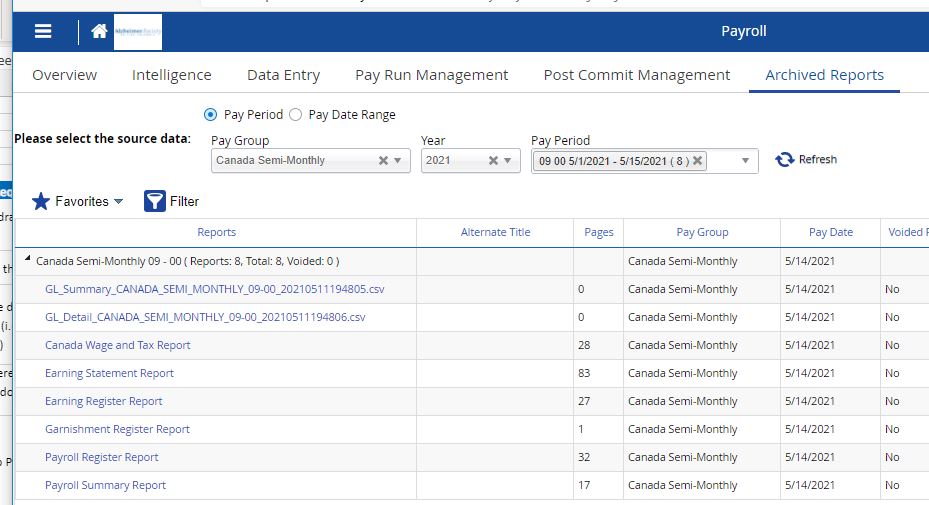
In the Payroll section, you 'should' have a menu item called "Archived Reports" Click on that and you should see options to select either pay period or pay date range. Below that is the "Pay Group" where you select your groups as well as the Year and Pay Period. Then hit refresh and the reports should show up.
The one to get is the GL_Detail_xxx.csv The naming convention may be different for your setup. But this report should be there.
Download that and start the pivot table process.
I've attached a screen shot and the basic export fields that I get. Or I think I've attached the file.
Sylvia Cook
Thanks for the info. That is where I have been getting our JE, but I only have a summary version. Doesn't look like the detailed version was added to our list. I've been trying to find how/where to get the detailed version.
Thanks again.
Quick Links
All Categories
Recent Posts
Activity
Unanswered
Groups
Help
Best Of