Saved Views in SKY

Where's the best resource to learn more about how our saved views are functioning in SKY and not just a high level…it's so easy or convenient…I'm looking detailed functionality? For example, why isn't a saved request view not applied any time requests are in the workspace? If I search for requests in the workspace, data is showing in my saved request view. If I open the organization record and then open its related requests, those requests are not shown in my saved request view AND there's no option to manage saved views.

Comments

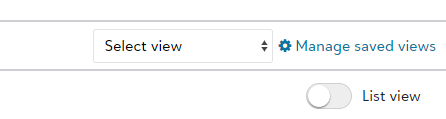
  • The option to access saved view only appears when viewing the results of a search, it appears just about the List view option, to the right of the screen

  • Thanks Marc. What I get out of your comment is the way related records are displayed "is what it is" - no option to adjust them. Correct?
  • I found that once i accessed the previously saved views I could alter them as in the classic view, albeit with a different layout, I did like that you can now drag and drop columns, rather than slowly click up or down each time. When you click Manage Saved Views you also get the option to add a new view, not sure why it is hidden there

  • Chrissy Haskell
    Chrissy Haskell Blackbaud Employee
    Eighth Anniversary Kudos 2 Name Dropper Participant

    Hi Bobbi Jo! There are a few Blackbaud University resources that will walk through how a saved View can function. The basics of Views are discussed in the Search and Workspace class. Plus, there are also additional purposes that Views can serve! For example, in the Creating Correspondence Templates class we walk through how a View can become a merge field in a template, or in Reports we go over how Views can be a component in creating an Ad Hoc report. All the classes can be found here: Datasheet_Training_Learn_BBGM.pdf (blackbaud.com)

Categories