Modern Merge Donation Acknowledgement Webview List Based V2 import failed


I'm following all the steps to impot my flows and this link is coming up with errors
Comments
-
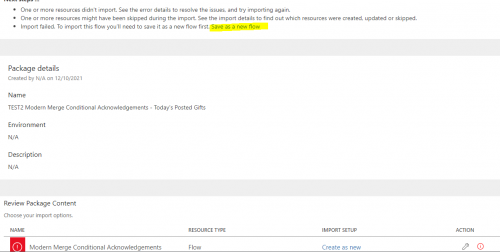
@Martha Hafele I believe you need to click on save as a new flow in a bullet at the top with the error information. I ran into the same issue.
0 -
Here is the image of where you can click on Save as a new flow
 0
0 -
Martha - thanks for giving it a shot. Yes, Dan's guidance is correct and we will be updating the documentation this week. Your feedback is really helpful.
0 -
I am getting error messages as well and I am unable to save the workflow and move forward until the errors are resolved. I was able to run the simple test and all of my connections are good.
0 -
Hi Dan,
Hope you can guide me. I'm following up on the tutorial on the community forum.
I followed the instructions provided and I am getting an error that will not allow me import the template. Instead of describing what I did, I recorded a short video outlining the exact steps I took and the specific errors I got. I surely hope you have a few minutes to help me.
1 -
Hi @Martha Hafele,
Was your issue resolved? I'm running into a similar issue.
0 -
@Jorge Lazaro Thanks for including the video and unfortunately I do not have a lot to help you with. @Austen Brown has suggested to try to import the flow in incognito mode and others have said they just have to try another day.
@Heather McLean @Ashley Moose @Glen Hutson @Alex Wong any advice you can give here?
1 -
@Jorge Lazaro I've never seen Power Automate not give the option to ‘Save as new’ so I'm not clear why that part is not available. I did notice in that long error message that it looked to be referencing the OneDrive connection so I'm guessing the flow is not happy since it cannot locate the file. To get around this, I imported the flow and updated this connection so you can re-create the same on your end.
First, in OneDrive, add a new folder called ‘Letter Templates’ then add the envelope and acknowledgement files.
simple-donation-ack-letter.docx

Then import this version of the same flow. This is the exact same as the original one you referenced, just with the OneDrive connections changed to reference the Letter Templates folder.
ModernMergeDonationAcknowledgement-WebViewListBased-Native_20230824160300.zip
Give that a try and let us know if you still have issues.
2 -
@Ashley Moose thanks for taking the time to review my post and video. I will certainly try your approach and post my results, should they be beneficial to anyone else. Have a terrific rest of your week.
2 -
@Dan Snyder Thanks for reviewing my post and video. I appreciate you connecting me to other wonderful resources. Hopefully, I will be able to successfully troubleshoot this issue shortly. Have a great day.
0 -
@Jorge Lazaro
I think Ashley already pointed out the issue and provide a new zip file with instruction needed.As for the original instruction page:
Can this page be updated with the folder path and file path needed? That way others following the page can avoid this same problem
0 -
Does this require Encodian? and is there a fee for Encodian?
What is the typical use/need for Actions in Encodian?
Can anyone give me a review of Encodian, and why it is needed?0 -
@Candy Reichert
I'm not sure where you are looking at that ask about Encodian, so i'm going to response in a more generic way.Encodian, from my experience, is not required. However, it is a nice to have if you are not too familiar with Power Automatic. It is “Free” for a certain number of request to do something for you, after that you have to pay, you can check it's website for fee structure.
depending on what you trying to do, there are default ability in Power Automate that can be used. For example, doing a word merge then converting to pdf, that's something you can do with the Microsoft Word connector.
2 -
@Alex Wong As I started going through the set up process for this flow the first video mentioned it required Encodian. If I actually don't need it then that's fine. I'll continue through the process and see where it takes me. Thanks for your quick response.
0 -
@Alex Wong As I started going through the set up process for this flow the first video mentioned it required Encodian. If I actually don't need it then that's fine. I'll continue through the process and see where it takes me. Thanks for your quick response.
Hi Candy, Encodian was removed as a requirement based on initial feedback. It can certainly help in such scenarios, but should not be required to create the acknowledgements.
1






















Categories
- All Categories
- New K-12 Community Home (TEST)
- New Higher Education Home Page (Test)
- New Impact Edge Community TEST
- New YourCause Community TEST
- New SKY Community TEST
- New Grantmaking TEST Community
- New Altru Test Community
- New bbcon Community - TEST
- 12 Blackbaud Agents for Good™
- New Raiser's Edge NXT Community
- 8 Blackbaud Community Help
- 222 bbcon®
- 1.4K Blackbaud Altru®
- 411 Blackbaud Award Management™ and Blackbaud Stewardship Management™
- 1.2K Blackbaud CRM™ and Blackbaud Internet Solutions™
- 16 donorCentrics®
- 361 Blackbaud eTapestry®
- 2.7K Blackbaud Financial Edge NXT®
- 688 Blackbaud Grantmaking™
- 604 Blackbaud Education Management Solutions for Higher Education
- 3.3K Blackbaud Education Management Solutions for K-12 Schools
- 954 Blackbaud Luminate Online® and Blackbaud TeamRaiser®
- 85 JustGiving® from Blackbaud®
- 7.1K Blackbaud Raiser's Edge NXT®
- 4K SKY Developer
- 258 ResearchPoint™
- 123 Blackbaud Tuition Management™
- 165 Organizational Best Practices
- 249 Member Lounge (Just for Fun)
- 40 Blackbaud Community Challenges
- 37 PowerUp Challenges
- 3 (Closed) PowerUp Challenge: Grid View Batch
- 3 (Closed) PowerUp Challenge: Chat for Blackbaud AI
- 3 (Closed) PowerUp Challenge: Data Health
- 3 (Closed) Raiser's Edge NXT PowerUp Challenge: Product Update Briefing
- 3 (Closed) Raiser's Edge NXT PowerUp Challenge: Standard Reports+
- 3 (Closed) Raiser's Edge NXT PowerUp Challenge: Email Marketing
- 3 (Closed) Raiser's Edge NXT PowerUp Challenge: Gift Management
- 4 (Closed) Raiser's Edge NXT PowerUp Challenge: Event Management
- 3 (Closed) Raiser's Edge NXT PowerUp Challenge: Home Page
- 4 (Closed) Raiser's Edge NXT PowerUp Challenge: Standard Reports
- 4 (Closed) Raiser's Edge NXT PowerUp Challenge: Query
- 829 Community News
- 3.1K Jobs Board
- 57 Blackbaud SKY® Reporting Announcements
- 47 Blackbaud CRM Higher Ed Product Advisory Group (HE PAG)
- 19 Blackbaud CRM Product Advisory Group (BBCRM PAG)