Attachment Tags (and where are they in power automate)
In the process of creating a flow for receipting, I've noticed that the “create a gift attachment” action provides no space to add attachment tags, although the Gift API does have the support to add these. Curiously, it looks to be the only field that didn't get included. Is there a reason for this? And has anyone found a way to accomplish it?
The only way I'm currently seeing around this would be to have the flow call a script on my computer to use the actual API.

Comments
-
@Aidan Lambert I haven't tried it yet, but couldn't you just add a separate HTTP action at the end of the automation to POST back to the gift?
0 -
Aidan Lambert:
In the process of creating a flow for receipting, I've noticed that the “create a gift attachment” action provides no space to add attachment tags, although the Gift API does have the support to add these. Curiously, it looks to be the only field that didn't get included. Is there a reason for this? And has anyone found a way to accomplish it?
The only way I'm currently seeing around this would be to have the flow call a script on my computer to use the actual API.Not every API endpoint/parameter has a counterpart in Power Automate, but we can pass along this request to add it.
0 -
Matt, I think that might be a pretty good work around. This would be my first attempt at using the SKY API, and I'm getting a little lost with how BB handles usage (needing an app, authorization codes, etc.), so I'm not really able to test it yet. But it definitely seems like a much simpler work around than what I thought of.
I also tried exporting the flow, editing the JSON to add a tag, and then importing. However, the import failed (I'm assuming because of the tag property I added that it didn't recognize).Glen, I (and others I bet) would greatly appreciate you suggesting it. I've also added it to the ideas page. I imagine I'll be needing to learn how to use the SKY APIs at some point either way, but I feel this might be a feature many other customers would enjoy having access to (without making an API app)
0 -
Hi Aidan (and fellow Lambert!),
This is great feedback, thanks for filing it! We originally didn't include tags in the attachment connector actions because we weren't sure it was really needed/useful (especially since they are expressed as an array of strings, which elevates the complexity of the UX in the Power Automate designer).
But rather than send you down an even more complex path of calling the SKY API from your flow, how urgently do you need this? Would it be possible for you to wait on us to get this added to the next release (you'd then just edit your flow and update the action to specify the desired tags)?
1 -
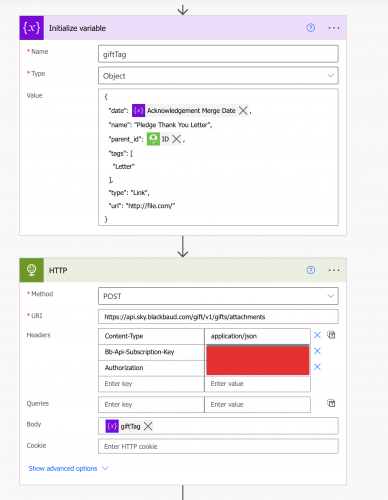
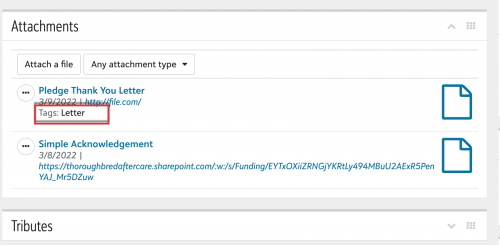
So this was a pretty straight forward process. The way I did it below was to initialize a object variable to construct my JSON object. Next was to create an HTTP action with the ‘Content Type’, ‘API key’, and ‘Authorization’ headers. I passed my JSON variable as the body and it worked perfectly.

1 -
What method did you use to pull the Authorization Header info into the flow?
0 -
@Ben Lambert Lovely to meet (¿interact with?) you! Your videos were/are helpful as I try to learn all of this. Now that I stop to think about it, the tags aren't really necessary in this instance, given the small number of attachments per gift, so no need to rush it into the next update. However, I might still make the case that support should eventually be added for tagging attachments (at least for records that might have many attachments, such as constituents or campaigns). Arrays are already used a good bit in various parts of Automate, so I would guess adding them wouldn't be terribly confusing for users.
@Matt Thacker Awesome to see that it works (and thank you again for the suggestion)! I think I'm just having trouble figuring out authorization. @Glen Hutson I used a definitely not correct method. I went to the Gift API endpoint reference, clicked the “Try It!” button, selected an authorization method, clicked “Authorize” in the pop up window, and then copy and pasted the resulting generated string into the Authorization header in the http action. I've also made zero sky apps so far, so that could be another issue.
0
Categories
- All Categories
- 6 Blackbaud Community Help
- 211 bbcon®
- 1.4K Blackbaud Altru®
- 402 Blackbaud Award Management™ and Blackbaud Stewardship Management™
- 1.1K Blackbaud CRM™ and Blackbaud Internet Solutions™
- 15 donorCentrics®
- 360 Blackbaud eTapestry®
- 2.6K Blackbaud Financial Edge NXT®
- 655 Blackbaud Grantmaking™
- 576 Blackbaud Education Management Solutions for Higher Education
- 3.2K Blackbaud Education Management Solutions for K-12 Schools
- 941 Blackbaud Luminate Online® and Blackbaud TeamRaiser®
- 84 JustGiving® from Blackbaud®
- 6.7K Blackbaud Raiser's Edge NXT®
- 3.7K SKY Developer
- 248 ResearchPoint™
- 120 Blackbaud Tuition Management™
- 165 Organizational Best Practices
- 240 Member Lounge (Just for Fun)
- 34 Blackbaud Community Challenges
- 37 PowerUp Challenges
- 3 (Open) PowerUp Challenge: Grid View Batch
- 3 (Closed) PowerUp Challenge: Chat for Blackbaud AI
- 3 (Closed) PowerUp Challenge: Data Health
- 3 (Closed) Raiser's Edge NXT PowerUp Challenge: Product Update Briefing
- 3 (Closed) Raiser's Edge NXT PowerUp Challenge: Standard Reports+
- 3 (Closed) Raiser's Edge NXT PowerUp Challenge: Email Marketing
- 3 (Closed) Raiser's Edge NXT PowerUp Challenge: Gift Management
- 4 (Closed) Raiser's Edge NXT PowerUp Challenge: Event Management
- 3 (Closed) Raiser's Edge NXT PowerUp Challenge: Home Page
- 4 (Closed) Raiser's Edge NXT PowerUp Challenge: Standard Reports
- 4 (Closed) Raiser's Edge NXT PowerUp Challenge: Query
- 796 Community News
- 3K Jobs Board
- 54 Blackbaud SKY® Reporting Announcements
- 47 Blackbaud CRM Higher Ed Product Advisory Group (HE PAG)
- 19 Blackbaud CRM Product Advisory Group (BBCRM PAG)