Sharing my Power Automate Flow: All-In-One SKY Add-In - Simple





As alluded to during the Microsoft Power Platform Office Hours on April 14th, here is an example of a method of creating a SKY Add-In tile facilitated by Power Automate in a single flow. This particular example displays a custom tile on a Constituent Record that automatically pulls in current and forecast weather information via MSN Weather. However, this gives you the foundation for your own custom tiles without needing to worry about the underpinnings of SKY Add-Ins .
Reminder, there already ways of creating SKY Add-In tiles that don't require any coding heavy lifting:
- If your tile is based on a Power App, then you can use the pre-made Power Apps Host SPA.
- If your tile is based on Power BI, then you can use the pre-made Power BI Host SPA.
- If your customization is a button that is meant to trigger a flow to perform an action, then you can use the pre-made Web Request Action SPA
What this example focuses on are scenarios where there is less interactivity and more of simply wanting to display the results of a Power Automate flow in a custom tile.
Extensive documentation as well as the example flow is available at https://github.com/glenhutson/BlackbaudCustomizations/tree/main/All-In-One-SKYAddins%2BPowerAutomate/Simple .
It's labeled as “Simple” as it focuses just on the custom tile and doesn't include the likes of fly-outs, etc. That being said, it should be considered at the very minimum Intermediate should you want to take it and adapt it to your own custom tile needs. If you're new to Power Automate and/or working with RENXT + Power Automate, this would not be something to attempt at this time.
Based on feedback, revised and more complex examples may be added.
Comments
-
Bummer. I created this in my environment, but it's not showing up on the NXT constituent record. The flow is running successfully, but still no tile. Do you know what I could have possibly missed? Thanks in advance.
0 -
JR Barden:
Bummer. I created this in my environment, but it's not showing up on the NXT constituent record. The flow is running successfully, but still no tile. Do you know what I could have possibly missed? Thanks in advance.
Oh, sorry you're having issues. When you're looking at all the run history are all runs showing as succeeded or are any showing “cancelled”? Each time the tile is pulled up there should be 3 runs, one for each of the different passes it goes through. If all of those are showing succeeded, then double check the very bottom of your constituent record as that's where new custom tiles show up for the first time. If everything in the flow run history is looking well and the tile is not showing up at the bottom of the constituent record, let me know.
0 -
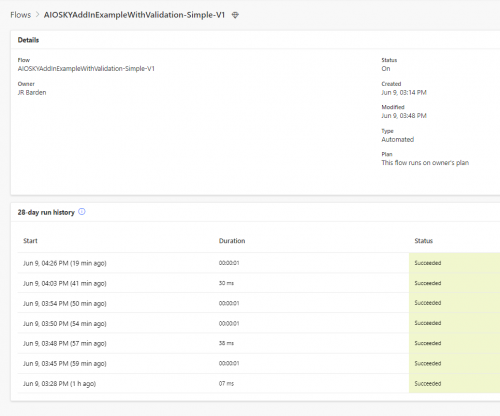
Glen, thanks for responding so quickly. Here is a snapshot of the flow. As you can see, everytime it ran it was successful. I did keep checking the bottom of the constituent record but the tile never appeared.
 0
0 -
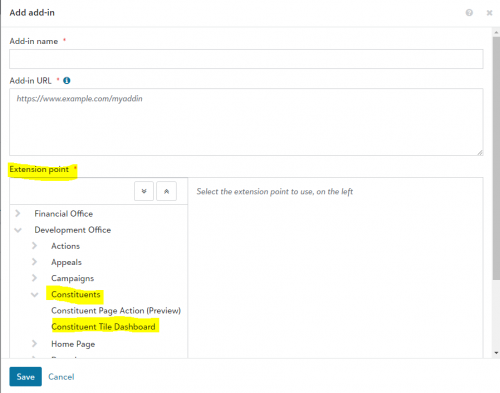
I'm not sure if this helps, but I tested this out as well and had to work through a couple of issues, so I figured I'd share what they were. One was I had selected the wrong extension point (accidentally selected campaign instead of constituent), so the tile wasn't showing up where I expected. And then, I used an apostrophe when naming the tile in the flow. When I tried calling it Constituent's Local Weather, it would run, but the system ID would show as blank, and nothing would populate on the constituent record. After taking the apostrophe out, it populated on the constituent record.
0 -
Thanks for the input Alessandra. I'm not sure what you mean when you say wrong extension point. Do you mean the connector? On the name of the flow, I just renamed it to ensure it had nothing other than letters and space and still no weather tile. ?
0 -
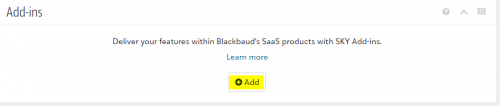
Bummer on the tile name not working. The extension point I was mentioning is within the application under the Add-ins tile. Starting at step 12 of Glen's notes.
 2
2 -
Great work, @Glen Hutson - using a flow to build the entire add-in javascript so you can decide which users see the tile was a mind-blown moment for me.
1 -
JR Barden:
Thanks for the input Alessandra. I'm not sure what you mean when you say wrong extension point. Do you mean the connector? On the name of the flow, I just renamed it to ensure it had nothing other than letters and space and still no weather tile. ?
Hey JR, checking to see if Alessandra's pointer helped out. When looking at the screenshot you posted earlier, it looks like it may not be completely setup. Every time someone accesses the page with that tile on it, you should 2-3 runs of the flow one right after another. Two if because of the security settings you put on the person accessing it doesn't need and 3 if it completely loaded for them. Here's an example of the 3 runs one right after another.
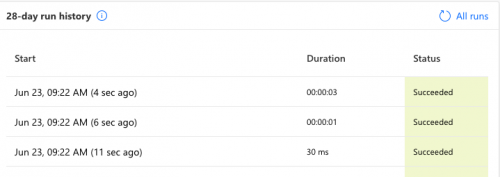
If you're not seeing that then it may not have been completely added as a SKY Add-In in your developer account.
0 -
@Glen Hutson
I finally had some time to play around with this flow, and I used it to create a Recent MailChimp Activity constituent tile that only shows up for Communications staff. Still think this approach is a game-changer. Thanks again for sharing!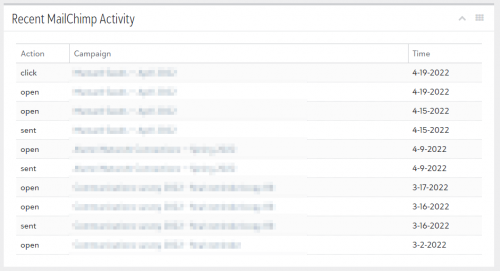 2
2










Categories
- All Categories
- New K-12 Community Home (TEST)
- New Higher Education Home Page (Test)
- New Impact Edge Community TEST
- New YourCause Community TEST
- New SKY Community TEST
- New Grantmaking TEST Community
- New Altru Test Community
- New bbcon Community - TEST
- 12 Blackbaud Agents for Good™
- New Raiser's Edge NXT Community
- 8 Blackbaud Community Help
- 222 bbcon®
- 1.4K Blackbaud Altru®
- 410 Blackbaud Award Management™ and Blackbaud Stewardship Management™
- 1.2K Blackbaud CRM™ and Blackbaud Internet Solutions™
- 16 donorCentrics®
- 361 Blackbaud eTapestry®
- 2.7K Blackbaud Financial Edge NXT®
- 687 Blackbaud Grantmaking™
- 604 Blackbaud Education Management Solutions for Higher Education
- 3.3K Blackbaud Education Management Solutions for K-12 Schools
- 954 Blackbaud Luminate Online® and Blackbaud TeamRaiser®
- 85 JustGiving® from Blackbaud®
- 7K Blackbaud Raiser's Edge NXT®
- 4K SKY Developer
- 258 ResearchPoint™
- 123 Blackbaud Tuition Management™
- 165 Organizational Best Practices
- 248 Member Lounge (Just for Fun)
- 40 Blackbaud Community Challenges
- 37 PowerUp Challenges
- 3 (Closed) PowerUp Challenge: Grid View Batch
- 3 (Closed) PowerUp Challenge: Chat for Blackbaud AI
- 3 (Closed) PowerUp Challenge: Data Health
- 3 (Closed) Raiser's Edge NXT PowerUp Challenge: Product Update Briefing
- 3 (Closed) Raiser's Edge NXT PowerUp Challenge: Standard Reports+
- 3 (Closed) Raiser's Edge NXT PowerUp Challenge: Email Marketing
- 3 (Closed) Raiser's Edge NXT PowerUp Challenge: Gift Management
- 4 (Closed) Raiser's Edge NXT PowerUp Challenge: Event Management
- 3 (Closed) Raiser's Edge NXT PowerUp Challenge: Home Page
- 4 (Closed) Raiser's Edge NXT PowerUp Challenge: Standard Reports
- 4 (Closed) Raiser's Edge NXT PowerUp Challenge: Query
- 829 Community News
- 3.1K Jobs Board
- 57 Blackbaud SKY® Reporting Announcements
- 47 Blackbaud CRM Higher Ed Product Advisory Group (HE PAG)
- 19 Blackbaud CRM Product Advisory Group (BBCRM PAG)