Refreshing data in Power BI when you use Blackbaud (Beta)





I have created 4 pages in a Power BI report. I'm unsure how to refresh it with the new gifts that come in. I have been going in manually and refreshing the data (which takes sometimes 15 minutes) and then re-publishing for my directors to use. Can it not refresh on its own somehow?
Comments
-
I believe it is possible, but it's a bit of a process to get it set up, and you'll have to install a gateway on your computer and have it turned on and online during the refresh. I've looked into it in the past, but I don't currently have any reports that are worth going through all the steps to set this up.
This post looks like it covers things pretty well.
2 -
I have installed the gateway for Blackbaud (beta) but it won't update unless I select the GIFTS table and refresh. Then I have to re-publish because it won't refresh in the online version. I'm going to try to use the gifts from queries instead of straight from ALL the gifts to see if that works.
0 -
Hi @Marsha Wynn, I believe what you're referring to is the NXT Power BI connector. That's just what allows Power BI to communicate with the Blackbaud API. To enable refreshing, you'll need to install a on-premise gateway (link). This allows the Power BI Service to connect to locally stored data source.
Once you get the gateway set up, you should have an app in your Start menu that looks like this:
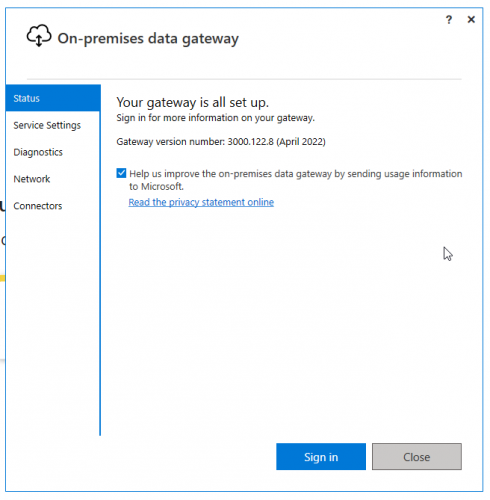
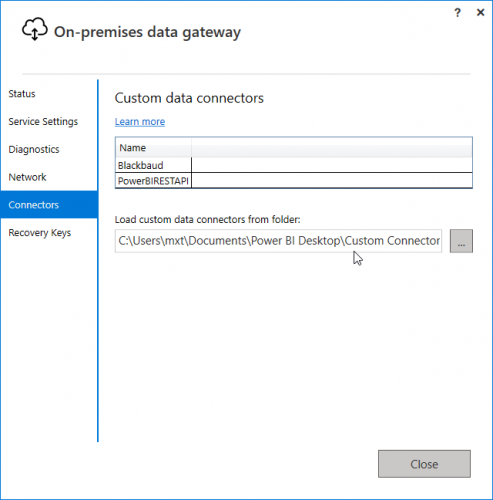
On the left hand panel, open the Connectors field and you'll be able to specify where your custom connectors are located. You should have your connector in:
\\Documents\\Power BI Desktop\\Custom Connectors
You should see Blackbaud come up as a connector.
You can then log into Power BI online and go to your dataset (make sure you're going to the dataset and not the report) and open the settings.
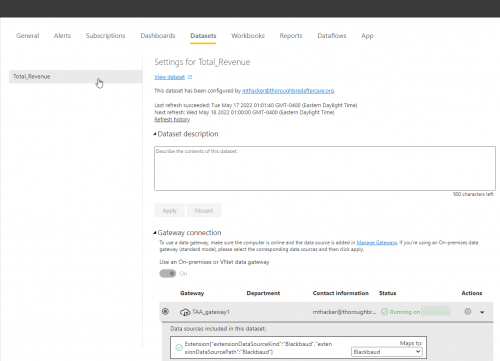
From here you can map it to the appropriate gateway. Once that status turns green and says running, the scheduled refresh field will become available and you can set when and how often you want your report to refresh.
Let me know if you run into any issues and I'd be happy to walk you through the who process.
1 -
Hi Matt, Thanks for sharing this process! How would you modify these steps to connect & refresh to data stored in the cloud?
0 -
What type of data source are you trying to pull from? Most cloud-based data sources will connect directly to Power BI Service and don't require the use of a gateway.
1 -
@Matt Thacker, I am just pulling from the Blackbaud (beta). My IT department help me to get that setup, so I'm unsure if they installed the on-premise gateway. I have sent them the link. Thank you SO much. ?
0 -
@Matt Thacker do you have to install a personal on-premise gateway on my laptop for that to work?
0









Categories
- All Categories
- New K-12 Community Home (TEST)
- New Higher Education Home Page (Test)
- New Impact Edge Community TEST
- New YourCause Community TEST
- New SKY Community TEST
- New Grantmaking TEST Community
- New Altru Test Community
- New bbcon Community - TEST
- 12 Blackbaud Agents for Good™
- New Raiser's Edge NXT Community
- 8 Blackbaud Community Help
- 222 bbcon®
- 1.4K Blackbaud Altru®
- 410 Blackbaud Award Management™ and Blackbaud Stewardship Management™
- 1.2K Blackbaud CRM™ and Blackbaud Internet Solutions™
- 16 donorCentrics®
- 361 Blackbaud eTapestry®
- 2.7K Blackbaud Financial Edge NXT®
- 687 Blackbaud Grantmaking™
- 604 Blackbaud Education Management Solutions for Higher Education
- 3.3K Blackbaud Education Management Solutions for K-12 Schools
- 954 Blackbaud Luminate Online® and Blackbaud TeamRaiser®
- 85 JustGiving® from Blackbaud®
- 7K Blackbaud Raiser's Edge NXT®
- 4K SKY Developer
- 258 ResearchPoint™
- 123 Blackbaud Tuition Management™
- 165 Organizational Best Practices
- 248 Member Lounge (Just for Fun)
- 40 Blackbaud Community Challenges
- 37 PowerUp Challenges
- 3 (Closed) PowerUp Challenge: Grid View Batch
- 3 (Closed) PowerUp Challenge: Chat for Blackbaud AI
- 3 (Closed) PowerUp Challenge: Data Health
- 3 (Closed) Raiser's Edge NXT PowerUp Challenge: Product Update Briefing
- 3 (Closed) Raiser's Edge NXT PowerUp Challenge: Standard Reports+
- 3 (Closed) Raiser's Edge NXT PowerUp Challenge: Email Marketing
- 3 (Closed) Raiser's Edge NXT PowerUp Challenge: Gift Management
- 4 (Closed) Raiser's Edge NXT PowerUp Challenge: Event Management
- 3 (Closed) Raiser's Edge NXT PowerUp Challenge: Home Page
- 4 (Closed) Raiser's Edge NXT PowerUp Challenge: Standard Reports
- 4 (Closed) Raiser's Edge NXT PowerUp Challenge: Query
- 829 Community News
- 3.1K Jobs Board
- 57 Blackbaud SKY® Reporting Announcements
- 47 Blackbaud CRM Higher Ed Product Advisory Group (HE PAG)
- 19 Blackbaud CRM Product Advisory Group (BBCRM PAG)