Enabling Power BI/Blackbaud Connector





I’m using Power BI Desktop Version: 2.105.664.0 64-bit (May 2022). I followed the installation instructions in:
https://docs.blackbaud.com/microsoft-connectors-docs/microsoft-power-platform/power-bi/power-bi-installation. Note: I cannot find the Custom data Connectors preview feature mentioned in Step 3. I enabled the (Not Recommended) Allow any extension to load without validation or warning under Data Extensions.
I’m able to connect to my site’s RE data in Power BI and I see the data in the Navigator. However, I’m unable to “load” the data into Power BI.
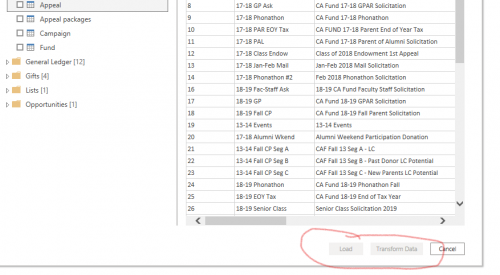
Not sure whether this has something to do with the fact that the Custom data connector preview feature is not enabled. Any help would be greatly appreciated.
Thanks,
Marita
Comments
-
Hi @Marita Gonsalves ,
Took me a few moments to find it in the new version of BI as well.
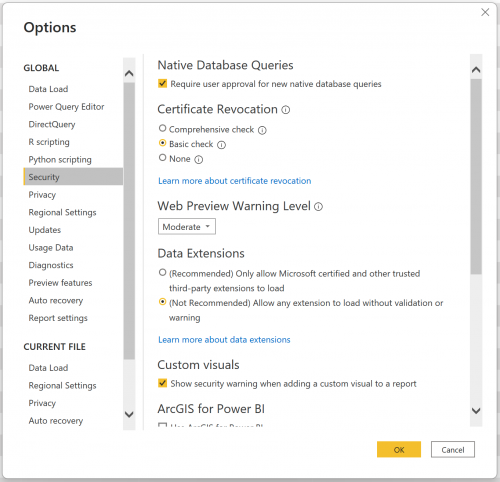
File > Options and Settings > Options
0 -
Hi @JP Provencal,
I got that piece of it (i.e., enabling the (Not Recommended) Allow any extension to load without validation or warning under Data Extensions). But I still can't find the Custom data Connectors preview feature which, I think, may be why I can see my data in Navigator but can't Load it.
0 -
Resolved. Had to apply some Windows updates and all worked after a reboot.
0



Categories
- All Categories
- New K-12 Community Home (TEST)
- New Higher Education Home Page (Test)
- New Impact Edge Community TEST
- New YourCause Community TEST
- New SKY Community TEST
- New Grantmaking TEST Community
- New Altru Test Community
- New bbcon Community - TEST
- 12 Blackbaud Agents for Good™
- New Raiser's Edge NXT Community
- 8 Blackbaud Community Help
- 222 bbcon®
- 1.4K Blackbaud Altru®
- 411 Blackbaud Award Management™ and Blackbaud Stewardship Management™
- 1.2K Blackbaud CRM™ and Blackbaud Internet Solutions™
- 16 donorCentrics®
- 361 Blackbaud eTapestry®
- 2.7K Blackbaud Financial Edge NXT®
- 688 Blackbaud Grantmaking™
- 604 Blackbaud Education Management Solutions for Higher Education
- 3.3K Blackbaud Education Management Solutions for K-12 Schools
- 954 Blackbaud Luminate Online® and Blackbaud TeamRaiser®
- 85 JustGiving® from Blackbaud®
- 7.1K Blackbaud Raiser's Edge NXT®
- 4K SKY Developer
- 258 ResearchPoint™
- 123 Blackbaud Tuition Management™
- 165 Organizational Best Practices
- 249 Member Lounge (Just for Fun)
- 40 Blackbaud Community Challenges
- 37 PowerUp Challenges
- 3 (Closed) PowerUp Challenge: Grid View Batch
- 3 (Closed) PowerUp Challenge: Chat for Blackbaud AI
- 3 (Closed) PowerUp Challenge: Data Health
- 3 (Closed) Raiser's Edge NXT PowerUp Challenge: Product Update Briefing
- 3 (Closed) Raiser's Edge NXT PowerUp Challenge: Standard Reports+
- 3 (Closed) Raiser's Edge NXT PowerUp Challenge: Email Marketing
- 3 (Closed) Raiser's Edge NXT PowerUp Challenge: Gift Management
- 4 (Closed) Raiser's Edge NXT PowerUp Challenge: Event Management
- 3 (Closed) Raiser's Edge NXT PowerUp Challenge: Home Page
- 4 (Closed) Raiser's Edge NXT PowerUp Challenge: Standard Reports
- 4 (Closed) Raiser's Edge NXT PowerUp Challenge: Query
- 829 Community News
- 3.1K Jobs Board
- 57 Blackbaud SKY® Reporting Announcements
- 47 Blackbaud CRM Higher Ed Product Advisory Group (HE PAG)
- 19 Blackbaud CRM Product Advisory Group (BBCRM PAG)