Enabling an Application



Hi
I'm attempting setup the Power BI Connector in RE NXT. I've found a YouTube video which provides very easy to follow instructions for setup (here).
However, I'm having trouble enabling the application I've created in our RE environment. This is the step shown at 6:51 of the video. There is no Applications option in our Control Panel drop-down. As such, I'm unable to enable the application and get the Connector working.
Just wondering if anyone here had any experience with this issue, and what the fix might be. Have I neglected to enable something on our end? Is there something BB needs to do?
Any and all help appreciated.
Adrian
Comments
-
Hi @Adrian Sellaro, are you in your SKY Developer Portal account when you're looking for the My Applications step you referenced. The step shown at 6:51 is in the same area as from the steps at 1:57. Try this link and see if that works.
1 -
@Adrian Sellaro
Hi Adrian,That's an older video after which which we've moved how to add an application to your Raiser's Edge NXT setup. This is now done via the Marketplace link. While in Raiser's Edge NXT, from the top left application Menu, select Marketplace.
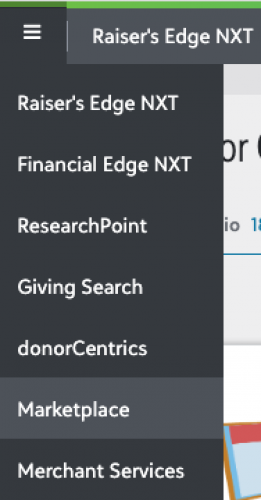
Once you're there, you should then see a “Manage” button in the upper-left.

If get to the Marketplace and you see the Browse, but not the Manage button, that means you're not an Environment Admin. See https://kb.blackbaud.com/knowledgebase/articles/Article/190614 on info on the different types of Admins and how to be come an Environment Admin.
1 -
Thanks both! I was going to the wrong place as Glen suggested. Went to the Marketplace link and it worked perfectly. Thanks again for your help.
Regards
Adrian
0










Categories
- All Categories
- New K-12 Community Home (TEST)
- New Higher Education Home Page (Test)
- New Impact Edge Community TEST
- New YourCause Community TEST
- New SKY Community TEST
- New Grantmaking TEST Community
- New Altru Test Community
- New bbcon Community - TEST
- 12 Blackbaud Agents for Good™
- New Raiser's Edge NXT Community
- 8 Blackbaud Community Help
- 222 bbcon®
- 1.4K Blackbaud Altru®
- 410 Blackbaud Award Management™ and Blackbaud Stewardship Management™
- 1.2K Blackbaud CRM™ and Blackbaud Internet Solutions™
- 16 donorCentrics®
- 361 Blackbaud eTapestry®
- 2.7K Blackbaud Financial Edge NXT®
- 687 Blackbaud Grantmaking™
- 603 Blackbaud Education Management Solutions for Higher Education
- 3.3K Blackbaud Education Management Solutions for K-12 Schools
- 954 Blackbaud Luminate Online® and Blackbaud TeamRaiser®
- 85 JustGiving® from Blackbaud®
- 7K Blackbaud Raiser's Edge NXT®
- 4K SKY Developer
- 258 ResearchPoint™
- 123 Blackbaud Tuition Management™
- 165 Organizational Best Practices
- 248 Member Lounge (Just for Fun)
- 40 Blackbaud Community Challenges
- 37 PowerUp Challenges
- 3 (Closed) PowerUp Challenge: Grid View Batch
- 3 (Closed) PowerUp Challenge: Chat for Blackbaud AI
- 3 (Closed) PowerUp Challenge: Data Health
- 3 (Closed) Raiser's Edge NXT PowerUp Challenge: Product Update Briefing
- 3 (Closed) Raiser's Edge NXT PowerUp Challenge: Standard Reports+
- 3 (Closed) Raiser's Edge NXT PowerUp Challenge: Email Marketing
- 3 (Closed) Raiser's Edge NXT PowerUp Challenge: Gift Management
- 4 (Closed) Raiser's Edge NXT PowerUp Challenge: Event Management
- 3 (Closed) Raiser's Edge NXT PowerUp Challenge: Home Page
- 4 (Closed) Raiser's Edge NXT PowerUp Challenge: Standard Reports
- 4 (Closed) Raiser's Edge NXT PowerUp Challenge: Query
- 829 Community News
- 3.1K Jobs Board
- 57 Blackbaud SKY® Reporting Announcements
- 47 Blackbaud CRM Higher Ed Product Advisory Group (HE PAG)
- 19 Blackbaud CRM Product Advisory Group (BBCRM PAG)