Tuition Management Shopping Cart
I've been using the Shopping Cart function in Tuition Management for about a year and and half and am becoming more and more frustrated with it the more I use it. At first I thought it would be a great way to sell items to students and or families through the web portal which would allow families to do this without coming into the school. We have been able to do this but getting information from Tuition Management about who bought what when has been very difficult. The only means of obtaining information is to run a “fee report”, but the report doesn't allow for any date range so that I can tell who purchased something yesterday or last week. The report is a year to date report with only months columns to tell me who might have purchased something more recently then not. I've called customer service and asked if there is an email feature so I would receive an email when someone makes a Shopping Cart purchase (like I would get if I were Amazon), and I'm told there is not. I asked if there is a report I can run with date range parameters and I'm told that feature also does not exist.
At present we run and report and save it so we have something to compare the next report to. This is useful in that we can know from the total purchase amount if it is higher or the same, but then we have to look at each student/family to see which one(s) have changed. In a large school this can take hours.
Have anyone out there run into this same issue and found a solution I have not? Please help!
Comments
-
@Lynn Ortega - Moving this to the Tuition Management category.
0 -
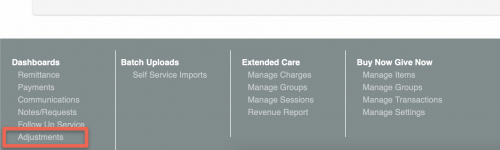
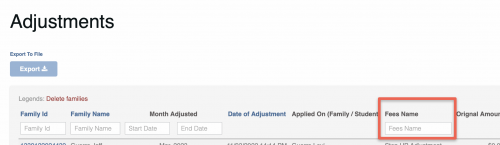
@Lynn Ortega if you look at the “adjustments” dashboard and export that data, you should be able to filter by the fee name.
Then export the data and you can filter by the reason column for “Shopping cart fee added.” The export also has the “date of adjustment,” which would be the day they purchased it.
Does that help you?

0 -
@Lynn Ortega The AR Billing Report can also be helpful, in addition to Bryan's recommendation of the Adjustments Report export, as it can be generated by date range. The benefit to the Adjustments Report export is you can add a filter to the column headers, and filter out members of the school, to find narrow down to the families that have made purchases.
A custom report is also possible, from the Reports > Create a New Custom Report menu. There is functionality that will allow you to set up a recurring weekly, bi-weekly, or monthly emailed report of the Shopping Cart fee(s) that you're looking to track the purchases of. I hope this is helpful.
1 -
@Bryan Lorenzo
I'm not getting consistent information with the adjustments report. If I've had to adjust the allocation of a prior payment in order to allow me to add an additional purchase of the same item for the month the combined total is what is seen in the report, not the new purchase amount. If this is not the case and there has not been this adjustment to a prior purchase I see this a a potential possibility. The problem is I need this to be done by an assistant who isn't very savvy with Excel and filters. The dates are also a bit of a problem and there are two lists of dates to filter by which is very confusing.Thanks for the suggestion. I will continue to see if I can work with this to get the results needed.
0 -
@Ashley Kuha
Unfortunately the AR Billing report doesn't give me detail on Shopping Cart items purchased. I've not used the custom reports yet. I just tried but evidently am doing something wrong as I'm getting all the family listed but no purchases of the item I selected.Thanks for you suggestion.
0 -
@Lynn Ortega I added the idea for a Shopping Cart report to the idea bank https://blackbaudk12.ideas.aha.io/ideas/TM17-I-457. Please feel free to vote for the idea and add a comment on your needs/wants.
0
Categories
- All Categories
- 6 Blackbaud Community Help
- 211 bbcon®
- 1.4K Blackbaud Altru®
- 402 Blackbaud Award Management™ and Blackbaud Stewardship Management™
- 1.1K Blackbaud CRM™ and Blackbaud Internet Solutions™
- 15 donorCentrics®
- 360 Blackbaud eTapestry®
- 2.6K Blackbaud Financial Edge NXT®
- 655 Blackbaud Grantmaking™
- 576 Blackbaud Education Management Solutions for Higher Education
- 3.2K Blackbaud Education Management Solutions for K-12 Schools
- 941 Blackbaud Luminate Online® and Blackbaud TeamRaiser®
- 84 JustGiving® from Blackbaud®
- 6.7K Blackbaud Raiser's Edge NXT®
- 3.7K SKY Developer
- 248 ResearchPoint™
- 120 Blackbaud Tuition Management™
- 165 Organizational Best Practices
- 240 Member Lounge (Just for Fun)
- 34 Blackbaud Community Challenges
- 37 PowerUp Challenges
- 3 (Open) PowerUp Challenge: Grid View Batch
- 3 (Closed) PowerUp Challenge: Chat for Blackbaud AI
- 3 (Closed) PowerUp Challenge: Data Health
- 3 (Closed) Raiser's Edge NXT PowerUp Challenge: Product Update Briefing
- 3 (Closed) Raiser's Edge NXT PowerUp Challenge: Standard Reports+
- 3 (Closed) Raiser's Edge NXT PowerUp Challenge: Email Marketing
- 3 (Closed) Raiser's Edge NXT PowerUp Challenge: Gift Management
- 4 (Closed) Raiser's Edge NXT PowerUp Challenge: Event Management
- 3 (Closed) Raiser's Edge NXT PowerUp Challenge: Home Page
- 4 (Closed) Raiser's Edge NXT PowerUp Challenge: Standard Reports
- 4 (Closed) Raiser's Edge NXT PowerUp Challenge: Query
- 796 Community News
- 3K Jobs Board
- 54 Blackbaud SKY® Reporting Announcements
- 47 Blackbaud CRM Higher Ed Product Advisory Group (HE PAG)
- 19 Blackbaud CRM Product Advisory Group (BBCRM PAG)