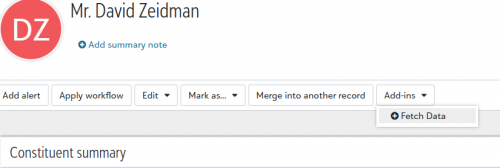
addin not displaying on constituent page

This feels like it is a rookie error but I have had so much trouble getting this addin to appear that I am putting it out there to the community… (I have done addins in the past - tiles - but not recently)

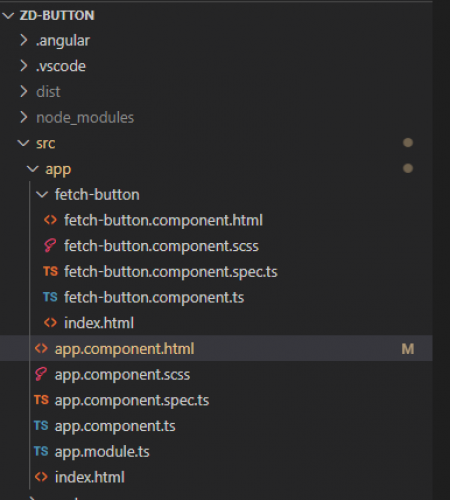
I have some very simple code and all I want to do is add a constituent page button. Here is the outline of my code

However when I go to developer mode in the browser it shows two entries for “fetch-button”. The first is red (not sure why) and the second one is black i.e. a status of 200. However when I look at the html for the 200 it is pulling from the app.component level i.e.

The highlighted tags are app-root but should be fetch-button.

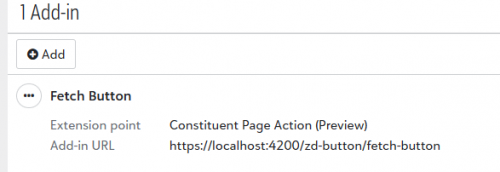
In my developer account I have the adding pointing to the following:
ce7acd3060f6ea127521894572551ead-huge-im

Happy to share other code/screenshots if that helps.

Thanks

Comments

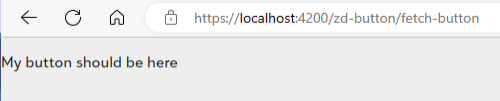
  • I should add that if I go to the page where the button should appear I get the text from the app.component.html file

    bda225791a0ae10a39df91e5d8a8d91f-huge-im

    ie

    1a3281b7599978a08357b51b6a6f81d8-huge-im


    whereas all my logic is in the files under the fetch-button branch.

  • Tim McVicker
    Tim McVicker Blackbaud Employee
    Sixth Anniversary Kudos 1 Name Dropper Participant

    @David Zeidman

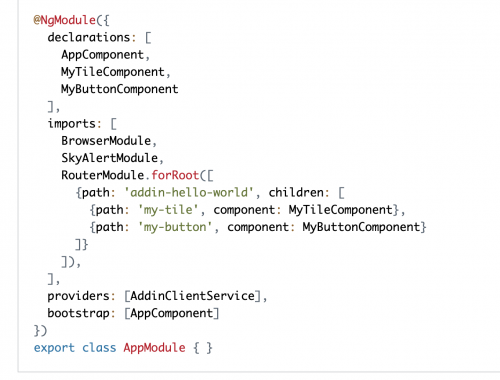
    Hey David! What's in your app.module.ts? I think you may be missing the child route that would route to your fetch-button component.

    If you check out the tutorial here https://developer.blackbaud.com/skyapi/docs/addins/get-started/skyux-button, you'll see that in the app.module.ts, there are some routes that route to the button component:

    c69fe4cc602a360e5ea4af14b56afcd3-huge-im
  • @Tim McVicker

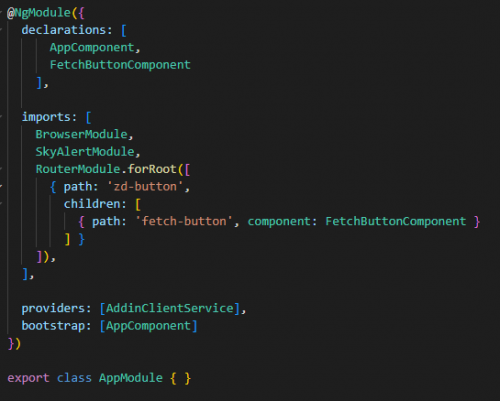
    Thanks for answering but… I think that I have that covered:

    f531874e53fdc29af8e8f125f839bde7-huge-im


  • Tim McVicker
    Tim McVicker Blackbaud Employee
    Sixth Anniversary Kudos 1 Name Dropper Participant

    @David Zeidman

    I agree, that looks correct - but if you put the correct route in the browser and it routes to the wrong component, I think there's something wrong with the Angular routing for the app.

    This is probably not it, but you should be able to get rid of those index.html files and just use the component.html files for the template. What version of Angular are you using?

  • @Tim McVicker

    I will try some more tomorrow.

    I am using Angular 15.1.1

  • @Tim McVicker

    If you want to take a look the code is here:

    https://github.com/dzeidman/skybutton.git


    Maybe you will spot something that I have missed

  • So I think that I got this working…

    I had one thing missing.

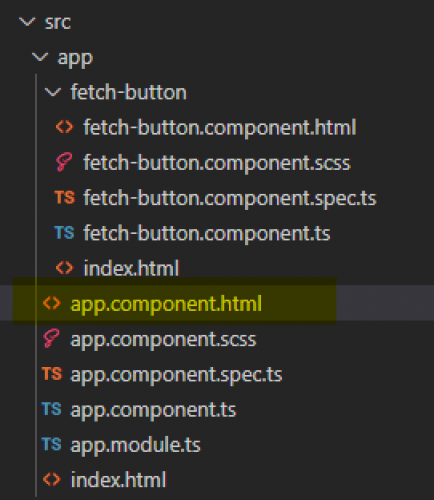
    In my app.component.html ie

    5d13ce2abb42275e95f14dc6fb1780a7-huge-im

    I added the line:

    <router-outlet></router-outlet>

    From an angular perspective this seems obvious. At least it is obvious that it should be somewhere in the code and it was not.

    I may be mistaken but I don't see any reference to this in the tutorial.

    One thing I am wondering about though…

    7db5ab2efd2676a92a15b8ce9c5d4422-huge-im

    Should my addin really be a button under an addins dropdown? I had assumed that it would be its own button. Is there a UI tweak for this otherwise I think it is a bit lame really to be honest. To the regular end user this is not an integrated approach. It makes me think of the macro button in RE7 database view.

  • Chris Rodgers
    Chris Rodgers Blackbaud Employee
    Ninth Anniversary Kudos 2 Name Dropper Participant

    Hey @David Zeidman, there is not a configuration option to break your add-in button out of the Add-ins button group. We took the conservative approach of creating a single dropdown to reduce the concern of many add-in buttons causing the toolbar to wrap. We've discussed options to allow applications to participate on the toolbar in a more first-class way (and your post stirred that back up), but we don't have plans to change this at the moment.

  • Hi @Chris Rodgers, thanks for your response. I think that the tiles really look good and it makes any custom content look and feel like a real part of the application. Where an org has a customisation the addin dropdown is really not that intuitive for a new RE user. I feel the only acceptable alternative would be to have a tile with its own button on it. (But then the tile would end up at the bottom of the page and much less prominent than a button could be).

    Hope this post pushes that discussion along somewhat!