Stuck adding adaptive card





@Ben Lambert Can you help me work through this? I am trying to set up an adaptive card and I have worked everything out…but I get no card on my page. I have created an HTTP request and added JSON.
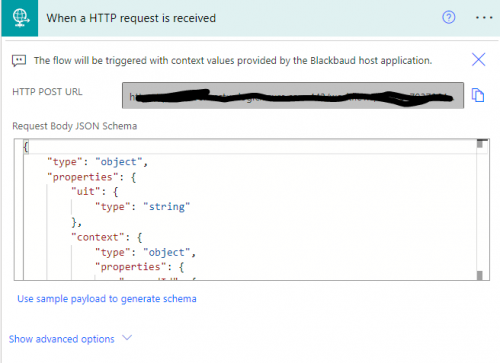
Validated a user identity token.
Composed Adaptive Card JSON
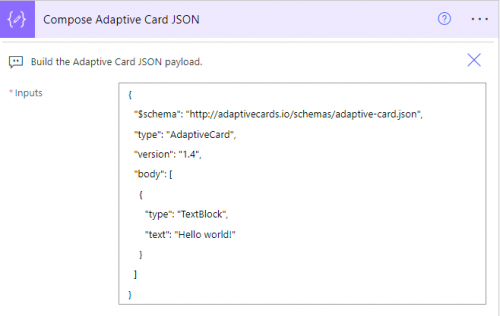
And generated a response
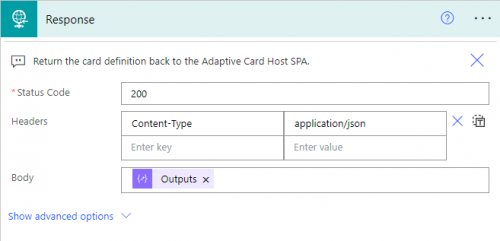
I then went into my develop application account and created a new add-in with a URL '
What am I missing? Any help would be appreciated.
Comments
-
@Bob Rickards The cardServiceUrl query parameter value needs to be a properly encoded URL, so make sure you encode the URL of your Power Automate flow when registering the add-in. You can find lots of URL encoders online, for example here is one that often use:
1 -
@Ben Lambert Ok Ben tried that…still did not work. Am I missing something else?
0 -
@Bob Rickards sorry I didn’t notice earlier, but check the last segment of the adaptive card host url….you need to specify the appropriate route within the host SPA, depending on the type of addin you’re creating (button, tile, etc.).
i.e., for a tile add-in, you’ll need… /tile?cardServiceUrl=xxxxx
1 -
@Bob Rickards - along with what Ben said I wanted to point out that in the Microsoft Platform- Adaptive Card section under Create an Add in Definition it is missing the word “tile” in it. Or course you can put anything add in there. (button, tile, flyout)
Incorrect if copying right from there:
This is the correct syntax which is found under Documentation- Getting Started- Adaptive Cards.
It took me a bit to figure this out on my own.
-Carol Grant
0 -
@Carolyn Grant Thanks…that really helps. And thanks to @Ben Lambert I was able to create an adaptive card in NXT that looks at the constituent's current weather. Now I just need to get better at coding adaptive cards! Thanks again to you both!
 3
3 -
@Bob Rickards - along with what Ben said I wanted to point out that in the Microsoft Platform- Adaptive Card section under Create an Add in Definition it is missing the word “tile” in it. Or course you can put anything add in there. (button, tile, flyout)
Incorrect if copying right from there:
This is the correct syntax which is found under Documentation- Getting Started- Adaptive Cards.
It took me a bit to figure this out on my own.
-Carol Grant
@Lindsey Rix just flagging this in case we can get that section updated.
1 -
@Dan Snyder Thank you for tagging me, I'll get the docs updated shortly.
0 -
@Ben Lambert Welcome back! So, what does it mean when you get "
The web request action returned an error response: 502"?0 -
@Bob Rickards Hi Bob, a 502 usually means that your request is being routed through a gateway (proxy/firewall/cdn/etc…) and that gateway had trouble with its connection to the underlying service. A 502 could just be a momentary blip, but if you're seeing this error regularly when attempting to connect to a Blackbaud resource (such as SKY API), you'll want to contact Blackbaud support. Support options
0 -
@Ben Lambert @Chris Rodgers @Bob Rickards Hi! I am having a similar issue. I created the add in tile from the sample template. I added my application ID. I encoded the URL and have the tile? in it… But it doesn't work. I am just using the sample info so it should give the Hello World text?? What did I miss? Any help is appreciated. Happy to send screen shots by DM if needed.
0 -
@Carol Grant @Dan Snyder @Lindsey Rix Tagging you in case you can answer my previous question as well. Sorry! I couldn't keep everyone's name in my head when typing before
 Appreciate all of you and your help!0
 -
- check your flow's run history, did it have a run history after the constituent page is loaded in RE NXT?
- if yes, look into the run history to see if there's a “fail” somewhere, if yes, provide the “failed” action's input and output screenshot and the same action's edit mode
- if no, then there's an issue with your application URL, double check to make sure the URL you put into the application add-in is correct
if the flow did run, and you see no error, then that means your adaptive card json may not be correct, go to run history and the “response” action, copy out the JSON that is the adaptive card, and go to https://adaptivecards.io/designer/ and put that JSON code in and see if your adaptive card renders, if not, it will tell you where your problem is (i.e. extra comma somewhere shouldn't would completely mess up your adaptive card)
1 - check your flow's run history, did it have a run history after the constituent page is loaded in RE NXT?
-
@Alex Wong Thank you. I do not have anything in the run history…
My URL begins with: https://app.blackbaud.com/addin-adaptivecard-host/tile?cardServiceUrl= then I inserted the encoded URL with the https and all the %'s all the way through Finvoke%3F&title=Hello%20WorldMy original URL ended api-version=2016-06-01 but none of the URLs in the how-to documents had that at the end so I trimmed it off. I did try it with the full URL, but it didn't do anything then either…
I don't know if the URL contains anything proprietary so I didn't want to post it here, but can email you the before and after URLs if that's helpful?
THANK YOU!!
0 -
@Liz DixonEversole
the URL you got from trigger, you are likely not selecting the right option, you need to select Anyone 0
0 -
@Alex Wong OOOH, You are right. I had anyone in my tenant. Let me try again and I will report back. Thank you!!
0 -
@Alex Wong I have changed to everyone, but it is still not calling the flow… No run history… Does this mean the URL is wrong?
0 -
@Liz DixonEversole
This is what my URL looks like “almost exactly"… replacing some of the alphanumeric characters, you can compare to yours.URL used in the application Add-in URL: (title used: Adaptive Card Template)
1 -
@Alex Wong Yayayayayay!!! It's working. Thank you thank you! I think the encoding website I was using didn't quite do it right. Glorious! Now I just have to make it actually do what I want it to, rather than say Hello World
Much appreciated!!!!!1 -
@Liz DixonEversole
I just posted a AIAC (All-Inclusive Adapative Card) template on Community, you can start with that if you want to do more than just displaying info.1 -
@Alex Wong Amazing. I will check it out! This particular card was pretty simple (once I got it to display!) but love all the options there are to get creative.
0

















Categories
- All Categories
- New YourCause Community TEST
- New SKY Community TEST
- New Grantmaking TEST Community
- New Altru Test Community
- New bbcon Community - TEST
- 12 Blackbaud Agents for Good™
- New Raiser's Edge NXT Community
- 7 Blackbaud Community Help
- 218 bbcon®
- 1.4K Blackbaud Altru®
- 409 Blackbaud Award Management™ and Blackbaud Stewardship Management™
- 1.2K Blackbaud CRM™ and Blackbaud Internet Solutions™
- 16 donorCentrics®
- 361 Blackbaud eTapestry®
- 2.7K Blackbaud Financial Edge NXT®
- 680 Blackbaud Grantmaking™
- 598 Blackbaud Education Management Solutions for Higher Education
- 3.3K Blackbaud Education Management Solutions for K-12 Schools
- 952 Blackbaud Luminate Online® and Blackbaud TeamRaiser®
- 85 JustGiving® from Blackbaud®
- 7K Blackbaud Raiser's Edge NXT®
- 3.9K SKY Developer
- 257 ResearchPoint™
- 123 Blackbaud Tuition Management™
- 165 Organizational Best Practices
- 247 Member Lounge (Just for Fun)
- 40 Blackbaud Community Challenges
- 37 PowerUp Challenges
- 3 (Closed) PowerUp Challenge: Grid View Batch
- 3 (Closed) PowerUp Challenge: Chat for Blackbaud AI
- 3 (Closed) PowerUp Challenge: Data Health
- 3 (Closed) Raiser's Edge NXT PowerUp Challenge: Product Update Briefing
- 3 (Closed) Raiser's Edge NXT PowerUp Challenge: Standard Reports+
- 3 (Closed) Raiser's Edge NXT PowerUp Challenge: Email Marketing
- 3 (Closed) Raiser's Edge NXT PowerUp Challenge: Gift Management
- 4 (Closed) Raiser's Edge NXT PowerUp Challenge: Event Management
- 3 (Closed) Raiser's Edge NXT PowerUp Challenge: Home Page
- 4 (Closed) Raiser's Edge NXT PowerUp Challenge: Standard Reports
- 4 (Closed) Raiser's Edge NXT PowerUp Challenge: Query
- 822 Community News
- 3.1K Jobs Board
- 57 Blackbaud SKY® Reporting Announcements
- 47 Blackbaud CRM Higher Ed Product Advisory Group (HE PAG)
- 19 Blackbaud CRM Product Advisory Group (BBCRM PAG)