Power BI Connector: How to get ALL of the available data, and not just what is there by default.





I am using the Power BI Connector from Sky Developer, but when I query Sky Developer's custom connector in Power BI Desktop, I see that there is quite a lot of data that is not available, including custom fields of certain types of data. For instance, I can't query the fund "type" field (which isn't even a custom field, it's supposed to be a built-in table), and I certainly can't see any of the custom fields/attributes that we've created for funds. How does one access this information to use in a Power BI report? This is information that I normally use when I run queries out of Raiser's Edge 7 (Database view), but I'm trying to find a modern and more efficient way to update these Power BI reports. It won't work if I can't access all of the same data that I'd normally access in database view.
Comments
-
Hey @Ramon Carroll,
There is more information available in the connector but requires some additional work to access. I've attached file of a screenshot (it's a large image) of how to access a portion of it. This is the .pq file that is used to create the connector. It needs to be modified in order to make a number of the additional tables visible once you open the connecter in Power BI. There's a subset of tables (starting in line 572) that a single calls to the API based on the ID passed into it. For example, the endpoint for the fund custom fields list is:
https://api.sky.blackbaud.com/fundraising/v1/funds/{fund_id}/customfields
Calls to this endpoint only allow for 1 fund id to be passed at a time. The functionality is built into the connector, but in order to use it, you'll need to edit the .pq to uncomment that particular line of code (remove the //) and you'd need to write a function in your Power Query editor that will pass every fund id from your Fund table into this table.
0 -
@Matt Thacker
Thank you! It looks like I was at least on the right track because I had already tracked down this section of the connector’s .pq file. I couldn’t figure out what to do once I’d uncommented the appropriate lines because this is what I’d get below (see image) when I tried to reload the connector in PBI. Is this because I’m not supposed to load the fund custom fields this way but instead to do it directly inside the Power Query editor? Perhaps it’s just brain fog, but I can’t figure out where I’d do this. It would probably help to see an example of someone doing this very thing, as that might help me wrap my brain around where/how to accomplish this.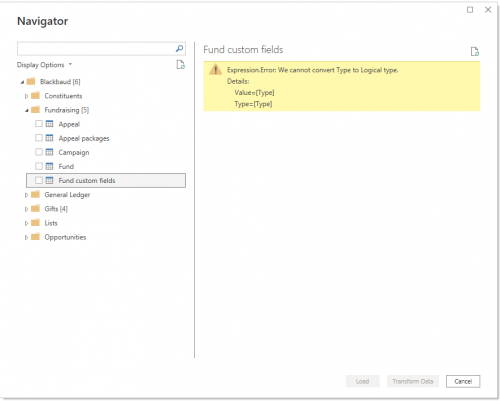 1
1 -
Can someone who is currently accessing the custom fields for Appeals, Funds, or Campaigns via the Sky Developer Power BI connector please show me an example of how they are writing this in Power Query? Is it via some iterator function in a separate blank query or a custom column attached to the parent table? My background in M code is very limited, so getting a visual example of how someone else accomplishes this would help me get started in the right direction.
1 -
@Ramon Carroll
I have heard others being able to write some sort of iterator to get all the fund custom fields, however, I also haven't seen any working case of this, so would love to see some post on this.For my org, we don't use Power BI connector for Blackbaud for this (and other) reasons. I use Power Automate to get all the data I need from SKY API and store them into a data warehouse I have on Azure (SQL Server o Azure). If you using Microsoft power platform as well, you can gather the data into SharePoint list or SharePoint excel file, which then can be picked up by Power BI. I have found this to be a easier and better method of gathering data and used in multiple/different Power BIs.
1 -
@Alex Wong
Thank you! I was just starting to look at a Power Automate solution, so you have confirmed my thoughts. It seems that it would be much easier to just pull it via Power Automate into some sort of external database (Azure, Excel, Dataverse, etc.) that a PBI report can use as its source, and just go from there. I’ve been suspecting that this is how the vast majority, at least those who are using the Power Platform, are getting to this data.0 -
@Ramon Carroll
I’ve been suspecting that this is how the vast majority, at least those who are using the Power Platform, are getting to this data.I think you're right about this. The PBI connector is nice if you're reporting on a very specific set of things, but it has a few limitations - available fields, refresh time, and data structure (often the field you want to report on is buried several levels deep, so a lot of transformation is needed in order to access it).
At BB Dev Days sessions and in the Power BI users groups, it's pretty rare to see someone who does extensive reporting using the PBI file. Using Power Automate to sync data to a warehouse is a common solution, and a lot of people also set up queries within RE Database View and either bring them into BI manually, or use Queue to export them to an FTP server where they can import them automatically with Power Automate.
1 -
@Ben Regier
Thank you so much for weighing in, Ben. This helps to confirm my suspicions. I’ve been doing a deep dive into the connector’s M code and the various ways to interact with it from inside Power Query for about a week. While my understanding of the language has improved significantly, I’ve unfortunately still come up empty on how exactly to access the data I need. With how large and thriving the Power BI user base has become, this seems like a significant lost opportunity on Blackbaud’s part.0 -
This is awesome - thanks @Matt Thacker.
Is there a similar way to pull Addressee/Salutation details (both Primary and other specific types) directly through the connector? I haven't found a way to grab this Add/Sal data with the tools available in the connector, but would love to streamline this piece of the process for a project I'm working on!
Thanks,
Matt0












Categories
- All Categories
- New K-12 Community Home (TEST)
- New Higher Education Home Page (Test)
- New Impact Edge Community TEST
- New YourCause Community TEST
- New SKY Community TEST
- New Grantmaking TEST Community
- New Altru Test Community
- New bbcon Community - TEST
- 12 Blackbaud Agents for Good™
- New Raiser's Edge NXT Community
- 8 Blackbaud Community Help
- 222 bbcon®
- 1.4K Blackbaud Altru®
- 411 Blackbaud Award Management™ and Blackbaud Stewardship Management™
- 1.2K Blackbaud CRM™ and Blackbaud Internet Solutions™
- 16 donorCentrics®
- 361 Blackbaud eTapestry®
- 2.7K Blackbaud Financial Edge NXT®
- 688 Blackbaud Grantmaking™
- 604 Blackbaud Education Management Solutions for Higher Education
- 3.3K Blackbaud Education Management Solutions for K-12 Schools
- 954 Blackbaud Luminate Online® and Blackbaud TeamRaiser®
- 85 JustGiving® from Blackbaud®
- 7.1K Blackbaud Raiser's Edge NXT®
- 4K SKY Developer
- 258 ResearchPoint™
- 123 Blackbaud Tuition Management™
- 165 Organizational Best Practices
- 249 Member Lounge (Just for Fun)
- 40 Blackbaud Community Challenges
- 37 PowerUp Challenges
- 3 (Closed) PowerUp Challenge: Grid View Batch
- 3 (Closed) PowerUp Challenge: Chat for Blackbaud AI
- 3 (Closed) PowerUp Challenge: Data Health
- 3 (Closed) Raiser's Edge NXT PowerUp Challenge: Product Update Briefing
- 3 (Closed) Raiser's Edge NXT PowerUp Challenge: Standard Reports+
- 3 (Closed) Raiser's Edge NXT PowerUp Challenge: Email Marketing
- 3 (Closed) Raiser's Edge NXT PowerUp Challenge: Gift Management
- 4 (Closed) Raiser's Edge NXT PowerUp Challenge: Event Management
- 3 (Closed) Raiser's Edge NXT PowerUp Challenge: Home Page
- 4 (Closed) Raiser's Edge NXT PowerUp Challenge: Standard Reports
- 4 (Closed) Raiser's Edge NXT PowerUp Challenge: Query
- 829 Community News
- 3.1K Jobs Board
- 57 Blackbaud SKY® Reporting Announcements
- 47 Blackbaud CRM Higher Ed Product Advisory Group (HE PAG)
- 19 Blackbaud CRM Product Advisory Group (BBCRM PAG)